# Create a New White Label User

Before we can register a session in the game, a user must first be created.

Passwords must be at least 8 characters long.

{% tabs %}
{% tab title="Unity" %}

```csharp
// Remember to use the LootLocker namespace in the top of your file.
using LootLocker.Requests;

// This code should be placed in a handler when user clicks the sign up button.
string email = "user@lootlocker.io";
string password = "password here";
LootLockerSDKManager.WhiteLabelSignUp(email, password, (response) =>
{
    if (!response.success)
    {
        Debug.Log("error while creating user");

        return;
    }

    Debug.Log("user created successfully");
});
```

{% endtab %}

{% tab title="Unreal" %}
{% hint style="warning" %}
This requires that you have [set up the Unreal SDK in your game.](https://github.com/lootlocker/gitbook-sync/blob/main/players/the-basics/unreal-quick-start/README.md)
{% endhint %}

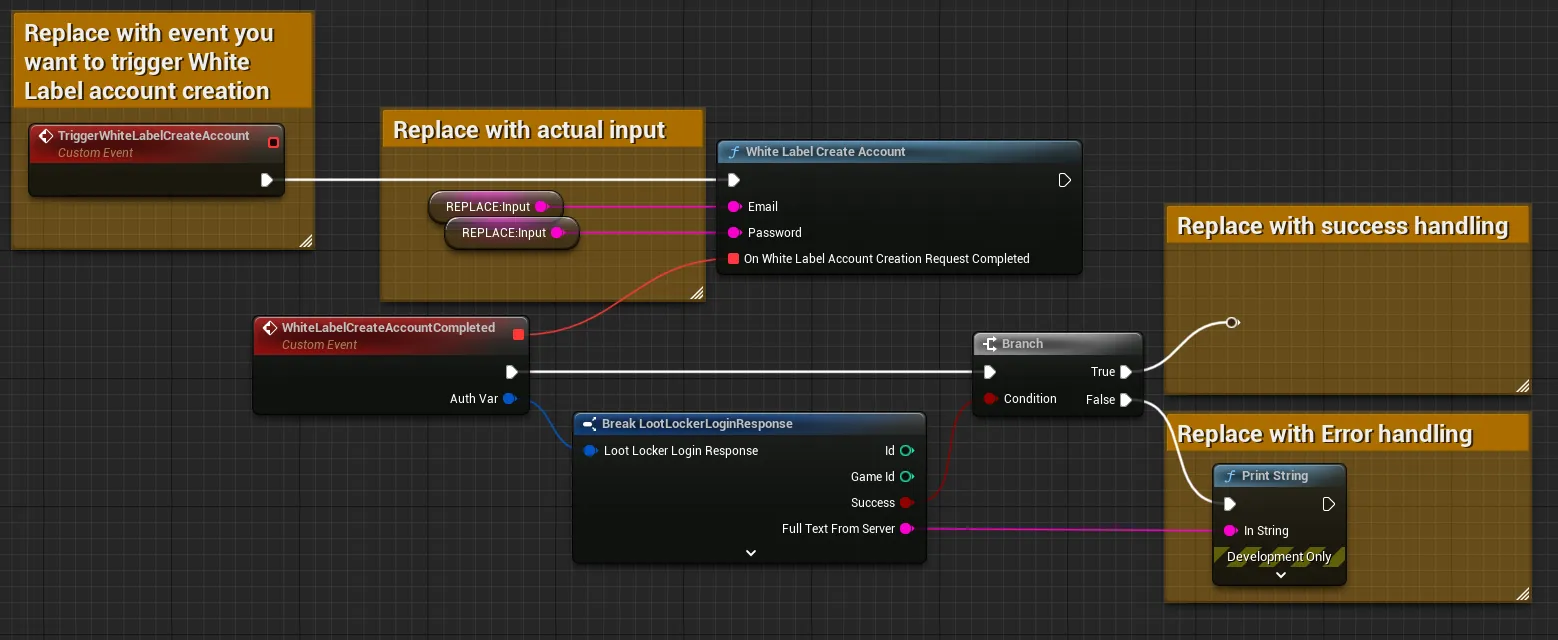
<figure><img src="https://534367586-files.gitbook.io/~/files/v0/b/gitbook-x-prod.appspot.com/o/spaces%2F-MVu1MPzezO-NgvC98xh%2Fuploads%2Fgit-blob-22d7adf8c57eb93d5138b5e5b8dd5b053080f963%2FWhiteLabelCreateAccount.png?alt=media&#x26;token=aa2f9f31-794e-4266-8950-a5c00382c85d" alt="Shows an example of how to implement White Label account creation in Unreal Blueprints - see link: https://blueprintue.com/blueprint/a7i0c3u9/"><figcaption><p><a href="https://blueprintue.com/blueprint/a7i0c3u9/">Blueprint example of create white label account</a></p></figcaption></figure>

Above is an example of how to implement White Label account creation using blueprints in Unreal Engine. For an example you can copy and paste into your editor, [look here](https://blueprintue.com/blueprint/a7i0c3u9/).

**Input**

You need to exchange the `TriggerWhiteLabelCreateAccount`event for whatever event you want to use to trigger the login flow.

Remove the nodes `Replace: Input` with the email and password input from the user input in your game.

**Output**

We recommend branching the completed events on the success flag, and if you do this you will probably want to add error handling in case the request fails as well as what (if any) continued actions you want on success.
{% endtab %}

{% tab title="Godot" %}

```gdscript

var response = await LL_WhiteLabel.SignUp.new("input-user-email-here", "input-user-password-here").send()
if(!response.success) :
    # Request failed, handle errors
    pass
else:
    # Request succeeded, use response as applicable in your game logic
	  # Remember to remind the player to verify their email to be able to utilize this new account
    pass
```

{% endtab %}

{% tab title="REST" %}

```bash
curl -X POST "https://api.lootlocker.io/white-label-login/sign-up" \
  -H "domain-key: 11aaa11" \
  -H "is-development: true" \
  -H "Content-Type: application/json" \
  -d "{\"email\": \"test@lootlocker.io\", \"password\": \"some password here\"}"
```

Example response:

```json
{
  "id": 406,
  "game_id": 2,
  "email": "test@lootlocker.io",
  "created_at": "2021-08-25T08:03:34.612346459Z",
  "updated_at": "2021-08-25T08:03:34.612346459Z",
  "deleted_at": null,
  "validated_at": null
}
```

{% endtab %}
{% endtabs %}


---

# Agent Instructions: Querying This Documentation

If you need additional information that is not directly available in this page, you can query the documentation dynamically by asking a question.

Perform an HTTP GET request on the current page URL with the `ask` query parameter:

```
GET https://docs.lootlocker.com/players/white-label-login/how-to/create-new-user.md?ask=<question>
```

The question should be specific, self-contained, and written in natural language.
The response will contain a direct answer to the question and relevant excerpts and sources from the documentation.

Use this mechanism when the answer is not explicitly present in the current page, you need clarification or additional context, or you want to retrieve related documentation sections.