
This how-to makes a request through the LootLocker Game API on a server, acting as a specific Player. Server impersonation lets you do something as a player of your game. This can be useful for many reasons, such as:
- Offloading logic from the client to the server
- Moving authoritative calls from the client to the server. In general, we always recommend keeping all write operations on the server — things like submitting scores, rewarding Currency, and adding Progression points.
- Delayed actions. Say your idle game loop lets players perform actions that take effect after a certain amount of time while they're not online — you can take those actions from your game server instead.
About Impersonation using Token Exchange
Impersonation on the server can be done in one of two ways. The first uses a Player session token. With this method, a token from a Game API session can be used to identify a Player. Use this in cases where you want to use the Game API in your game client but perform some Player actions in the secure context of the server, not the client.
Prefer token exchange if:
- Your player is online when you make actions on behalf of them
- The calls you make are triggered by player actions
About Impersonation using Player ULIDs
The other way of impersonating a Player is through their ULID. With this method, the server can get an active Game API session token without the user authenticating. Use this in cases where you either don't want the client to talk directly to LootLocker at all, or need to perform actions on behalf of a player disconnected from them being online to authenticate.
Prefer ULID impersonation if:
- You need to perform actions on behalf of a player disconnected from their online status. For example:
- Delayed actions
- Actions triggered from outside the game, such as sending a friend request from a web page
- You want to perform mass actions on lists of players
- You want to add user moderation actions to the game server
- You want to help support recover accounts or otherwise inspect player information
Prerequisites
- An Unreal Server Project.
- An Unreal Game Project.
- An active Player session (see Authentication). This example defaults to guest login, but impersonation works with any authentication method.
- Alternatively, you can create the Player directly from the server for a Steam user — see Create Players.
- A running LootLocker Server Session.
With Token Exchange
1. Start a Server Session
Refer to the Start Server documentation.
2. Client Code
First, authenticate your player in the game client and sync the received session token to the server. This example uses guest sessions for simplicity.
ULootLockerSDKManager::GuestLogin(FLootLockerSessionResponse::CreateLambda([](const FLootLockerAuthenticationResponse& sessionResponse) {    if (!sessionResponse.success)    {        // Handle the error case        UE_LOG(<LogCategory>, Error, TEXT("Failed to login: %s"), *sessionResponse.ErrorData.Message);        return;    }
    // Replace with your way of syncing the session token to the server    SyncPlayerTokenToGameServer(sessionResponse.session_token);}));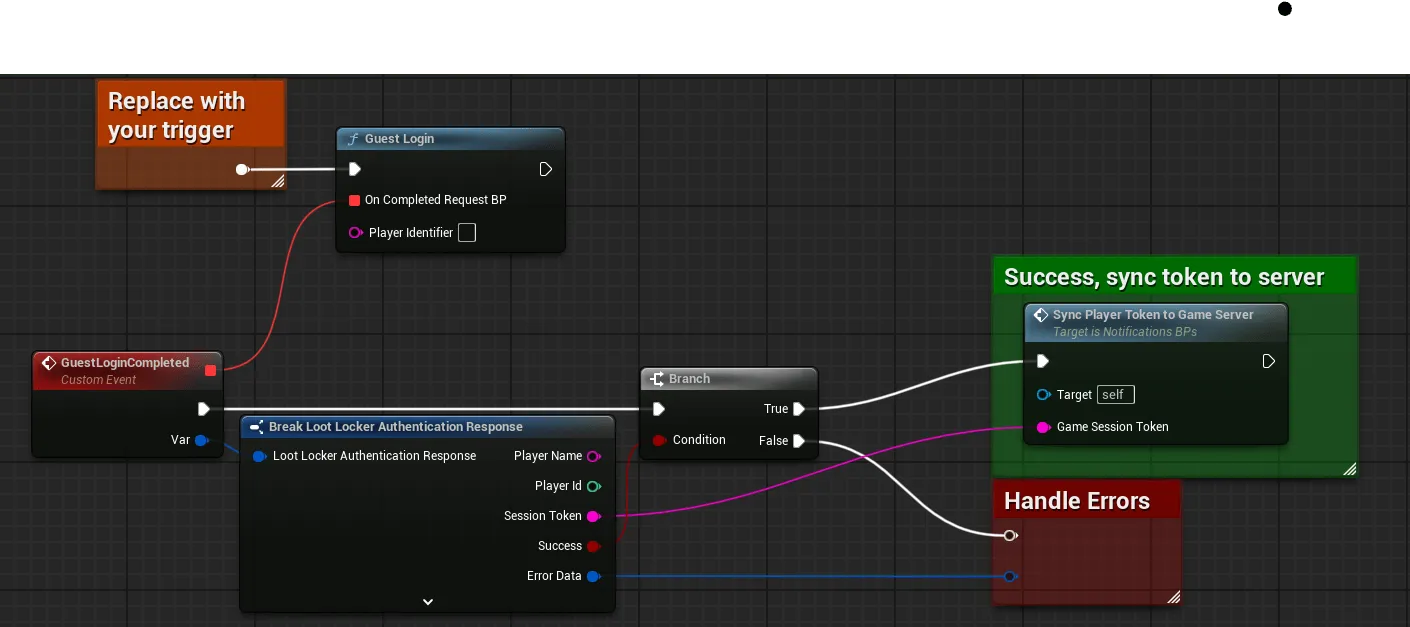
3. Server Token Exchange
When you get the token from the client, exchange the client session token for an impersonated token using the token exchange method. Once you've done that, add the new session to your copy of the Game SDK.
void OnTokenReceivedFromGameClient(const FString& ClientSessionToken) {    ULootLockerServerForCpp::GameApiTokenExchange(ClientSessionToken,        FLootLockerServerTokenExchangeResponseDelegate::CreateLambda([](const FLootLockerServerTokenExchangeResponse& TokenExchangeResponse)        {            if (!TokenExchangeResponse.Success)            {                // Handle the error case                UE_LOG(<LogCategory>, Error, TEXT("Failed to exchange game client token with error %s"), *TokenExchangeResponse.ErrorData.Message);                return;            }
            // Successfully exchanged the token, now add game api session to local copy of game SDK            FLootLockerPlayerData PlayerData;            PlayerData.PlayerUlid = TokenExchangeResponse.Subject_ulid;            PlayerData.Token = TokenExchangeResponse.Access_token;
            ULootLockerSDKManager::StartSessionManual(PlayerData);
            // Make sure to save the player ulid as that will be used for subsequent requests            TokenExchangeResponse.Subject_ulid;        })    );}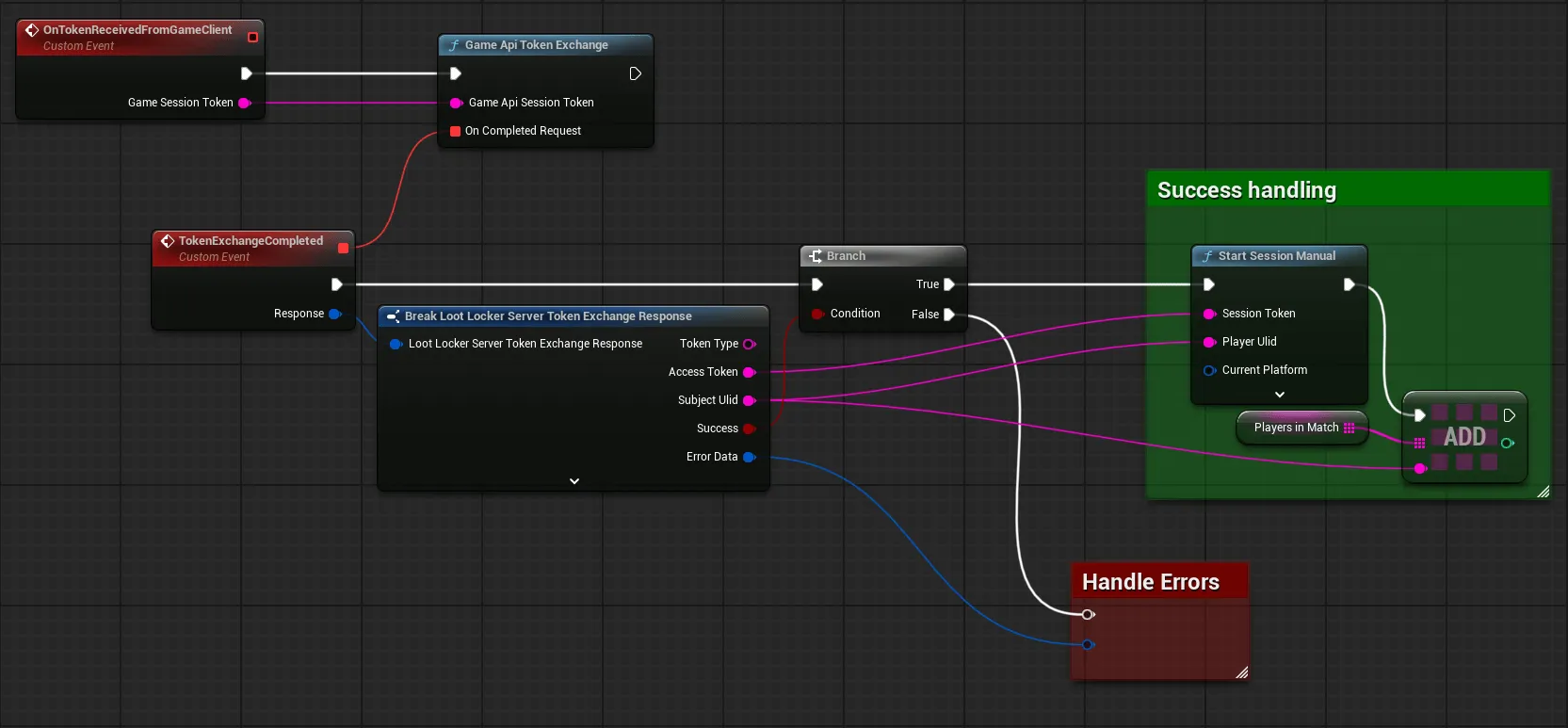
4. Secure Calls on the Player's Behalf
Now that you have the impersonated user on the server, that session can be used to call any of the functions in the Unreal Game SDK, increasing the functionality beyond what the Server SDK is capable of. Here's an example of submitting scores in the game server once an imaginary match finishes, on behalf of the impersonated players.
void OnMatchFinished(const FMatchData& MatchData) {  for(const FMatchPlayer& Player : MatchData.Players) {    ULootLockerSDKManager::SubmitScore("", "match_highscore_" + MatchData.MatchId, Player.MatchScore, Player.MatchComment, FLootLockerSubmitScoreResponseDelegate::CreateLambda([](const FLootLockerSubmitScoreResponse& SubmitScoreResponse)    {      if (!SubmitScoreResponse.success)      {        UE_LOG(<LogCategory>, Warning, TEXT("Failed to submit score for player %s with error %s"), *SubmitScoreResponse.PlayerName, *SubmitScoreResponse.ErrorData.Message);      }
      else      {        UE_LOG(<LogCategory>, Display, TEXT("Successfully submitted score for player %s with score %d"), *SubmitScoreResponse.PlayerName, SubmitScoreResponse.Score);      }    }), /*IMPORTANT: Make the request execute on behalf of *this* player:*/ Player.PlayerUlid);  }}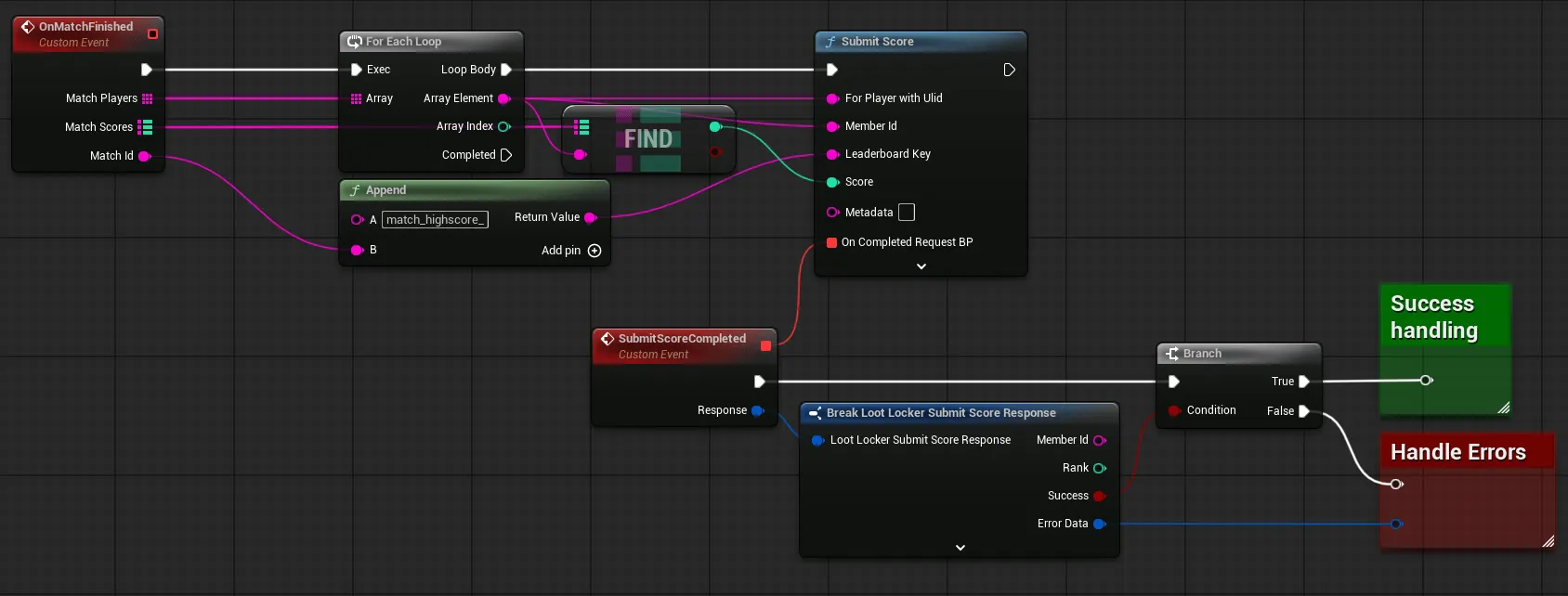
With Player ULID Impersonation
1. Start a Server Session
Refer to the Start Server documentation.
2. Impersonate Using Player ULID
When you want to take actions on behalf of a player, you need that player's ULID. This example starts impersonation from an imaginary server command.
void OnCommandImpersonatePlayer(const FString& PlayerUlid) {    ULootLockerServerForCpp::GameApiUserImpersonation(PlayerUlid,        FLootLockerServerTokenExchangeResponseDelegate::CreateLambda([](const FLootLockerServerTokenExchangeResponse& TokenExchangeResponse)        {            if (!TokenExchangeResponse.Success)            {                // Handle the error case                UE_LOG(<LogCategory>, Error, TEXT("Failed to impersonate player with error %s"), *TokenExchangeResponse.ErrorData.Message);                return;            }
            // Successfully impersonated the player, now add game api session to local copy of game SDK            FLootLockerPlayerData PlayerData;            PlayerData.PlayerUlid = TokenExchangeResponse.Subject_ulid;            PlayerData.Token = TokenExchangeResponse.Access_token;
            ULootLockerSDKManager::StartSessionManual(PlayerData);
            // Make sure to save the player ulid as that will be used for subsequent requests            TokenExchangeResponse.Subject_ulid;        })    );}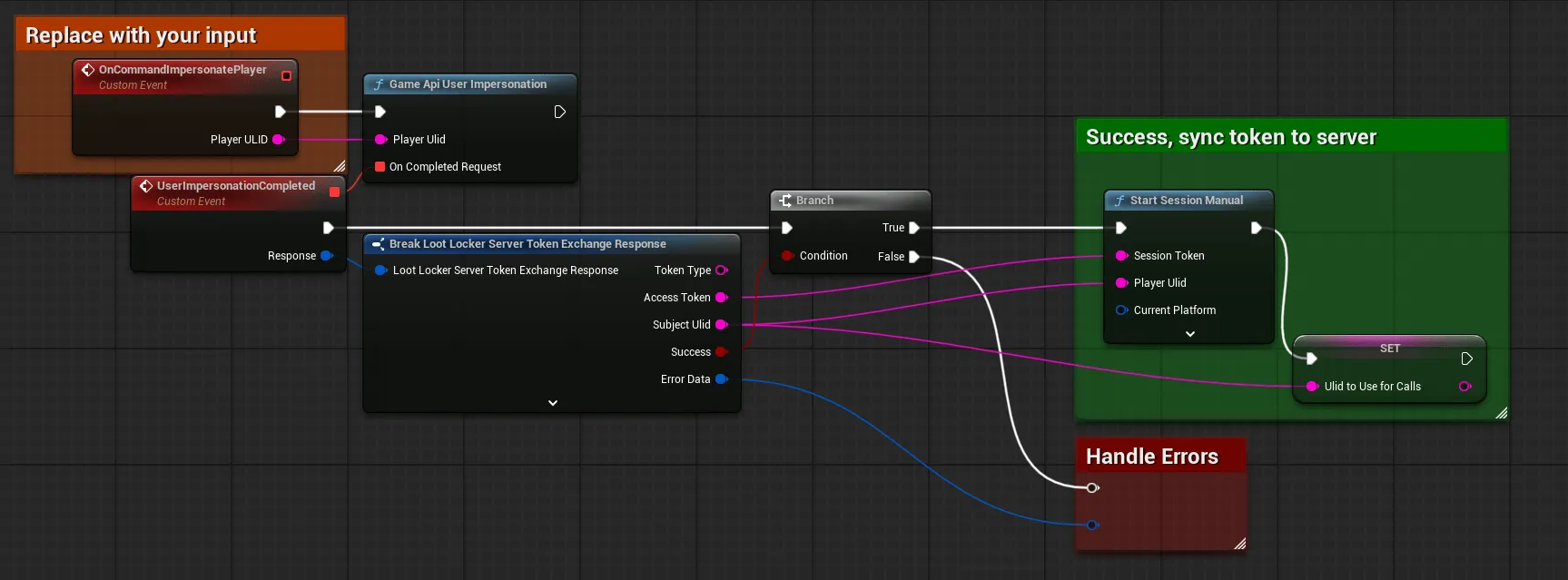
3. Secure Calls on the Player's Behalf
This logic is the same as the token exchange example — call the Client SDK methods as you would on the client, and make sure to supply the forPlayerWithUlid parameter with the ULID you want to execute the request for.
Conclusion
You've gone through two different ways of letting the server act as a player. With the Server API and Game API working hand in hand on your server, you can minimize the risk of tampering from the game client by reducing the ways your players can interact with LootLocker. The full Unreal Game SDK and Unreal Server SDK are now at your disposal for trusted, secure operations from your game server.