
This how-to implements the Apple App Store purchase flow in your game: initiating a purchase, then redeeming it with LootLocker to grant rewards to the Player.
Prerequisites
- Unity, Unreal, or Godot SDK installed and configured in your project (not required for REST). Unity also requires the In-App Purchasing package.
- An active Player session (see Authentication).
- Apple App Store IAP settings configured and a Catalog Listing configured for Apple App Store IAP.
Set Up the IAP Manager
Create an IAPManager script that inherits from IDetailedStoreListener to handle all purchase callbacks: initializing the store, registering your products with the Product IDs from App Store Connect, and handling the purchase flow when a player buys an item.
using Unity.Services.Core;using Unity.Services.Core.Environments;using UnityEngine;using UnityEngine.Purchasing;using UnityEngine.Purchasing.Extension;
public class IAPManager : MonoBehaviour, IDetailedStoreListener{    public IStoreController controller;    private IExtensionProvider extensions;
    public async void Awake()    {        try        {            var options = new InitializationOptions()                .SetEnvironmentName("production");            await UnityServices.InitializeAsync(options);        }        catch (Exception exception)        {            Debug.Log(exception);        }
        // Create IAP configuration for Apple App Store        var builder = ConfigurationBuilder.Instance(StandardPurchasingModule.Instance(AppStore.AppleAppStore));
        // Register your products from App Store Connect        builder.AddProduct("com.company.game.coins100", ProductType.Consumable);        builder.AddProduct("com.company.game.coins500", ProductType.Consumable);        builder.AddProduct("com.company.game.premium_pass", ProductType.NonConsumable);
        // Initialize the purchasing system        UnityPurchasing.Initialize(this, builder);    }
    /// <summary>    /// Called when a user clicks the purchase button    /// </summary>    public void OnPurchaseClicked(string productId)    {        Purchase(productId);    }
    /// <summary>    /// Initiates a purchase for the given product ID    /// </summary>    public void Purchase(string productId)    {        var product = controller.products.WithID(productId);
        if (product is { availableToPurchase: true })        {            controller.InitiatePurchase(product);        }        else        {            Debug.Log($"Product {productId} is not available for purchase");        }    }
    /// <summary>    /// Called when Unity IAP is ready to make purchases    /// </summary>    public void OnInitialized(IStoreController controller, IExtensionProvider extensions)    {        this.controller = controller;        this.extensions = extensions;    }
    /// <summary>    /// Called when Unity IAP encounters an initialization error    /// </summary>    public void OnInitializeFailed(InitializationFailureReason error)    {        Debug.Log($"IAP initialization failed: {error}");    }
    /// <summary>    /// Called when a purchase completes successfully    /// </summary>    public PurchaseProcessingResult ProcessPurchase(PurchaseEventArgs e)    {        string purchaseToken = e.purchasedProduct.transactionID;
        // Redeem with LootLocker (see section below for details)        RedeemPurchaseForPlayer(purchaseToken);
        return PurchaseProcessingResult.Complete;    }
    /// <summary>    /// Called when a purchase fails    /// </summary>    public void OnPurchaseFailed(Product product, PurchaseFailureDescription failureDescription)    {        Debug.Log($"Purchase failed: {failureDescription.reason}");    }
    public void OnInitializeFailed(InitializationFailureReason error, string message)    {        Debug.Log("IAP Error: " + message);    }
    private void RedeemPurchaseForPlayer(string purchaseToken)    {        LootLockerSDKManager.RedeemAppleAppStorePurchaseForPlayer(purchaseToken, (result) =>        {            if (!result.success)            {                Debug.Log("Redeem Purchase unsuccessful!");                return;            }        });    }}
Coming soon — this sample hasn't been written yet.
Coming soon — this sample hasn't been written yet.
To initiate a purchase, use the Apple App Store's StoreKit directly in your game. After a successful purchase, extract the transaction ID and send it to LootLocker for validation.
# After getting a transaction ID from a successful purchase, redeem it:curl -X POST 'https://api.lootlocker.io/game/store/apple/redeem' \ -H 'x-session-token: your_session_token' \ -H 'Content-Type: application/json' \ -d '{ "sandboxed": true, "transaction_id": "2000000316432479" }'Redeem a Purchase for the Player
After a purchase completes, redeem it with LootLocker to validate the purchase and grant rewards to the player. Provide the transaction ID from the completed purchase — LootLocker validates it with Apple's servers and grants the configured rewards.
private void RedeemPurchaseForPlayer(string purchaseToken){    LootLockerSDKManager.RedeemAppleAppStorePurchaseForPlayer(purchaseToken, (result) =>    {        if (!result.success)        {            Debug.Log("Redeem Purchase unsuccessful!");            return;        }
        Debug.Log("Purchase successfully redeemed with LootLocker!");    });}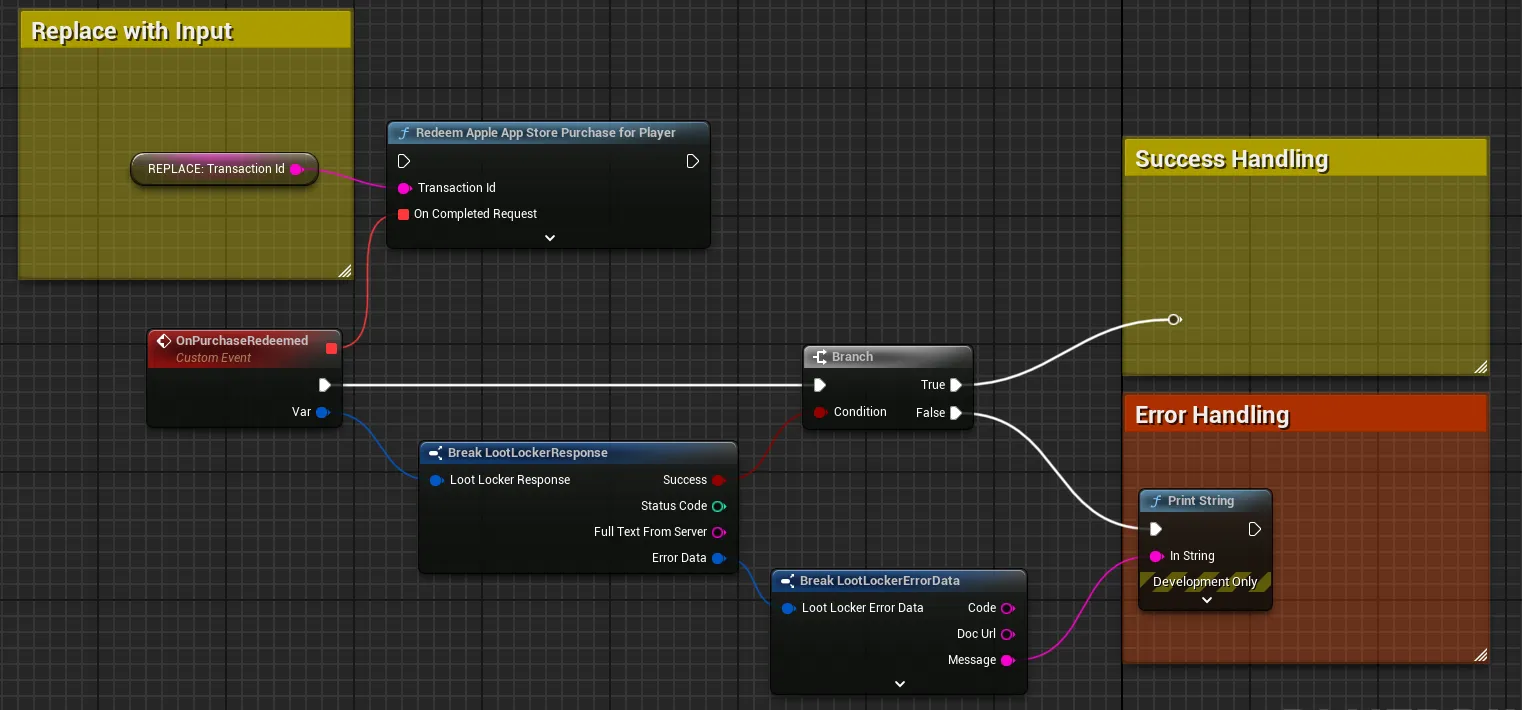
Extract the transaction ID from a successful purchase and pass it to the redeem function.
Coming soon — this sample hasn't been written yet.
curl -X POST 'https://api.lootlocker.io/game/store/apple/redeem' \ -H 'x-session-token: your_session_token' \ -H 'Content-Type: application/json' \ -d '{ "sandboxed": true, "transaction_id": "2000000316432479" }'On successful redemption, a 204 No Content response is returned.
Redeem a Purchase for a Character Class
You can also redeem a purchase to reward a specific Character Class that the player owns. This is useful for class-specific cosmetics or items. Provide both the transaction ID and the class ID of the target Character Class.
public void RedeemPurchaseForClass(string purchaseToken, int classID){    LootLockerSDKManager.RedeemAppleAppStorePurchaseForClass(purchaseToken, classID, (result) =>    {        if (!result.success)        {            Debug.Log("Redeem Purchase unsuccessful!");            return;        }
        Debug.Log($"Purchase successfully redeemed for class {classID}!");    });}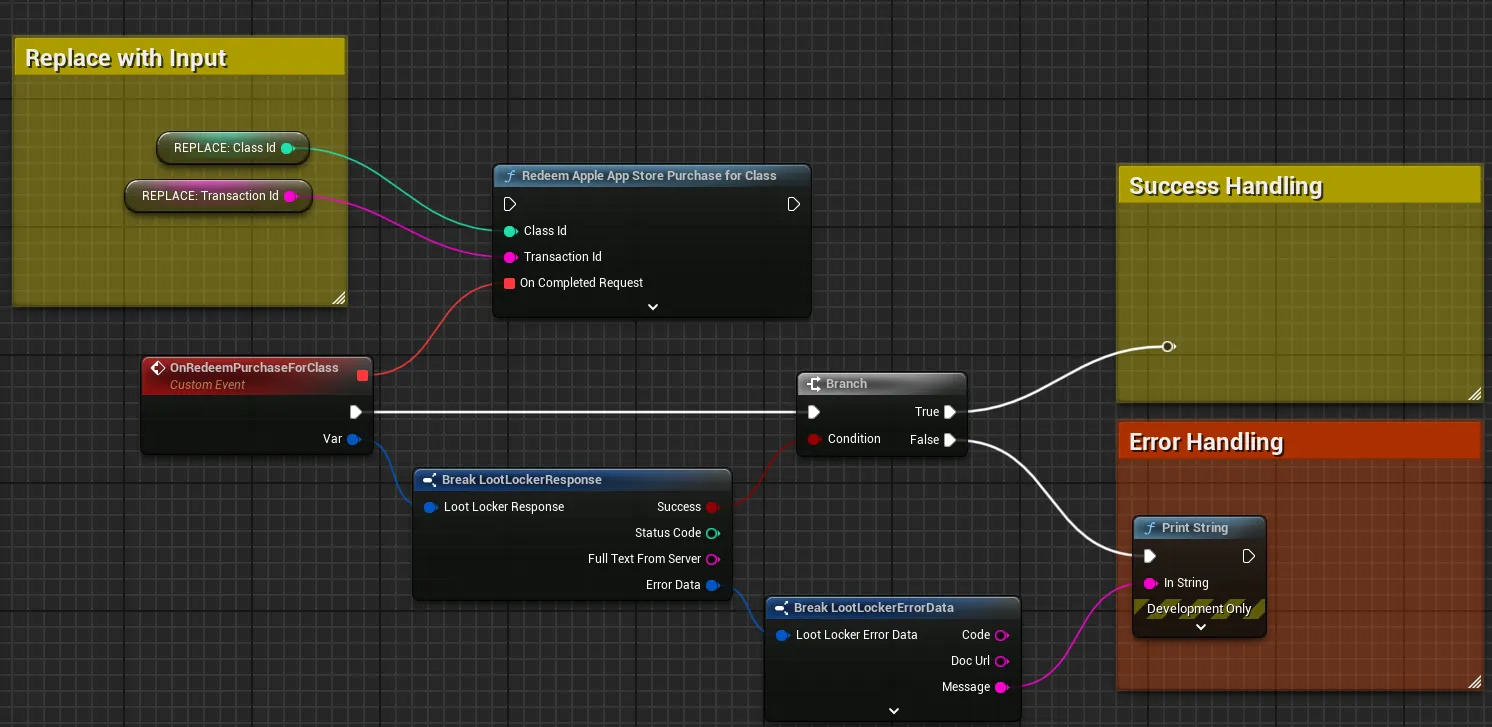
Extract the transaction ID and provide the class ID to the redeem function.
Coming soon — this sample hasn't been written yet.
curl -X POST 'https://api.lootlocker.io/game/redeem/store/apple' \ -H 'x-session-token: your_session_token' \ -H 'Content-Type: application/json' \ -d '{ "sandboxed": true, "transaction_id": "2000000316432499", "character_id": 123 }'On successful redemption, a 204 No Content response is returned.
Conclusion
You now have a complete Apple in-app purchase flow: setting up products in App Store Connect, initiating purchases from your game, and redeeming them through LootLocker to grant rewards to Players and Character Classes.