
White Label Login works a little differently from other platforms: you first create a White Label login session, which is then used to create a game session. Once the White Label account is logged in, the token is saved and used to create a game session.
The LootLocker SDKs provide a single method for the complete login flow. If you need to separate the steps, that's possible too — reach out to us for guidance on manual login.
Prerequisites
Section titled “Prerequisites”- Unity, Unreal, or Godot SDK installed and configured in your project (not required for REST).
- A White Label user created.
Log In and Start a Session
Section titled “Log In and Start a Session”// Remember to use the LootLocker namespace in the top of your file.using LootLocker.Requests;
// This code should be placed in a handler when user clicks the login button.string password = "password here";bool rememberMe = true;LootLockerSDKManager.WhiteLabelLoginAndStartSession(email, password, rememberMe, response =>{ if (!response.success) { if (!response.LoginResponse.success) { Debug.Log("error while logging in"); } else if (!response.SessionResponse.success) { Debug.Log("error while starting session"); } return; }
// Handle Returning Player});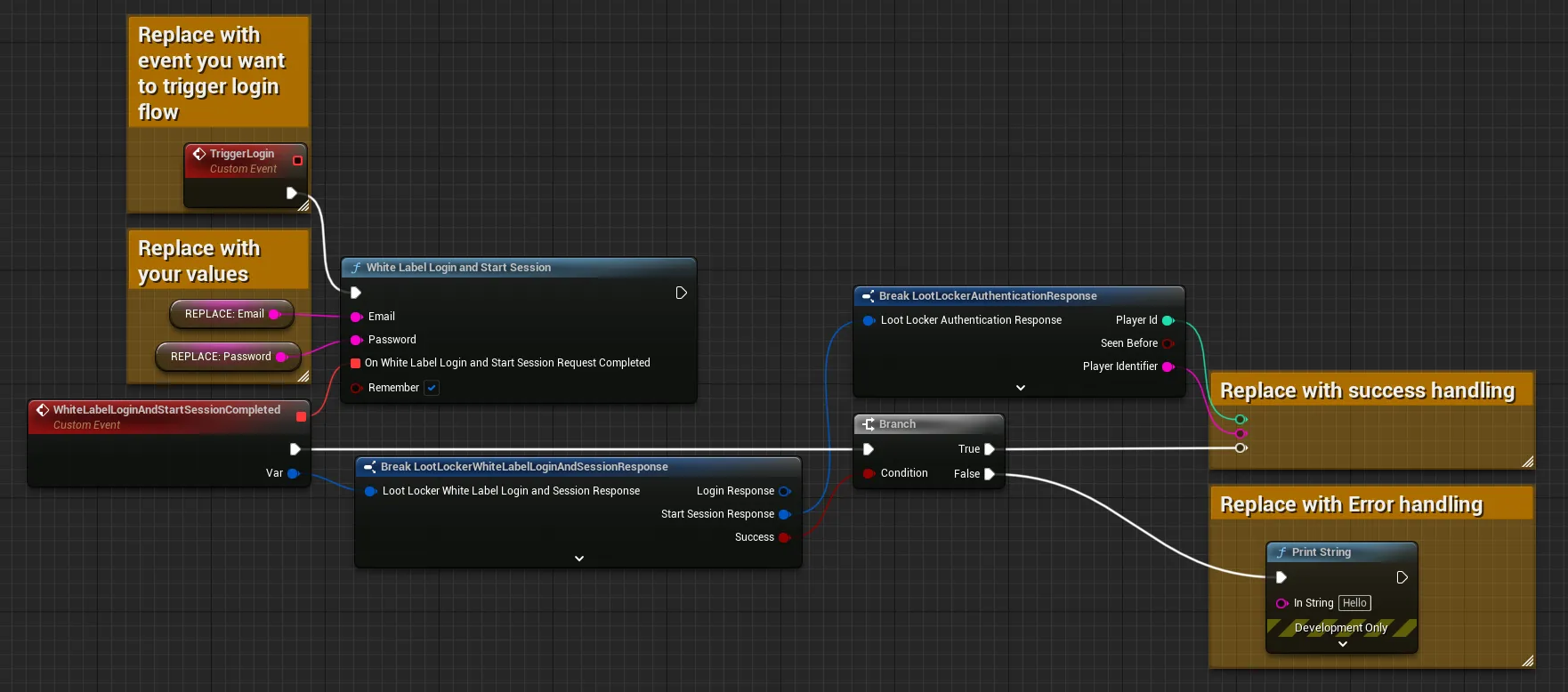
Input
Exchange the TriggerLogin event for whatever event should trigger the flow.
Output
Branch the completed events on the success flag, and add error handling for the failure case. Create variables from the Player ID and Player Identifier outputs for subsequent LootLocker calls.
Since this method is a two-step process behind the scenes — first login, then starting a game session — you can access the individual responses for debugging purposes using the LoginResponse and StartSessionResponse properties.
var response = await LL_WhiteLabel.LoginAndStartSession.new("an-email>", "a-password").send()if(!response.success) : # Request failed, handle errors passelse: # Request succeeded, use response as applicable in your game logic passFirst, log in to get the session token:
curl -X POST "https://api.lootlocker.io/white-label-login/login" \ -H "domain-key: 11aaa11" \ -H "is-development: true" \ -H "Content-Type: application/json" \Example response:
{ "id": 406, "game_id": 2, "created_at": "2021-08-25T08:03:34.612346459Z", "updated_at": "2021-08-25T08:03:34.612346459Z", "deleted_at": null, "validated_at": null, "session_token": "afccd38d-09d5-48aa-8235-b9c4c9151596"}Then use the session token to start a game session:
curl -X POST "https://api.lootlocker.io/game/v2/session/white-label" \ -H "Content-Type: application/json" \ -d "{\"game_key\": \"your_game_key\", \"email\": \"[email protected]\", \"token\": \"afccd38d-09d5-48aa-8235-b9c4c9151596\", \"game_version\": \"0.10.0.0\"}"Example response:
{ "success": true, "session_token": "e6fa44946f077dd9fe67311ab3f188c596df9969", "player_id": 3, "public_uid": "TSEYDXD8", "player_created_at": "2022-05-30T07:56:01+00:00", "check_grant_notifications": true, "check_deactivation_notifications": false, "seen_before": true}Conclusion
Section titled “Conclusion”You've started using LootLocker in your game with White Label Login. Next, review LootLocker's full feature set to decide which other features to implement.