
This how-to lists every Catalog configured for your game, so you can confirm which Catalogs are available before building against them.
Prerequisites
Section titled “Prerequisites”- Unity, Unreal, or Godot SDK installed and configured in your project (not required for REST).
- At least one Catalog configured in the Web Console.
- An active Player session (see Authentication).
List Catalogs
Section titled “List Catalogs”LootLockerSDKManager.ListCatalogs((response) =>{ if (!response.success) { Debug.Log("Could not List Catalogs"); return; }
foreach(var catalog in response.catalogs) { Debug.Log(catalog.name); Debug.Log(catalog.key); Debug.Log(catalog.id); }});See the Reference Documentation for the full response.
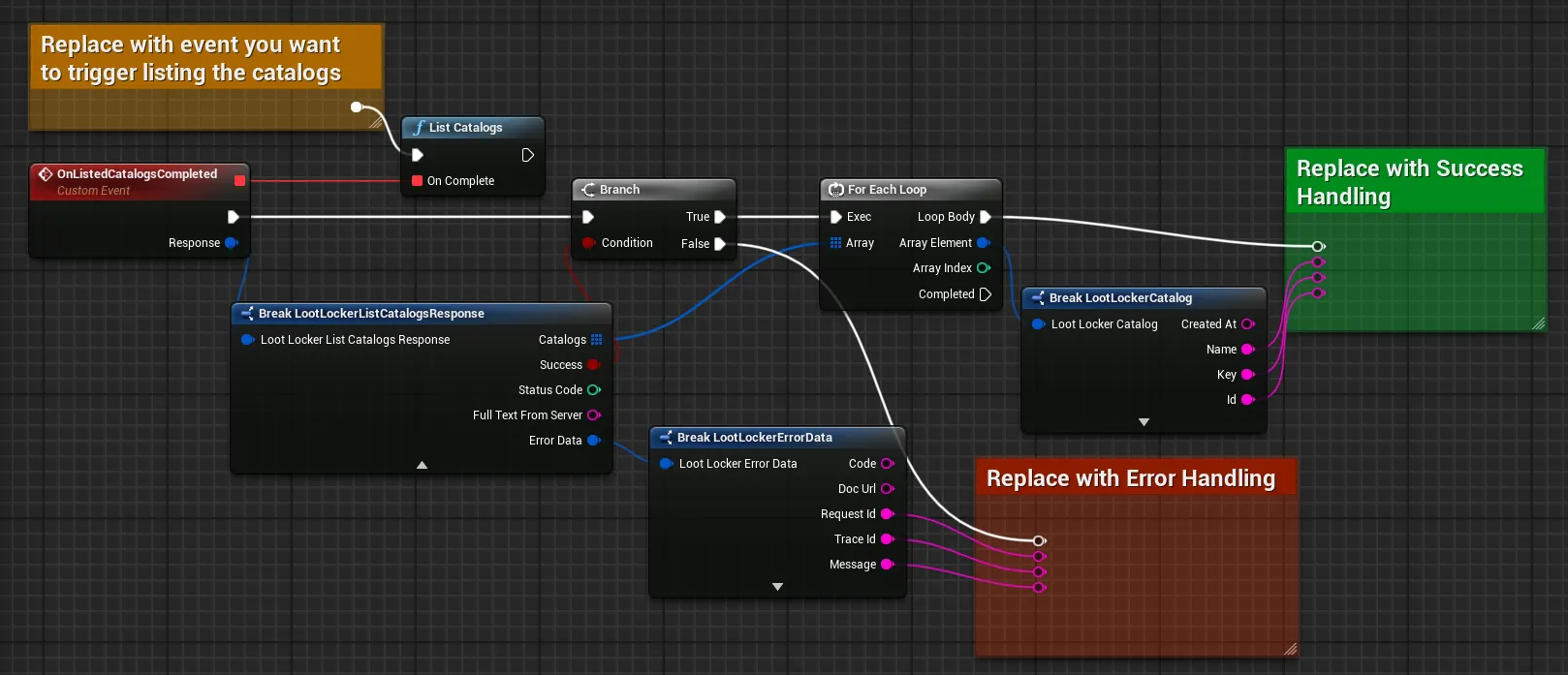
Coming soon — this sample hasn't been written yet. In the meantime, refer to the Reference Documentation for this endpoint.
curl -X GET 'https://api.lootlocker.io/game/catalogs/' \-H 'x-session-token: {token}' \-H "Content-Type: application/json"See the Reference Documentation for the full response.
Conclusion
Section titled “Conclusion”You've listed every Catalog configured for your game. Next, set up UI for an in-game store using the results.