
This how-to retrieves Player Feedback categories and reports a Player from your game.
Prerequisites
Section titled “Prerequisites”- Unity, Unreal, or Godot SDK installed and configured in your project (not required for REST).
- An active Player session (see Authentication).
- At least one Player Feedback Category configured (see Manage Feedback Categories).
Retrieve Category IDs
Section titled “Retrieve Category IDs”Before we can create the Feedback report, we first need to find the category to report the player under.
If you only have a single category, you could manually retrieve the category ID from the Web Console. However, if you have multiple categories, you should list the categories and let the player choose which category to report under.
To retrieve all the categories, we can use the following code:
public void RetrieveCategoryIDs(){    LootLockerSDKManager.ListPlayerFeedbackCategories((response) =>    {        if (!response.success)        {            // Replace this with your own error handling            Debug.Log("Could not list player related feedback categories");            Debug.Log(response.errorData.ToString());            return;        }
        // Replace this section with your own UI to let the player choose the category        foreach (var category in response.categories)        {            Debug.Log(category.name + "\n"                + category.description + "\n"                + category.id);        }    });}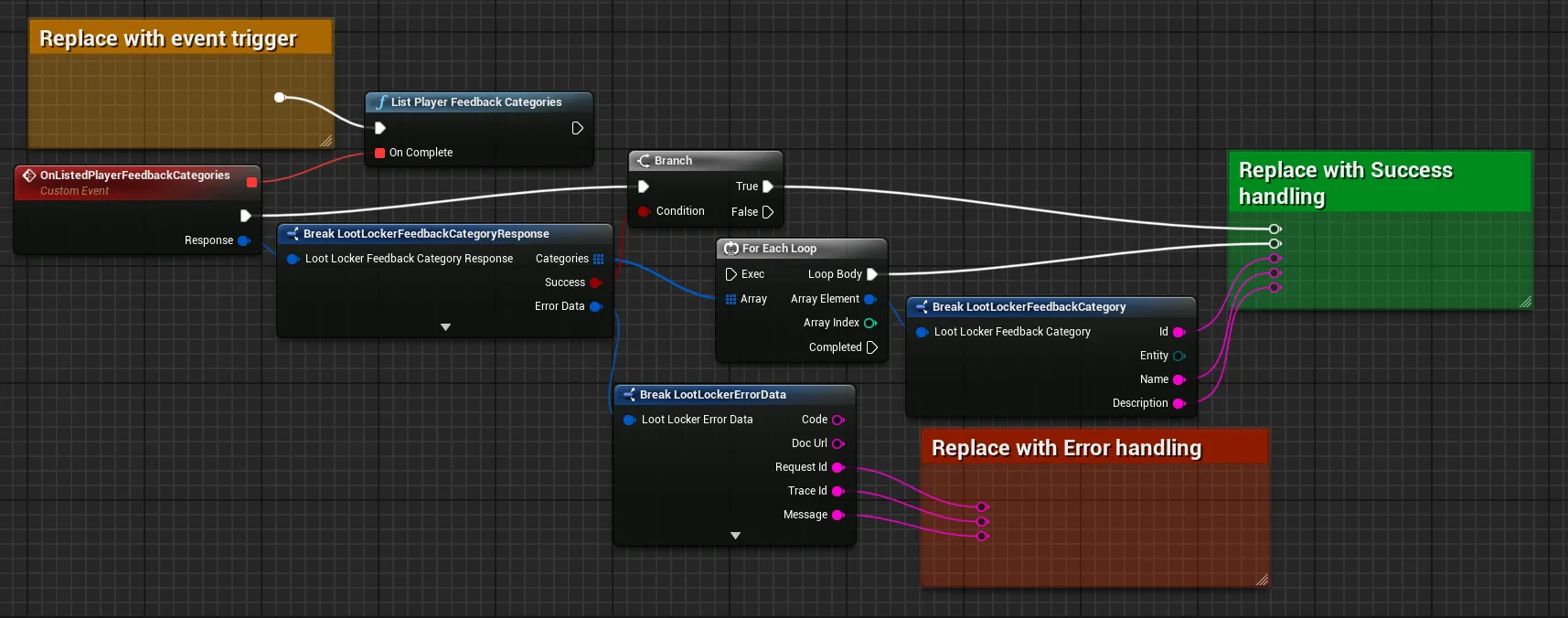
Coming soon — this sample hasn't been written yet. In the meantime, refer to the Reference Documentation for this endpoint.
curl -X "https://api.lootlocker.io/game/feedback/category/entity/player" \ -H "x-session-token: your_token_here"Send Player Report
Section titled “Send Player Report”Now that we have the category ID, we can send the player report.
To send a player report, we need to provide the following information:
- The category ID
- The ULID of the player being reported
- Optionally a description, which can be entered by the player, or filled in by the game
public void SendPlayerReport(){    string cateogryID = "category_id_here";    string reportedPlayerULID = "player_id_here";    string description = "The Player had an inappropiate profile picture";
    LootLockerSDKManager.SendPlayerFeedback(reportedPlayerULID, description, cateogryID, (response) =>    {        if (!response.success)        {            // Replace this with your own error handling            Debug.Log("Could not report player");            Debug.Log(response.errorData.ToString());            return;        }
        // Replace this with your own success handling        Debug.Log("Report sent to LootLocker");    });}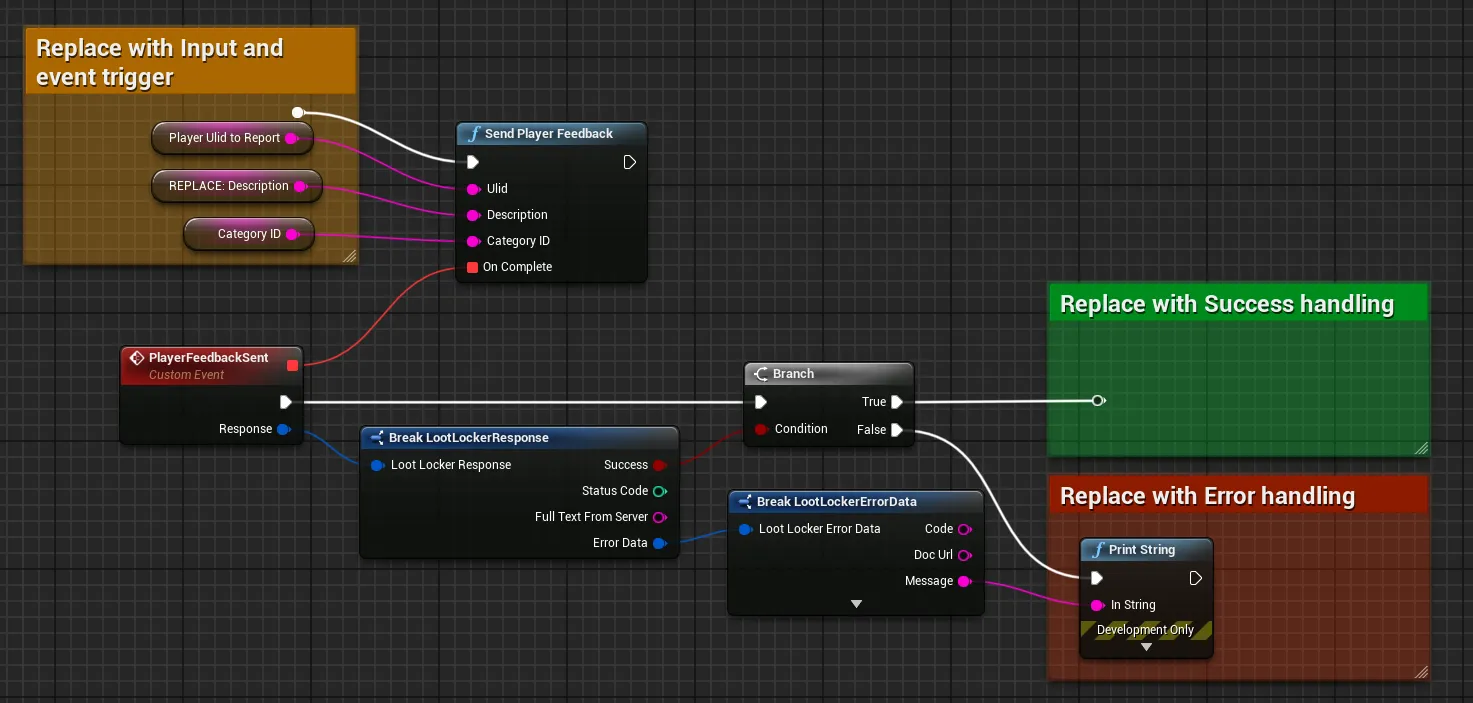
Coming soon — this sample hasn't been written yet. In the meantime, refer to the Reference Documentation for this endpoint.
curl -X "https://api.lootlocker.io/game/feedback" \ -H "x-session-token: your_token_here" \ -D '{ "entity": "player", "entity_id": "", "category_id": "category_id_here", "description": "The Player had an inappropiate profile picture" }'Conclusion
Section titled “Conclusion”You've listed Player Feedback categories and reported a Player from your game. Next, see Create Game Feedback or Create UGC Feedback.