
This how-to updates, retrieves, and looks up player names, and views them in the Web Console.
Prerequisites
Section titled “Prerequisites”- Unity, Unreal, or Godot SDK installed and configured in your project (not required for REST).
- An active Player session (see Authentication).
Automatic Platform Names
Section titled “Automatic Platform Names”When possible, LootLocker attaches a name to the player when starting a session. This is only possible for platforms where the player already has a name, such as Steam or PlayStation Network.
Platforms Supporting Automatic Names: Steam, PlayStation Network.
If you're using a platform without automatic player names, or want to update the name LootLocker has stored for the player, you can change the name using the SDK or API.
Player names can also be viewed in the Web Console:

Unique Player Names
Section titled “Unique Player Names”To ensure no two players in your game have the same name, use the Unique Player Names setting in your game settings. Enabling this toggle returns an error when updating a player's name if that name is already taken.
Update Player Name in Game
Section titled “Update Player Name in Game”LootLockerSDKManager.SetPlayerName("Some other name", (response) =>{ if (response.success) { Debug.Log("Successfully set player name"); } else { Debug.Log("Error setting player name"); }});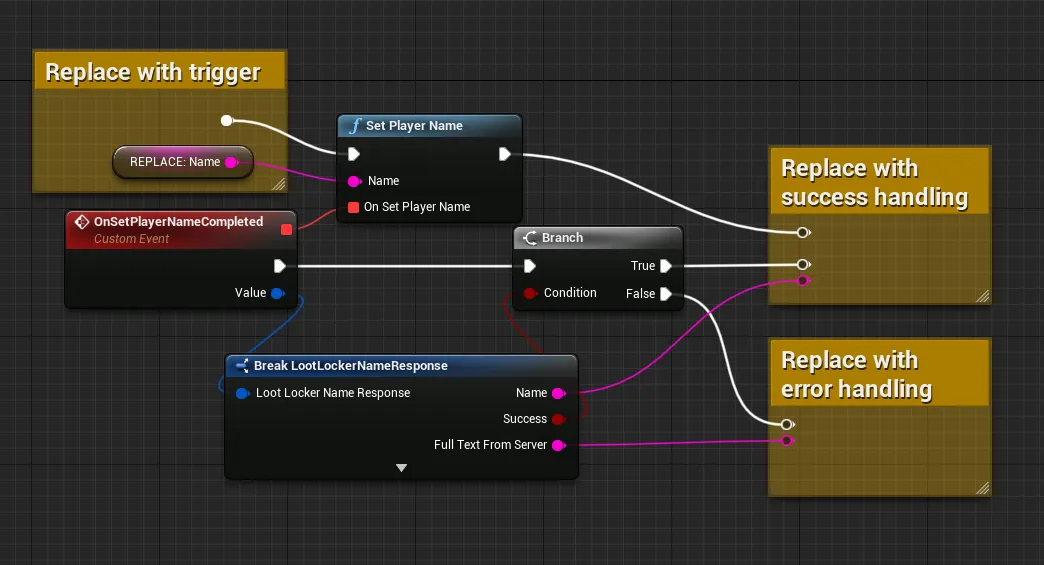
var response = await LL_Players.SetPlayerName.new("a-new-name").send()if(!response.success) : # Request failed, handle errors passelse: # Request succeeded, use response as applicable in your game logic passcurl -X PATCH "https://api.lootlocker.io/game/player/name" \ -H "x-session-token: your_token_here" \ -H "LL-Version: 2021-03-01" \ -H "Content-Type: application/json" \ -d "{\"name\": \"Player Name\"}"Example response:
{ "name": "Player Name"}Retrieve Player Name in Game
Section titled “Retrieve Player Name in Game”LootLockerSDKManager.GetPlayerName((response) =>{ if (response.success) { Debug.Log("Successfully retrieved player name: " + response.name); } else { Debug.Log("Error getting player name"); }});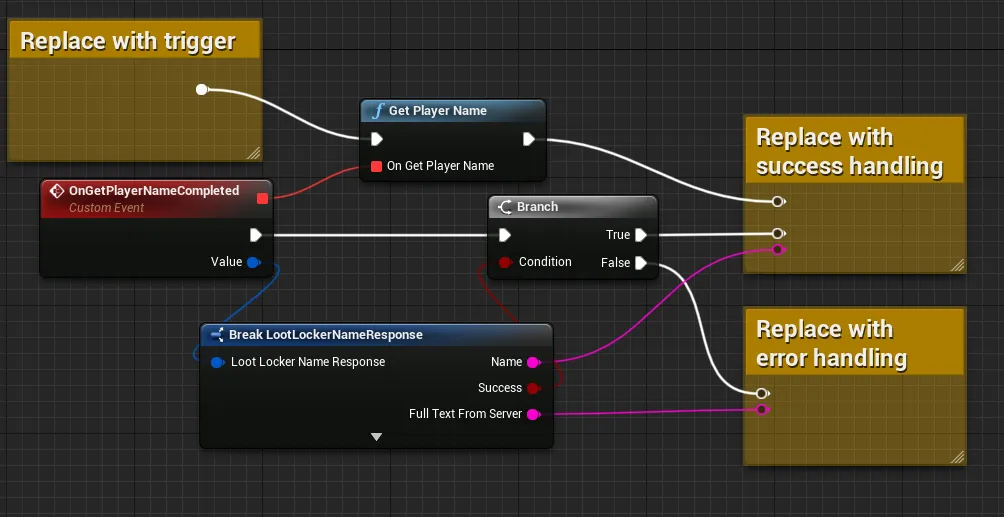
var response = await LL_Players.GetPlayersActiveName.new().send()if(!response.success): # Request failed, handle errors passelse: # Request succeeded, use response as applicable in your game logic passcurl -X GET "https://api.lootlocker.io/game/player/name" \ -H "x-session-token: your_token_here" \ -H "LL-Version: 2021-03-01"Example response:
{ "name": "Player Name"}Lookup Multiple Player Names Using Player IDs
Section titled “Lookup Multiple Player Names Using Player IDs”ulong player1ID = 1;ulong player2ID = 2;ulong player3ID = 3;
LootLockerSDKManager.LookupPlayerNamesByPlayerIds(new ulong[] { player1ID, player2ID, player3ID }, response =>{ if (response.success) { foreach (var player in response.players) { Debug.Log(player.player_id); Debug.Log(player.player_public_uid); Debug.Log(player.name); Debug.Log(player.last_active_platform); Debug.Log(player.platform_player_id); } } else { Debug.Log("Error looking up player names"); }});Multiple platforms and public UID are also supported:
- LookupPlayerNamesByPlayerPublicUIds(string[] playerPublicUIds, Action onComplete)- LookupPlayerNamesBySteamIds(ulong[] steamIds, Action onComplete)- LookupPlayerNamesBySteamIds(string[] steamIds, Action onComplete)- LookupPlayerNamesByPSNIds(ulong[] psnIds, Action onComplete)- LookupPlayerNamesByPSNIds(string[] psnIds, Action onComplete)- LookupPlayerNamesByXboxIds(string[] xboxIds, Action onComplete)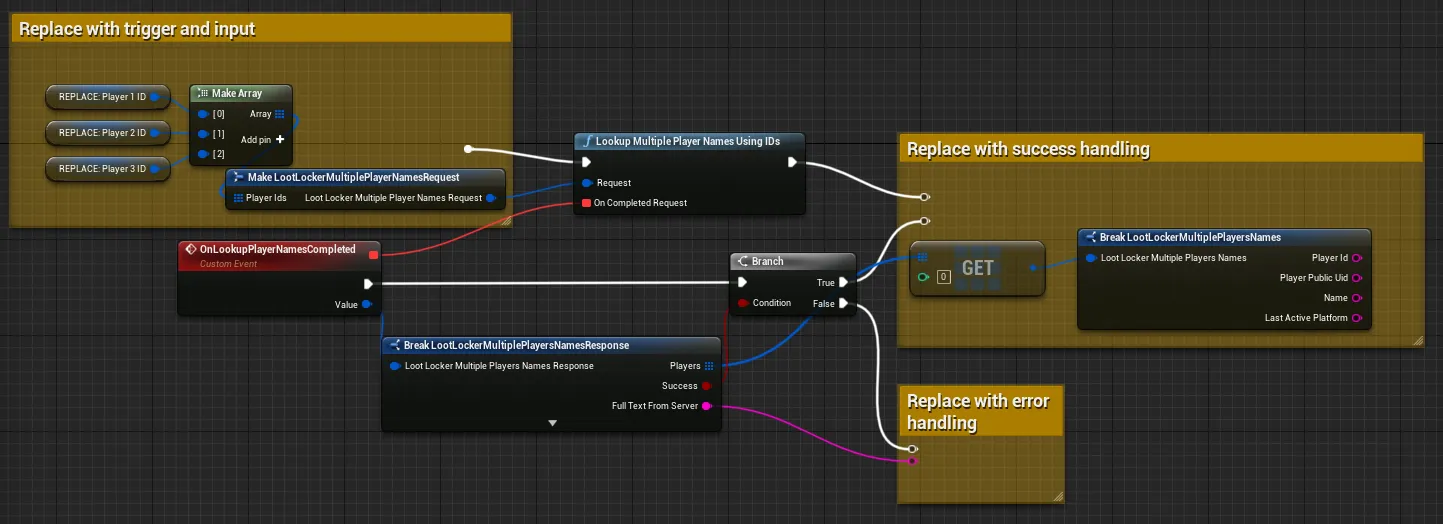
Coming soon — this sample hasn't been written yet.
curl -G "https://api.lootlocker.io/game/player/lookup/name" \ -H "x-session-token: your_token_here" \ -H "LL-Version: 2021-03-01" \ -d player_id=1 \ -d player_id=2 \ -d player_public_uid=JARL7PGR \ -d player_guest_login_id=a270686a-7dd7-482f-89b6-9b2a634f46fb \ -d steam_id=9465748036854778475 \ -d psn_id=1234567890 \ -d xbox_id=E51D19530BBE721286F75C03B934E5EB7CA23B99Example response:
{ "players": [ { "player_id": 1, "player_public_uid": "6DDXH947", "name": "Player 1 Name", "last_active_platform": "xbox_one" }, { "player_id": 2, "player_public_uid": "4FDGF738", "name": "Player 2 Name", "last_active_platform": "xbox_one" }, { "player_id": 3, "player_public_uid": "JARL7PGR", "name": "Player 3 Name", "last_active_platform": "guest" }, { "player_id": 4, "player_public_uid": "9HDK4F5Y", "name": "Player 4 PSN Name", "last_active_platform": "psn", "platform_player_id": "1234567890" }, { "player_id": 5, "player_public_uid": "3XTMHFS3", "name": "Player 5 Steam Name", "last_active_platform": "steam", "platform_player_id": "9465748036854778475" }, { "player_id": 6, "player_public_uid": "9RKPSRRT", "name": "Player 6 XBox Name", "last_active_platform": "xbox_one", "platform_player_id": "E51D19530BBE721286F75C03B934E5EB7CA23B99" }, { "player_id": 7, "player_public_uid": "T4HV7G5D", "name": "Player 7 GuestLogin Name", "last_active_platform": "guest", "platform_player_id": "a270686a-7dd7-482f-89b6-9b2a634f46fb" } ]}Conclusion
Section titled “Conclusion”You've updated, retrieved, and looked up player names, and can view them in the Web Console. Next, review LootLocker's full feature set to decide which other features to implement.