
This how-to configures scheduled resets and Rewards for a Leaderboard in the Web Console, then retrieves those Rewards in your game.
Prerequisites
Section titled “Prerequisites”- A Leaderboard created in the Web Console (see Configure Leaderboard in Web Console).
- Assets, Progression Points, Progression Resets, or Currency already configured in the Web Console, if you want to select them as Leaderboard Rewards.
- Unity, Unreal, or Godot SDK installed and configured in your project (not required for REST).
- An active Player session (see Authentication).
Configure Scheduling in Web Console
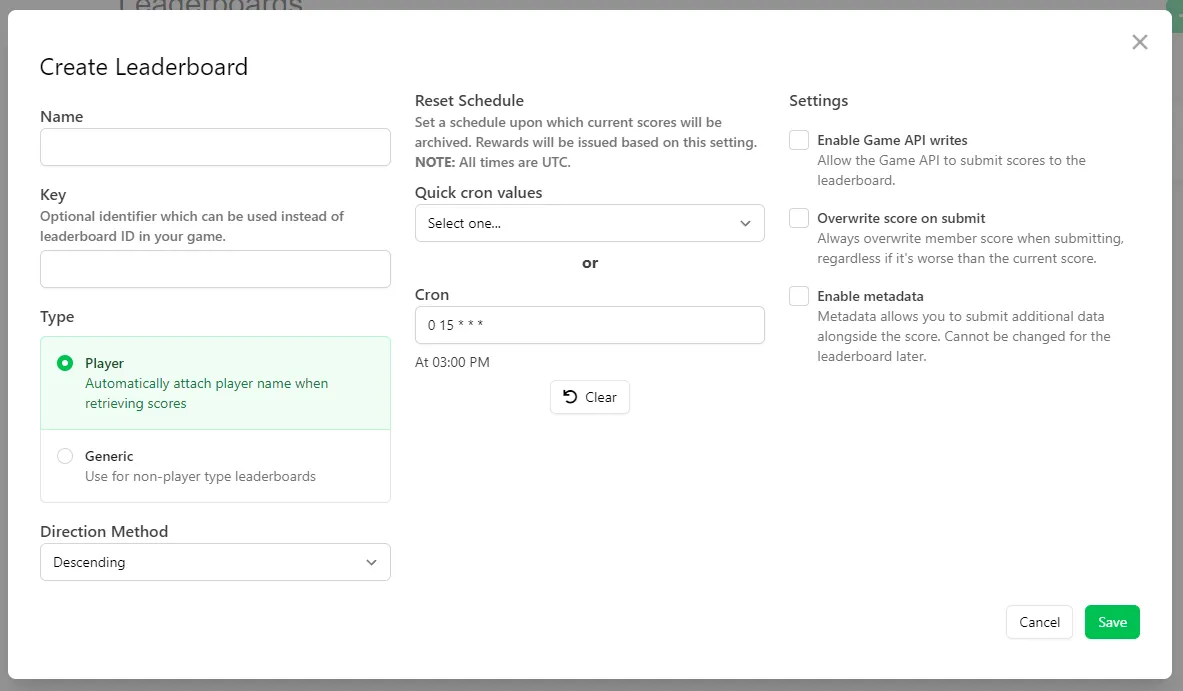
Section titled “Configure Scheduling in Web Console”As you create a Leaderboard, you can set a Cron value (or select a Quick Cron Value), which determines the schedule.
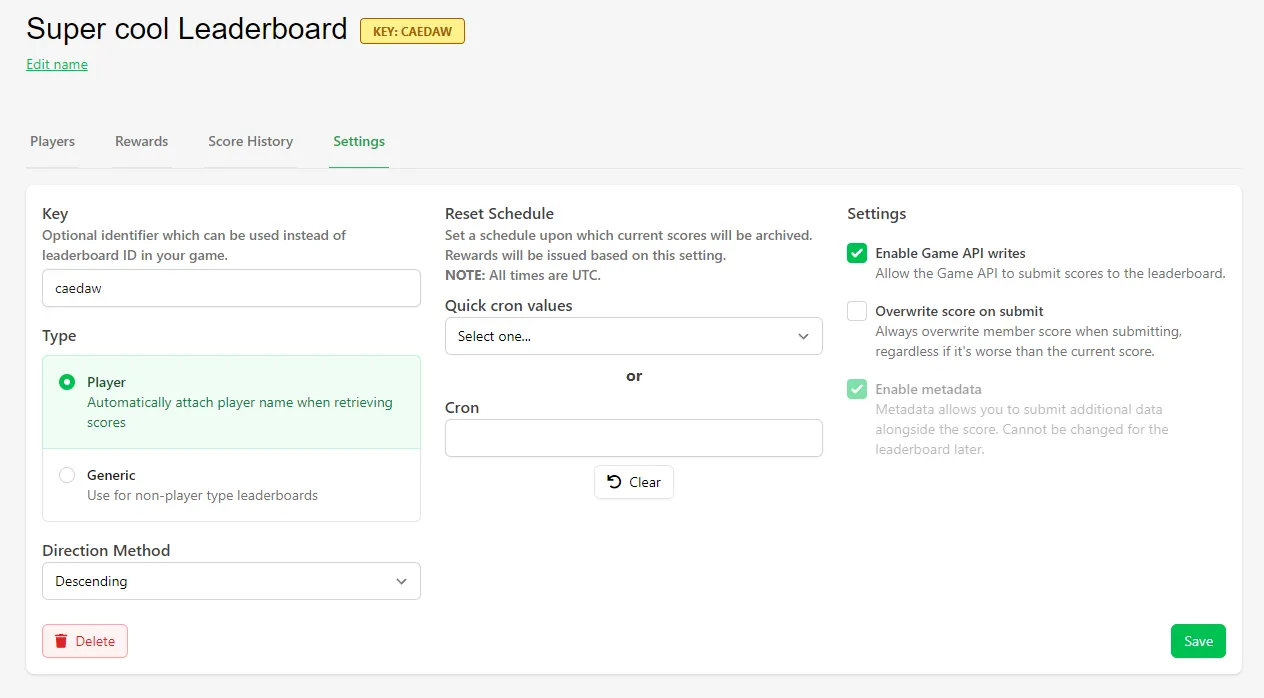
If you want to edit the schedule, or haven't set one before creating the Leaderboard, the schedule settings are found inside the Leaderboard, under Settings.
Configure Rewards in Web Console
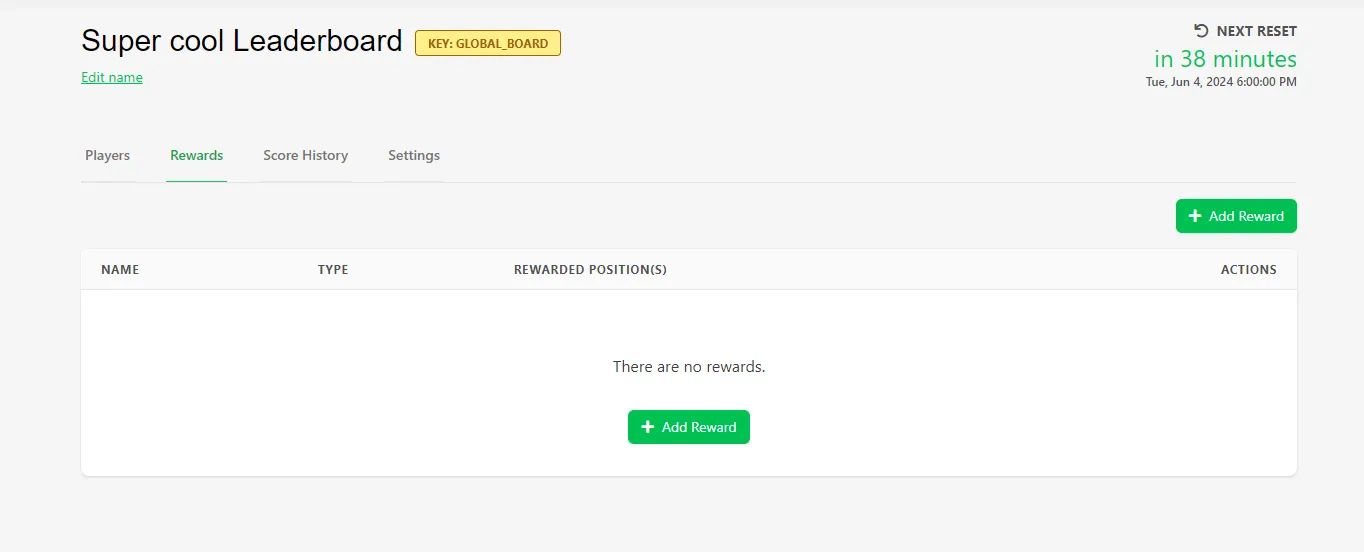
Section titled “Configure Rewards in Web Console”The Rewards settings are found under the Rewards tab. Once you select the reward type (Asset, Currency, Progression Point, Progression Reset, Group), configure the selection.
Here we have configured the selection to use the player's ranking, between a range of min 1 and max 10 — this results in the top 10 players receiving the reward.
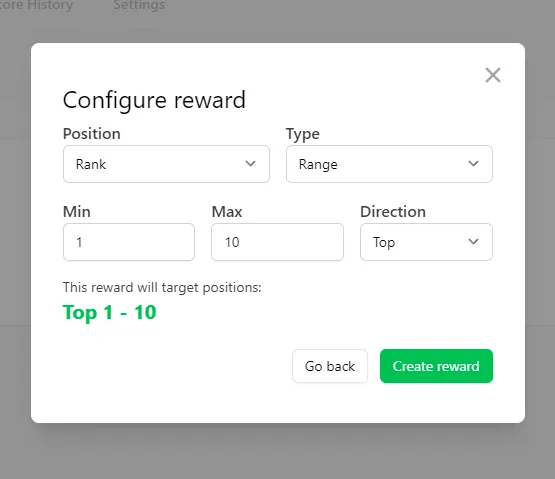
You can customize this further by selecting different types, directions, and positions.
Get Rewards in Game
Section titled “Get Rewards in Game”private void GetRewards(){ string leaderboard_key = ""; LootLockerSDKManager.GetLeaderboardData(leaderboard_key, (response) => { if (!response.success) { return; } foreach (var reward in response.rewards) { switch (reward.reward_kind) { case LootLockerLeaderboardRewardEntityKind.group: ConfigureGroup(reward.group); break; case LootLockerLeaderboardRewardEntityKind.asset: ConfigureAsset(reward.asset); break; case LootLockerLeaderboardRewardEntityKind.currency: ConfigureCurrency(reward.currency); break; case LootLockerLeaderboardRewardEntityKind.progression_points: ConfigureProgressionPoints(reward.progression_points); break; case LootLockerLeaderboardRewardEntityKind.progression_reset: ConfigureProgressionReset(reward.progression_reset); break; default: break; } } });}
private void ConfigureAsset(LootLockerLeaderboardRewardAsset asset){ Debug.Log(asset.asset_ulid); Debug.Log(asset.details.name); Debug.Log(asset.details.thumbnail);}
private void ConfigureCurrency(LootLockerLeaderboardRewardCurrency currency){ Debug.Log(currency.amount); Debug.Log(currency.details.name); Debug.Log(currency.details.id); Debug.Log(currency.details.code);}
private void ConfigureProgressionPoints(LootLockerLeaderboardRewardProgression progression){ Debug.Log(progression.amount); Debug.Log(progression.progression_id); Debug.Log(progression.details.name); Debug.Log(progression.details.id); Debug.Log(progression.details.key);}
private void ConfigureProgressionReset(LootLockerLeaderboardRewardProgressionReset progression){ Debug.Log(progression.progression_id); Debug.Log(progression.details.name); Debug.Log(progression.details.id); Debug.Log(progression.details.key);}
private void ConfigureGroup(LootLockerLeaderboardRewardGroup group){ foreach (var reward in group.associations) { switch (reward.kind) { case LootLockerLeaderboardRewardEntityKind.asset: Debug.Log(reward.asset.asset_ulid); Debug.Log(reward.asset.details.name); Debug.Log(reward.asset.details.thumbnail); break; case LootLockerLeaderboardRewardEntityKind.currency: Debug.Log(reward.currency.currency_id); Debug.Log(reward.currency.amount); Debug.Log(reward.currency.details.name); Debug.Log(reward.currency.details.code); Debug.Log(reward.currency.details.id); break; case LootLockerLeaderboardRewardEntityKind.progression_points: Debug.Log(reward.progression_points.progression_id); Debug.Log(reward.progression_points.amount); Debug.Log(reward.progression_points.details.name); Debug.Log(reward.progression_points.details.key); Debug.Log(reward.progression_points.details.id); break; case LootLockerLeaderboardRewardEntityKind.progression_reset: Debug.Log(reward.progression_reset.progression_id); Debug.Log(reward.progression_reset.details.name); Debug.Log(reward.progression_reset.details.key); Debug.Log(reward.progression_reset.details.id); break; } }}We start by getting the Leaderboard data and iterating through each reward.
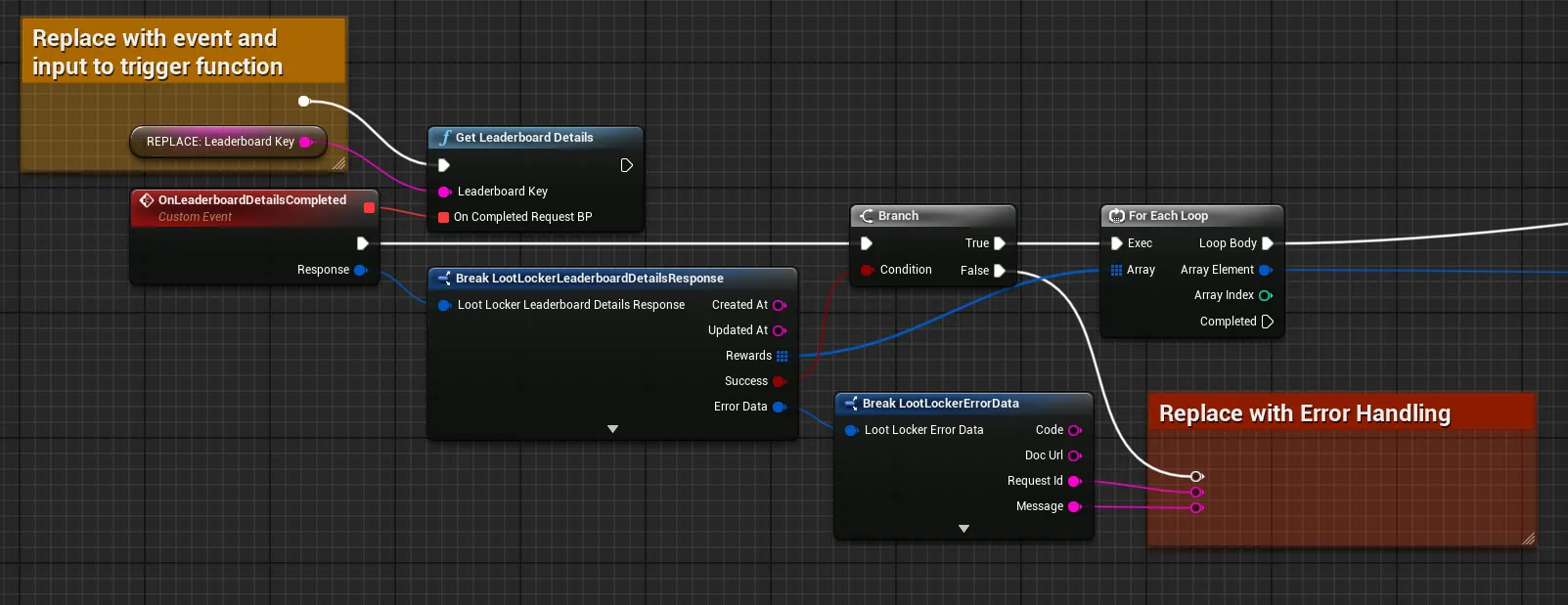
Then we switch through the Reward Kind, and branch out into different logic based on the result.
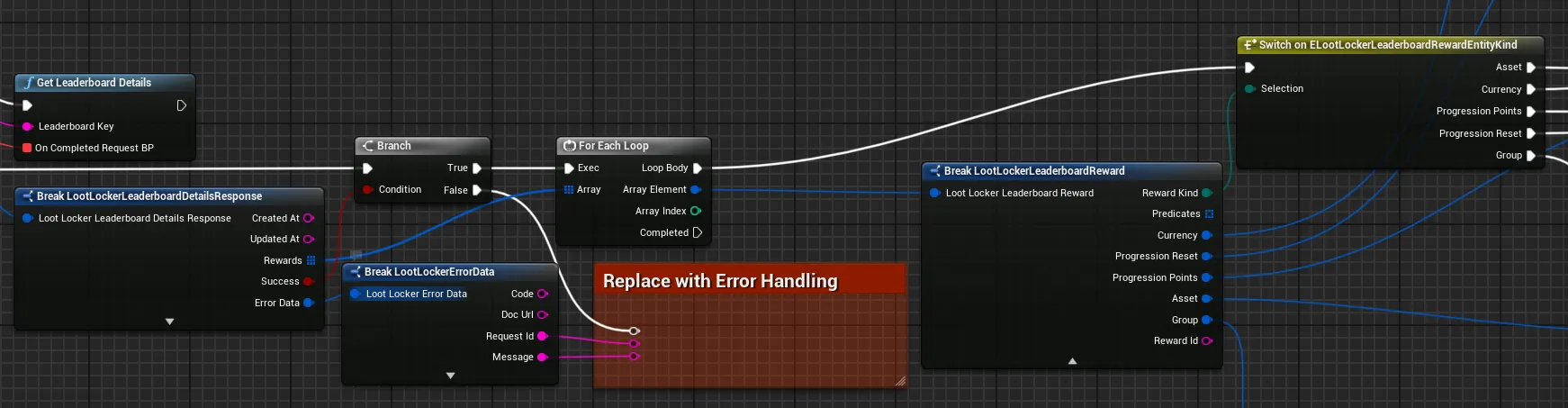
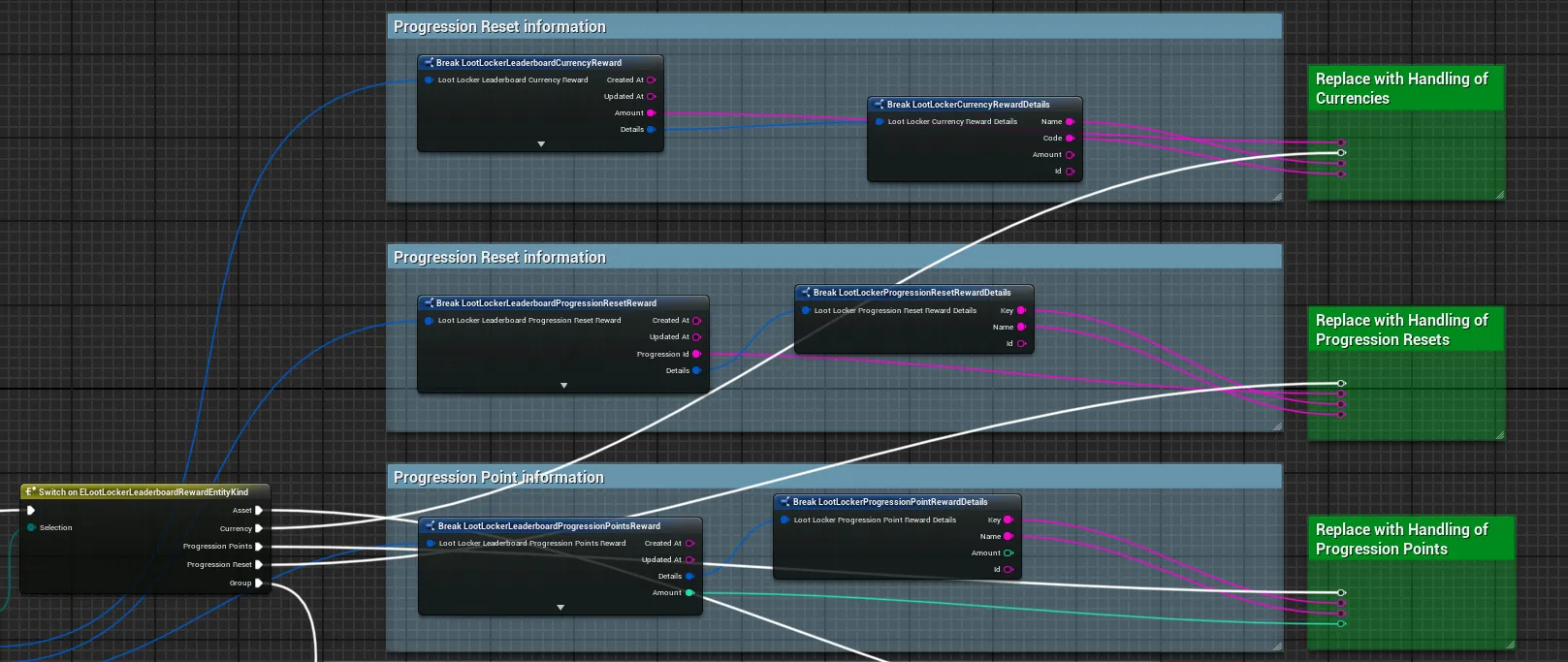
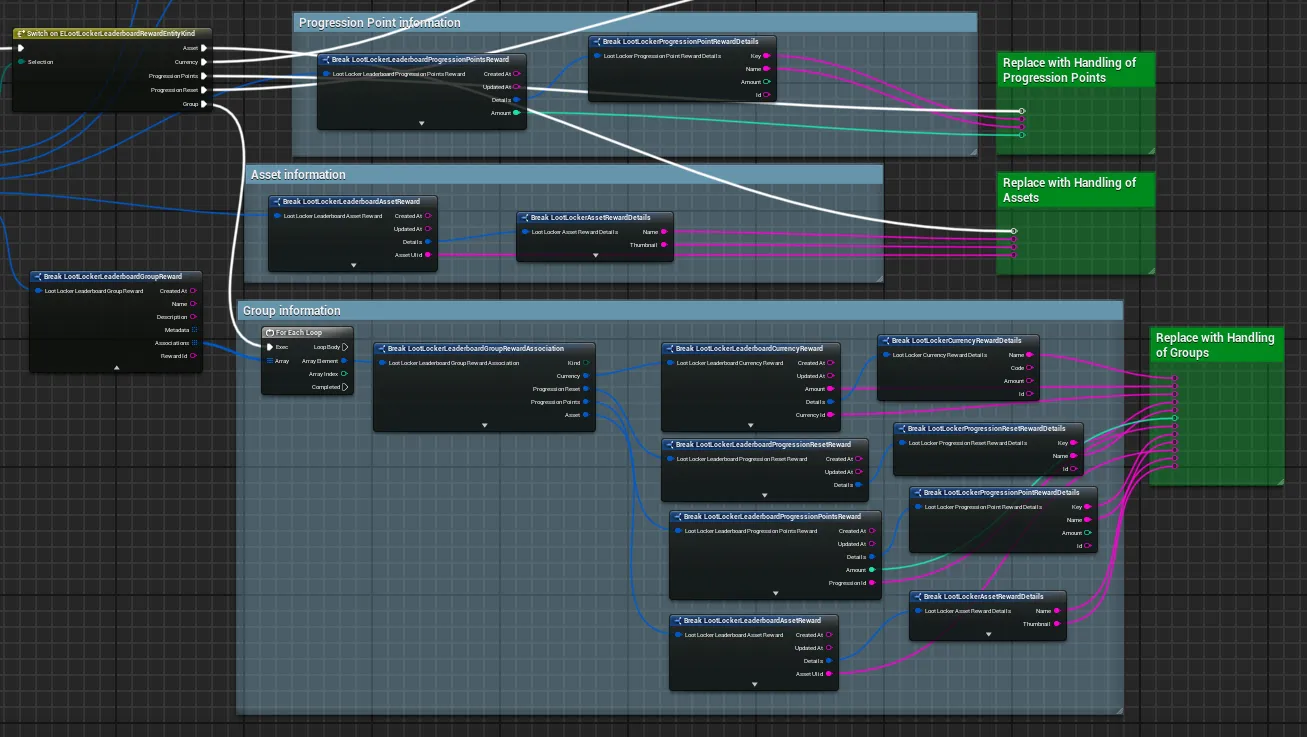
Finally we get the information, and from here you can generate your UI or further game logic.
Coming soon — this sample hasn't been written yet.
Coming soon — this sample hasn't been written yet.
Conclusion
Section titled “Conclusion”You've configured a scheduled reset with Rewards for a Leaderboard, and retrieved those Rewards from your game. Rewards are given automatically to players who meet the requirements once the Leaderboard resets. Next, see Use Leaderboards for Time Based Rankings or Use Metadata to Store Additional Information to keep building out your Leaderboards.