
This how-to submits and retrieves scores on a Generic Leaderboard, where entries link to a custom key instead of an individual player.
Prerequisites
Section titled “Prerequisites”- Unity, Unreal, or Godot SDK installed and configured in your project (not required for REST).
- An active Player session (see Authentication).
- A Generic Leaderboard configured in the Web Console (see Configure Leaderboard in Web Console).
Get List of Scores
Section titled “Get List of Scores”Retrieve the top 50 scores from a Leaderboard.
string leaderboardKey = "my_leaderboard";int count = 50;
LootLockerSDKManager.GetScoreList(leaderboardKey, count, 0, (response) =>{    if (!response.success) {        Debug.Log("Could not get score list!");        Debug.Log(response.errorData.ToString());        return;    }    Debug.Log("Successfully got score list!");});
Check out the Reference Documentation for a more in-depth understanding of the endpoint.
Coming soon — this sample hasn't been written yet. In the meantime, refer to the Reference Documentation for this endpoint.
var leaderboardKey : String = "my_leaderboard"var count : int = 50
var response = await LL_Leaderboards.GetScoreList.new(leaderboardKey, count).send()if(!response.success) :    # Request failed, handle errors    passelse:    # Request succeeded, use response as applicable in your game logic    pass
Check out the Reference Documentation for a more in-depth understanding of the endpoint.
Coming soon — this sample hasn't been written yet. In the meantime, refer to the Reference Documentation for this endpoint.
Use a Generic Leaderboard as a Clan List
Section titled “Use a Generic Leaderboard as a Clan List”Use a Leaderboard to store a list of members in a clan or guild.
string clanName = "super cool clan!";string metadata = "{clan_members:5213125,534034,534238,213890}";string leaderboardKey = "leaderboard_clan_list";int clanScore = 519;
LootLockerSDKManager.SubmitScore(clanName, clanScore, leaderboardKey, metadata, (response) =>{    if (!response.success)    {        Debug.Log("Could not submit score!");        Debug.Log(response.errorData.ToString());        return;    }    Debug.Log("Successfully submitted score!\n with metadata: " + metadata);});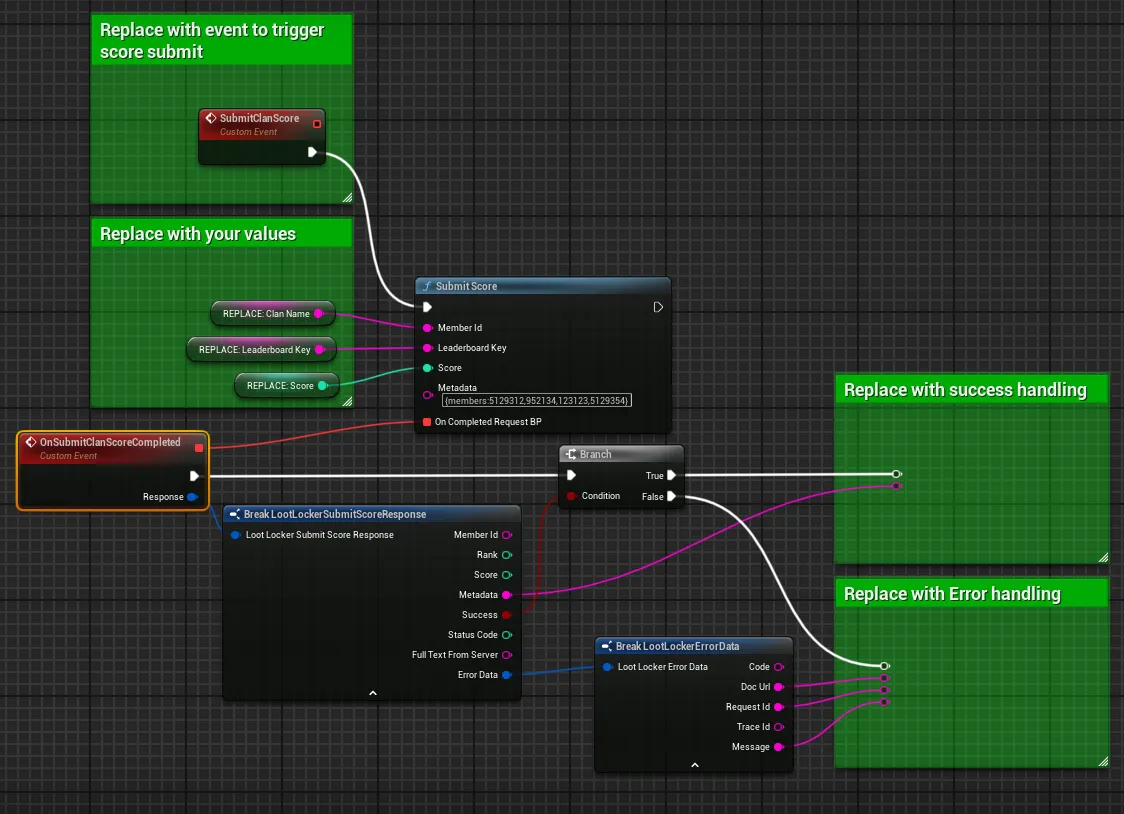
To copy and paste this example into your editor, look here.
You need to exchange the SubmitClanScore event for whatever event you want to use to trigger this flow. Replace the input variables with the data you want to submit to the Leaderboard.
We recommend branching the completed events on the success flag in the response — add error handling in case the request fails, plus whatever continued actions you want on success.
var clanName : String = "super cool clan!"var metadata : String = "{clan_members:5213125,534034,534238,213890}"var leaderboardKey : String = "leaderboard_clan_list"var clanScore : int = 519
var response = await LL_Leaderboards.SubmitScore.new(leaderboardKey, clanScore, clanName, metadata).send()if(!response.success) : # Request failed, handle errors passelse: # Request succeeded, use response as applicable in your game logic passcurl -X POST "https://api.lootlocker.io/game/leaderboards/1/submit" \ -H "x-session-token: your_token_here" \ -H "Content-Type: application/json" \ -d "{\"score\": 1000, \"metadata\": \"{members:5129312,952134,123123,5129354}\"}"Conclusion
Section titled “Conclusion”You've retrieved scores from a Generic Leaderboard and submitted a score tied to a custom key instead of a player. Next, see Use Metadata to Store Additional Information to add more context to each entry.