
This how-to lists a Player's unread notifications, finds a specific notification by key, and marks it as read.
Prerequisites
Section titled “Prerequisites”- Unity, Unreal, or Godot SDK installed and configured in your project (not required for REST).
- An active Player session (see Authentication).
- There are a few different systems that can generate notifications in LootLocker:
- Triggers
- Purchasing a Catalog Item
- Twitch Drops
- Custom notifications from the Admin API, Server SDK (using the
SendNotificationToPlayermethods), or through the Web Console (go to a Player in the player list, choose Actions, and Send Notification).
- A previously sent notification, from for example an invoked Trigger or a successful purchase.
List Notifications and Mark One as Read
Section titled “List Notifications and Mark One as Read”To find the notification that matches a previous action (an invoked Trigger, a purchase call), you need one or more of the following:
- A purchase using virtual currency: use the
catalog_listing_id - An In App Purchase using Apple App Store: use the
transaction_id - An In App Purchase using Google Play Store: use the
product_id - An In App Purchase using Steam Store: use the
entitlement_id - A Trigger: use the
trigger_key - A Twitch Drop: use the
twitch reward id - A custom notification from server, console, or Admin API: use the notification type you set for the notification.
// We're only interested in unread notifications for this how to.// If you want to see information about notifications you've previously marked as read then set this to truebool showRead = false;
// The key that we saved from invoking a trigger, or calling a purchase to get the correct notificationstring notificationKey = "saved_trigger_key_or_catalog_item_id_from_a_previous_response";
// You can optionally return only a specific priorityLootLocker.LootLockerEnums.LootLockerNotificationPriority? priority = null;
// You can optionally return only a specific type of notification.// Triggers and purchased items are of the type LootLocker.LootLockerStaticStrings.LootLockerNotificationTypes.PullRewardAcquiredstring ofType = LootLocker.LootLockerStaticStrings.LootLockerNotificationTypes.PullRewardAcquired;
// The source of the notification: a type of purchase or trigger.// Use the static strings provided in LootLocker.LootLockerStaticStrings.LootLockerNotificationSources// to specify what type of notification you are requesting.// For purchases, use:// LootLocker.LootLockerStaticStrings.LootLockerNotificationSources.Purchasing.(the source of purchase: LootLocker, AppleAppStore, GooglePlayStore, SteamStore)// For triggers, use:// LootLocker.LootLockerStaticStrings.LootLockerNotificationSources.Triggersstring notificationSource = LootLocker.LootLockerStaticStrings.LootLockerNotificationSources.Triggers;
// The Page and Count parameters are used for pagination.// Count means count per page, and Page is what page to access.// For example: A count of 100, and page 2 would list all notifications (if any) from 101-201int count = 10;int page = 1;LootLockerSDKManager.ListNotifications(showRead, priority, ofType, notificationSource, count, page, (response) =>{    if (!response.success)    {        Debug.Log("Error, could not list notifications:" + response.errorData.message);        // Add your own code here to handle the error        return;    }
    // A notifications request returns success even if no notifications were found,    // handle that by checking if the notifications returned are null    if (response.Notifications == null)    {        Debug.LogWarning("Error: no notifications found");        // Add your own code to handle what should happen        return;    }
    // Get the desired notification    LootLockerNotification[] matchingNotifications;    bool notificationWasFound = response.TryGetNotificationsByIdentifyingValue(notificationKey, out matchingNotifications);
    if ( !notificationWasFound || matchingNotifications?.Length == 0 )    {        Debug.LogWarning("Error: Notification not found.");        // Add your own code here to handle the error        return;    }
    // In this example we know that the trigger has only been invoked once so we can safely access the first element of the array    LootLockerNotification desiredNotification = matchingNotifications[0];
    if (desiredNotification == null)    {        Debug.LogWarning("Error: Notification not found.");        // Add your own code here to handle the error        return;    }
    // In this example we know that the notification is of the type LootLocker.LootLockerStaticStrings.LootLockerNotificationTypes.PullRewardAcquired all of which have the reward content body    LootLockerNotificationContentRewardBody body;    if (!desiredNotification.Content.TryGetContentBodyAsRewardNotification(out body))    {        Debug.LogWarning("Could not parse content body as reward notification.");        // Add your own code here to handle the error        return;    }
    // The enum value in the notification.Content.Body.Kind field shows what type of "thing" was rewarded, use that to know which field in the body contains the data about the reward.    switch (body.Kind)    {        case LootLocker.LootLockerEnums.LootLockerNotificationContentKind.group:            // The reward is a reward group which contains a list of "associations". Ie, a list of assets, currencies, or other similar things rewarded as one in this single reward.            // Handle this in line with your game logic            Debug.Log($"Trigger with key '{notificationKey}' gave reward of type group. The group has name '{desiredNotification.Content.Body.Group.Name}', description '{desiredNotification.Content.Body.Group.Description}'. and {desiredNotification.Content.Body.Group.Associations.Length} associations.");            break;        case LootLocker.LootLockerEnums.LootLockerNotificationContentKind.currency:            // The reward is a currency. Handle this in line with your game logic            Debug.Log($"Trigger with key '{notificationKey}' gave reward of type currency: {desiredNotification.Content.Body.Currency.Details.Amount} {desiredNotification.Content.Body.Currency.Details.Code}");            break;        case LootLocker.LootLockerEnums.LootLockerNotificationContentKind.asset:            // The reward is an asset. Handle this in line with your game logic            Debug.Log($"Trigger with key '{notificationKey}' gave reward of type asset with name '{desiredNotification.Content.Body.Asset.Details.Name}'");            break;        case LootLocker.LootLockerEnums.LootLockerNotificationContentKind.progression_reset:            // The reward is a progression reset. Handle this in line with your game logic            Debug.Log($"Trigger with key '{notificationKey}' gave reward of type progression reset which resets the progression named '{desiredNotification.Content.Body.Progression_reset.Details.Name}'");            break;        case LootLocker.LootLockerEnums.LootLockerNotificationContentKind.progression_points:            // The reward is progression points. Handle this in line with your game logic            Debug.Log($"Trigger with key '{notificationKey}' gave reward of type progression points which gives the player {desiredNotification.Content.Body.Progression_points.Details.Amount} points in the progression named '{desiredNotification.Content.Body.Progression_points.Details.Name}'");            break;        default:            Debug.LogWarning($"Unhandled case {body.Kind.ToString()}");            break;    }
    // After you've handled the notification in your game logic, remember to mark it as read.    // This way it will not be returned on the next request unless you specifically request notifications marked as read.    desiredNotification.MarkThisNotificationAsRead((response) =>    {        if (response.success)        {            Debug.Log("Marked notification as read");        }        else        {            Debug.LogWarning("Error marking notification as read: " + response.errorData.message);            // Add your own code here to handle the error        }    });});
See the Reference Documentation for the full response.
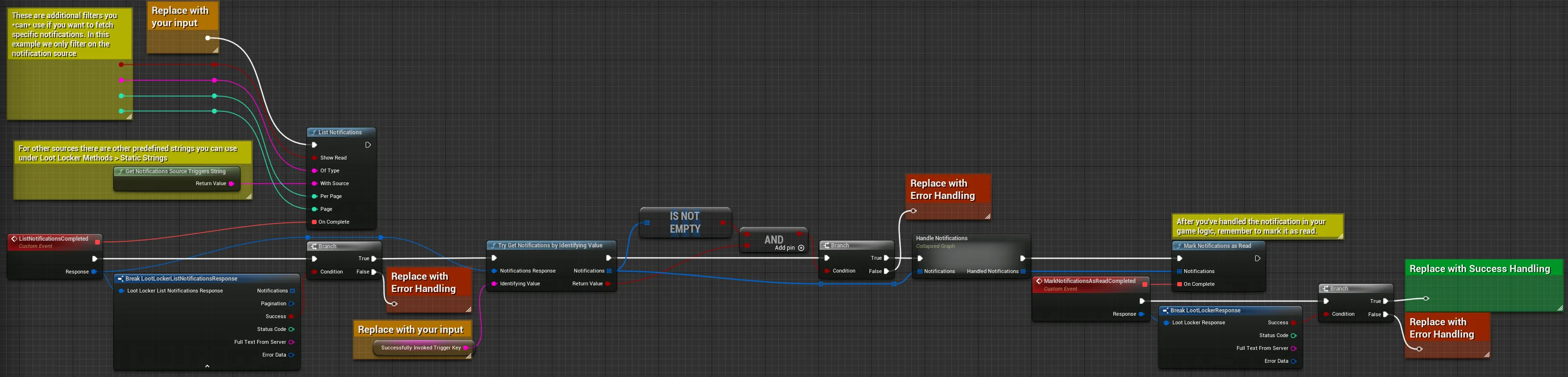
This example filters notifications by their source using the triggers string. Other filters include Show Read (set to true to include previously read notifications), Priority (fetch notifications of a specific priority), and Of Type (fetch notifications of a specific type, such as PullRewardAcquired for triggers and purchased items). If there are many notifications, use pagination to navigate through the data.
Once a notification is processed in your game logic, mark it as read. This excludes it from future requests unless you specifically request read notifications. Apply this to each item in the list of handled notifications.
When listing notifications, branch the completed event based on the success flag and add error handling for failed requests. The notification response also includes pagination data to help you navigate large notification lists.
Here, only unread notifications from the triggers source are retrieved, with default pagination (up to 10 items), then filtered further by SuccessfullyInvokedTriggerKey to narrow the list to specific triggers.
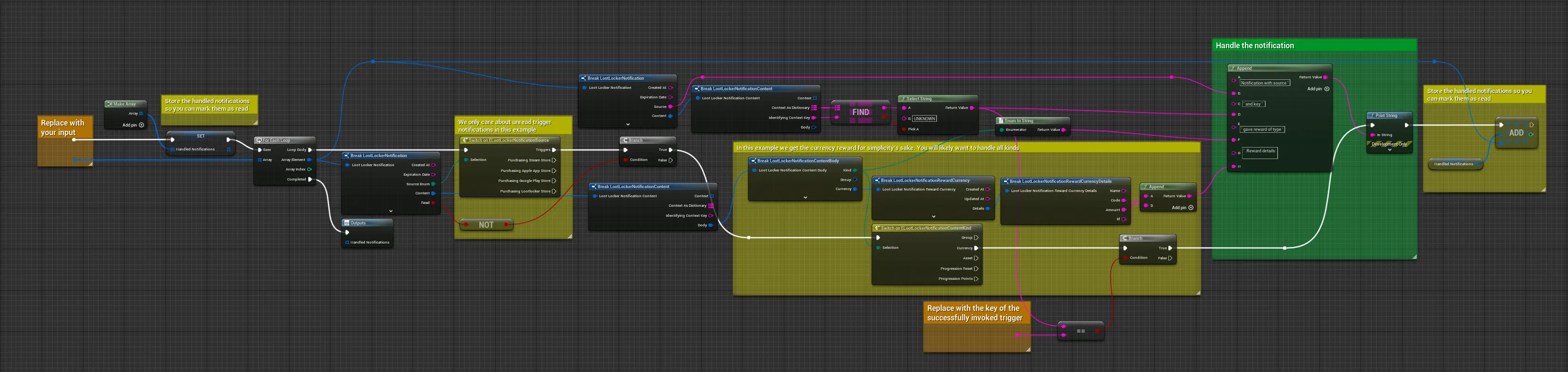
This example prints the notification info — adapt it to handle notifications based on your game's requirements. Here, SuccessfullyInvokedTriggerKey is assumed to provide a currency reward, so only that information is expanded.
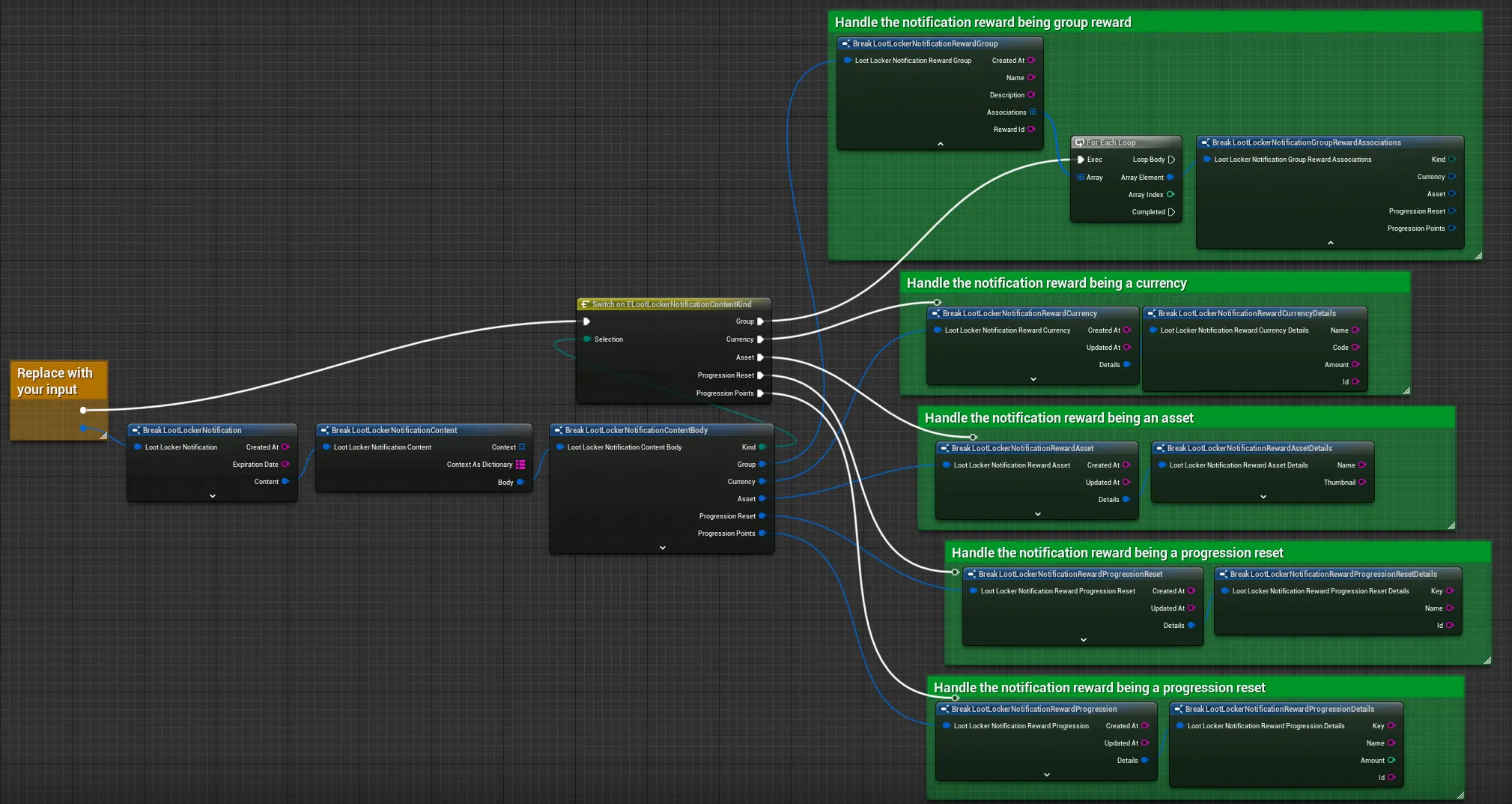
For a more general approach, iterate over all notifications to handle various sources and types relevant to your game. The example below outlines how to extract different types of rewards.
Coming soon — this sample hasn't been written yet. In the meantime, refer to the Reference Documentation for this endpoint.
curl --location --request GET 'https://api.lootlocker.io/game/notifications/v1?per_page=10&page=1' \--header 'x-session-token: 3266edd928f5769545425469ac417fee456d8367' \
curl --location --request PUT 'https://api.lootlocker.io/game/notifications/v1/read' \--header 'x-session-token: 3266edd928f5769545425469ac417fee456d8367' \--header 'Content-Type: application/json' \--data-raw '{    "notifications": ["01J6VYWY115186HY5N87HQDEC0","01J6VYWY0S1Z0MKKP9MTA8WZKB","01J6VYWY0F1MJ6E7QS93PZ4TQ7"    ]}'
See the Reference Documentation for the full response.
Conclusion
Section titled “Conclusion”You've listed a Player's notifications, found a specific one by key, and marked it as read. Notifications are typically listed after a purchase has been made or after an invoked Trigger.