
This how-to uses the Ban Player feature to prevent a player from starting new game sessions. This can be useful for moderating players who violate community guidelines, exploit the game, or otherwise disrupt the experience. A banned player can no longer start a new session in the game.
Prerequisites
Section titled “Prerequisites”- A Player that has either started a session at least once, or been created manually in the Player Manager.
Ban a Player
Section titled “Ban a Player”Ban a player directly from their profile in the Web Console.
Navigate to Player Manager, search for and open the player profile you want to manage, then click the Actions dropdown and select Ban Player.
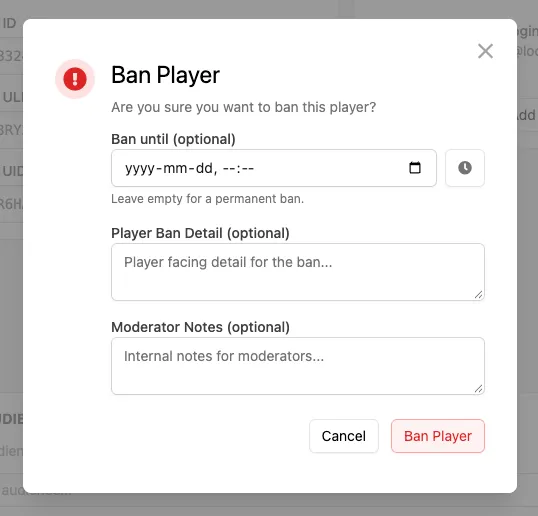
In the Ban Player dialog, fill in the optional fields:
- Ban until: Pick an end date and time for the ban. If left empty, the ban is permanent.
- Player Ban Detail: A message describing the ban that is intended to be shown to the player.
- Moderator Notes: Internal notes for moderators. These are never shown to the player.
Confirm the action by clicking Ban Player.
Once banned, the player is prevented from starting new sessions.
Viewing Banned Status
Section titled “Viewing Banned Status”If a player has been banned, their profile clearly displays that they're banned. From here, you can:
- View and edit the notes associated with the ban by clicking View Notes.
- Unban the player if the restriction should be lifted.

Unban a Player
Section titled “Unban a Player”Navigate to the banned player's profile and click the Unban button. The player can now start game sessions again, and any notes associated with the ban are removed.
Conclusion
Section titled “Conclusion”You've banned a player, reviewed their ban notes, and unbanned them.