
This how-to submits a score to a Leaderboard along with Metadata, using a player's country as an example.
Prerequisites
Section titled “Prerequisites”- Unity, Unreal, or Godot SDK installed and configured in your project (not required for REST).
- An active Player session (see Authentication).
- A Leaderboard configured in the Web Console with Metadata enabled (see Configure Leaderboard in Web Console).
Submit Score with Metadata
Section titled “Submit Score with Metadata”In this example, the player has already chosen or been assigned a country, which is submitted as Metadata alongside their score.
string leaderboardKey = "my_leaderboard";int score = 1000;string metadata = "country:" + PlayerPrefs.GetString("PlayerAssignedCountry"); // Replace PlayerPrefs.GetString("PlayerAssignedCountry") with an existing way of getting the configured country for the player in your game
LootLockerSDKManager.SubmitScore("", score, leaderboardKey, metadata, (response) =>{    if (!response.success) {        Debug.Log("Could not submit score!");        Debug.Log(response.errorData.ToString());        return;    }     Debug.Log("Successfully submitted score!\n with metadata: " + metadata);});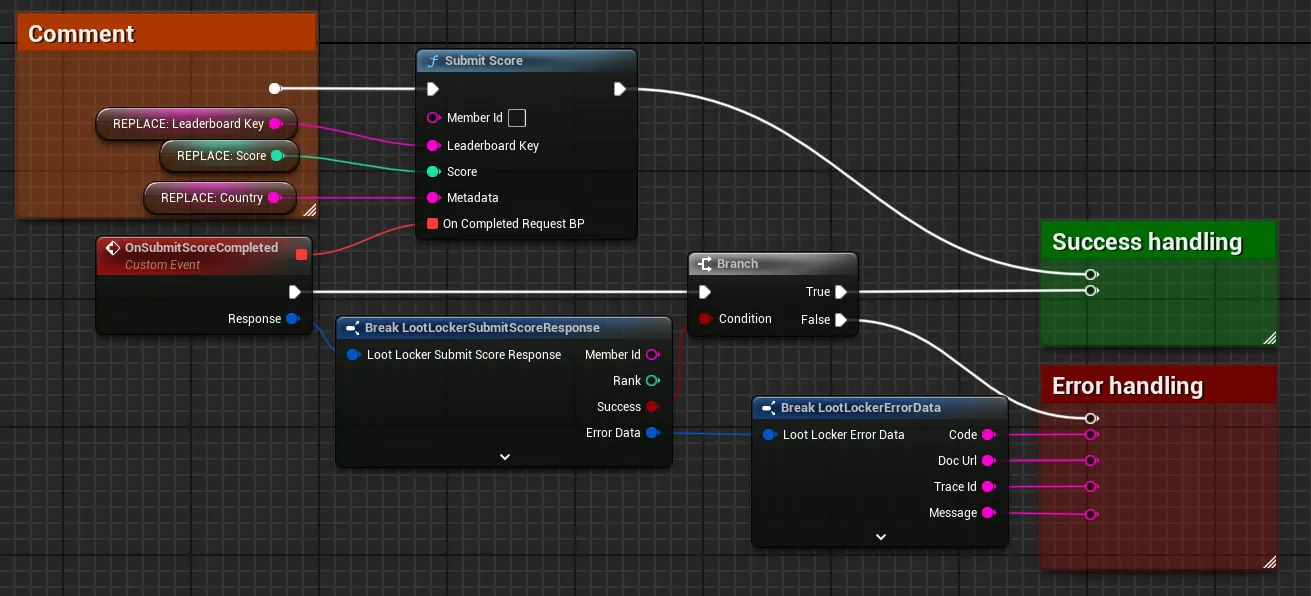
For a C++ implementation, the header file for the submit score handler should look like this:
#pragma once
#include "CoreMinimal.h"#include "LootLockerSDKManager.h"
DECLARE_DELEGATE_OneParam(FOnSubmitScoreResponse, FLootLockerSubmitScoreResponse);
class YOURPROJECTNAME_API SubmitScoreHandler{public:  SubmitScoreHandler();  void SubmitScore(int score);  ~SubmitScoreHandler();
private:  FString metadata;  FString leaderboardKey;
  void OnSubmitScoreResponse(FLootLockerSubmitScoreResponse Response);
};
The cpp file should look something like this:
#include "CountrySubmit.h"
CountrySubmit::CountrySubmit(){
}
void SubmitScoreHandler::SubmitScore(){  metadata = "Country:" + FunctionWhichGetsCountry();
  ULootLockerSDKManager::SubmitScore("",    leaderboardKey,    score,    metadata,    FOnSubmitScoreResponse::CreateUObject(this, &CountrySubmit::OnSubmitScoreResponse));}
void SubmitScoreHandler::OnSubmitScoreResponse(FLootLockerSubmitScoreResponse Response){  if (!Response.success) {    UE_LOG(LogTemp, Log, TEXT("Error: %d"), Response.ErrorData.Message);    return;  }
  UE_LOG(LogTemp, Log, TEXT("Score submitted successfully. Rank: %d"), Response.rank);}
CountrySubmit::~CountrySubmit(){
}
var metadata : String = "country: " + PlayerInformation.GetPlayerAssignedCountry() # Replace PlayerInformation.GetPlayerAssignedCountry() with an existing method that gets the configured country for the player in your gamevar leaderboardKey : String = "my_leaderboard"var score : int = 1000
var response = await LL_Leaderboards.SubmitScore.new(leaderboardKey, score, "", metadata).send()if(!response.success) : # Request failed, handle errors passelse: # Request succeeded, use response as applicable in your game logic passComing soon — this sample hasn't been written yet. In the meantime, refer to the Reference Documentation for this endpoint.
Conclusion
Section titled “Conclusion”You've submitted a score to a Leaderboard along with Metadata. Next, see Use Scheduled Reset with Rewards to reward top-ranked players automatically.