
LootLocker SDKs support managing multiple concurrent users in your game. This is useful for local multiplayer, hot seat, or any scenario where more than one player is authenticated at the same time.
Prerequisites
Section titled “Prerequisites”How It Works
Section titled “How It Works”Whenever you successfully authenticate a player (using any supported authentication method), the SDK automatically adds or updates that player's session in the multi user state — you don't need to manually add users, just authenticate them as usual.
Each player is tracked by their ULID, and you can make API calls for a specific player by providing their ULID.
Start Concurrent Sessions and Submit Scores
Section titled “Start Concurrent Sessions and Submit Scores”This example is simplified and abstracts away the game logic that would go between these two events — it's here to show how to make requests when there are multiple local users.
While we recommend always passing the ULID of the player you want to make a request for, this example also includes a request to fetch the current scores using the default player, to show the difference between performing a request on behalf of a specific player versus the default player.
// Replace with your actual leaderboard keypublic static string leaderboardKey = "your_leaderboard_key_here";
public void OnLoginButtonPressed(){    // Replace with your actual player identifier retrieval logic    string guest_player_identifier = GetGuestIdentifierFromInput();
    if (string.IsNullOrEmpty(guest_player_identifier))    {        Debug.LogWarning("Please enter a valid guest player identifier.");        return;    }
    LootLockerSDKManager.StartGuestSession(guest_player_identifier, response =>    {        if (!response.success)        {            Debug.LogError($"Login failed: {response.errorData}");            return;        }
        Debug.Log($"Login successful for guest player: {guest_player_identifier} with ulid {response.player_ulid}. The default player ulid is {LootLockerSDKManager.GetDefaultPlayerUlid()}");    });}
public void OnShowScoresButtonPressed(){    // Fetch the top 10 scores from the leaderboard, while we recommend always specifying which player    // you want to make the request for, this is an example of making a request for the default player (simply not specifying a player).    LootLockerSDKManager.GetScoreList(leaderboardKey, 10, 0, response =>    {        if (!response.success)        {            Debug.LogError($"Failed to retrieve scores: {response.errorData}");            return;        }        Debug.Log($"Scores retrieved successfully: {response.text}");        // Replace with your actual UI display logic        DisplayScoresInUI(response.items);    }/*, lootLockerPlayerUlid <- To make the request for a specific player you'd add this parameter*/);}
public void OnMatchFinished_SubmitScores(){    // Replace with your actual game logic    MatchData matchData = GetCurrentMatchData();    foreach (var playerScore in matchData.PlayerScores)    {        // Submit each player's score to the leaderboard        LootLockerSDKManager.SubmitScore("", playerScore.Score, leaderboardKey, response =>        {            if (!response.success)            {                Debug.LogError($"Failed to submit score for player {playerScore.PlayerId}: {response.errorData}");            }            else            {                Debug.Log($"Score submitted successfully for player {playerScore.PlayerId}: {response.text}");            }        }, /* IMPORTANT: */ playerScore.LootLockerPlayerULID /* This makes the score submission for *this* player */);    }}
// Replace with your actual leaderboard keyFString leaderboardKey = "your_leaderboard_key_here";
void OnLoginButtonPressed(){ // Replace with your actual player identifier retrieval logic FString guest_player_identifier = GetGuestIdentifierFromInput();
if (guest_player_identifier.IsEmpty()) { UE_LOG(<LogCategory>, Warning, TEXT("Please enter a valid guest player identifier.")); return; }
ULootLockerSDKManager::GuestLogin(FLootLockerSessionResponse::CreateLambda([](const FLootLockerAuthenticationResponse& response) { if (!response.success) { UE_LOG(<LogCategory>, Error, TEXT("Login failed: %s"), *response.errorData); return; }
UE_LOG(<LogCategory>, Log, TEXT("Login successful for guest player: %s with ulid %s. The default player ulid is %s"), *guest_player_identifier, *response.player_ulid, *ULootLockerSDKManager::GetDefaultPlayerUlid()); }), guest_player_identifier);}
void OnShowScoresButtonPressed(){ // Fetch the top 10 scores from the leaderboard, while we recommend always specifying which player // you want to make the request for, this is an example of making a request for the default player (simply not specifying a player). ULootLockerSDKManager::GetScoreList(leaderboardKey, 10, 0, FLootLockerGetScoreListResponseDelegate::CreateLambda([](const FLootLockerGetScoreListResponse& response) { if (!response.success) { UE_LOG(<LogCategory>, Error, TEXT("Failed to retrieve scores: %s"), *response.ErrorData.Message); return; } UE_LOG(<LogCategory>, Log, TEXT("Scores retrieved successfully: %s"), *response.text); // Replace with your actual UI display logic DisplayScoresInUI(response.items); })/*, lootLockerPlayerUlid <- To make the request for a specific player you'd add this parameter*/);}
void OnMatchFinished_SubmitScores(){ // Replace with your actual game logic MatchData matchData = GetCurrentMatchData(); for (const auto& playerScore : matchData.PlayerScores) { // Submit each player's score to the leaderboard ULootLockerSDKManager::SubmitScore("", leaderboardKey, playerScore.Score, FLootLockerSubmitScoreResponseDelegate::CreateLambda([playerScore](const FLootLockerSubmitScoreResponse& response) { if (!response.success) { UE_LOG(<LogCategory>, Error, TEXT("Failed to submit score for player %s: %s"), *playerScore.PlayerId, *response.ErrorData.Message); } else { UE_LOG(<LogCategory>, Log, TEXT("Score submitted successfully for player %s: %s"), *playerScore.PlayerId, *response.text); } }, /* IMPORTANT: */ playerScore.LootLockerPlayerULID /* This makes the score submission for *this* player */); }}Starting sessions in a multi user context works the exact same as in a single user context — the only difference is that it becomes imperative to store the player ULID, since that's what's used later to specify which player a request should be made on behalf of.
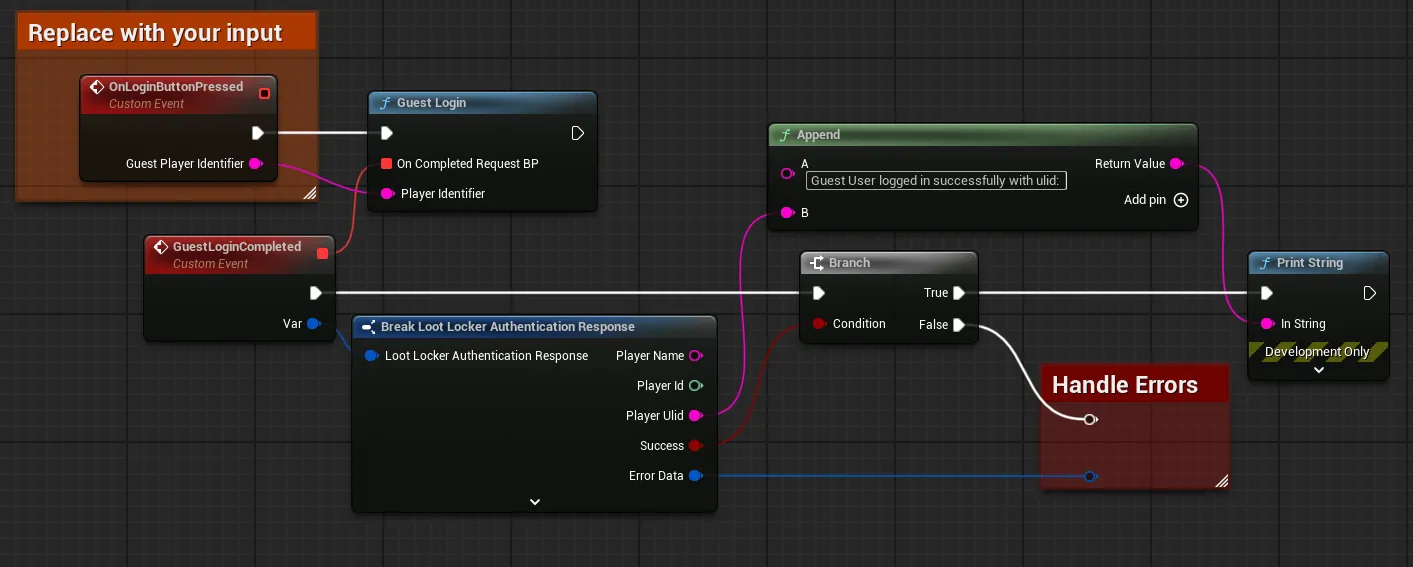
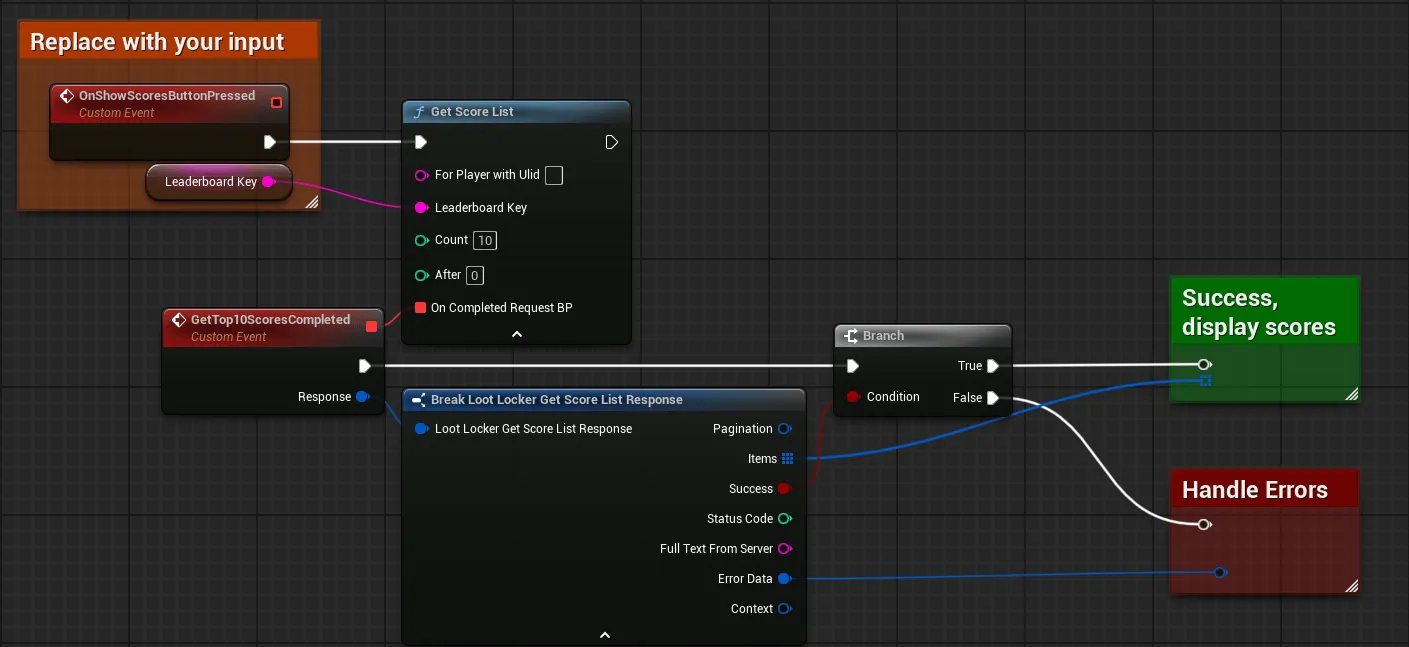
Below is an example of fetching the score list using the default user (not specifying which player ULID to execute the request as). While we recommend always specifying which user to perform the request as in a multi user game, this shows how to use the default user.
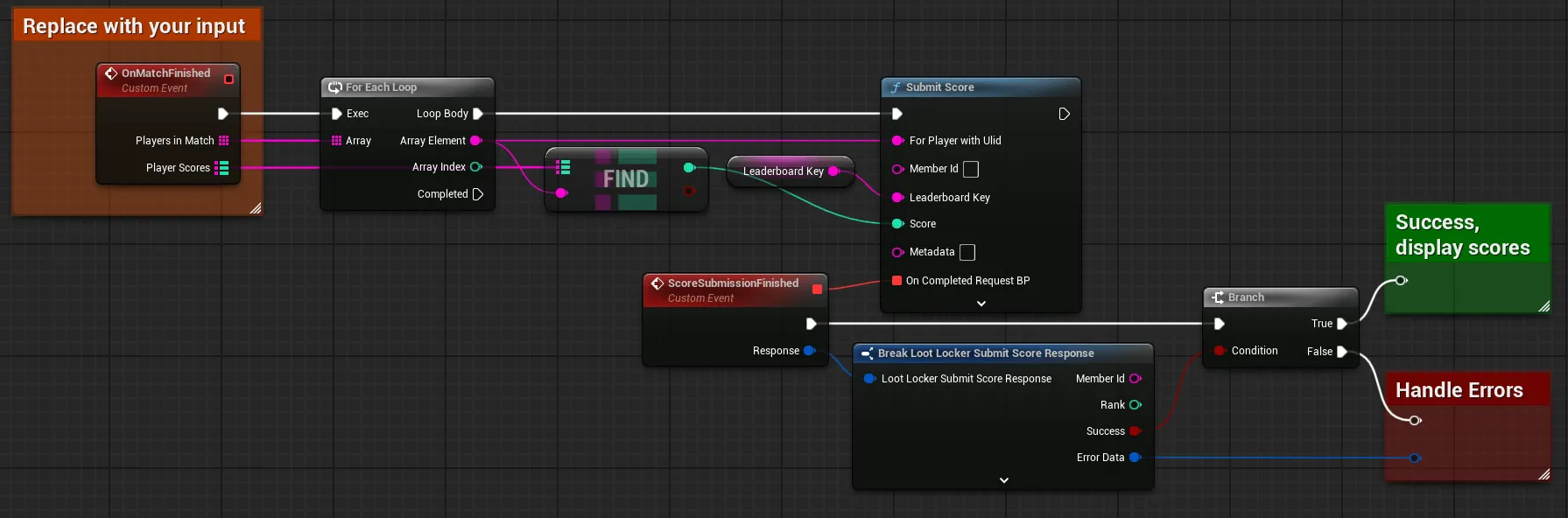
Finally, when the match finishes, submit the match scores for each player.
Coming soon — this sample hasn't been written yet.
Coming soon — this sample hasn't been written yet.
Conclusion
Section titled “Conclusion”You can now authenticate and make requests for multiple concurrent local users, targeting each by their player ULID.