
This how-to retrieves a Player's Progressions in your game, and adds, subtracts, resets, or deletes their points on a Progression.
Prerequisites
Section titled “Prerequisites”- Unity, Unreal, or Godot SDK installed and configured in your project (not required for REST).
- An active Player session (see Authentication).
- At least one Progression created in the Web Console.
Start a Player Progression
Section titled “Start a Player Progression”A Player is started on a Progression the moment you add points to it — you don't need to create the association separately. Your game may define many Progressions, and a Player only progresses through the ones they've started.
Retrieve Player Progressions
Section titled “Retrieve Player Progressions”Get a Single Player Progression
Section titled “Get a Single Player Progression”string progressionKey = "mage";
LootLockerSDKManager.GetPlayerProgression(progressionKey, response =>{ if (!response.success) { Debug.Log("Failed: " + response.Error); }
// Output the player level and show how much points are needed to progress to the next tier Debug.Log($"The player is currently level {response.step}"); if (response.next_threshold != null) { Debug.Log($"Points needed to reach next level: {response.next_threshold - response.points}"); }});See the Reference Documentation for the full response.
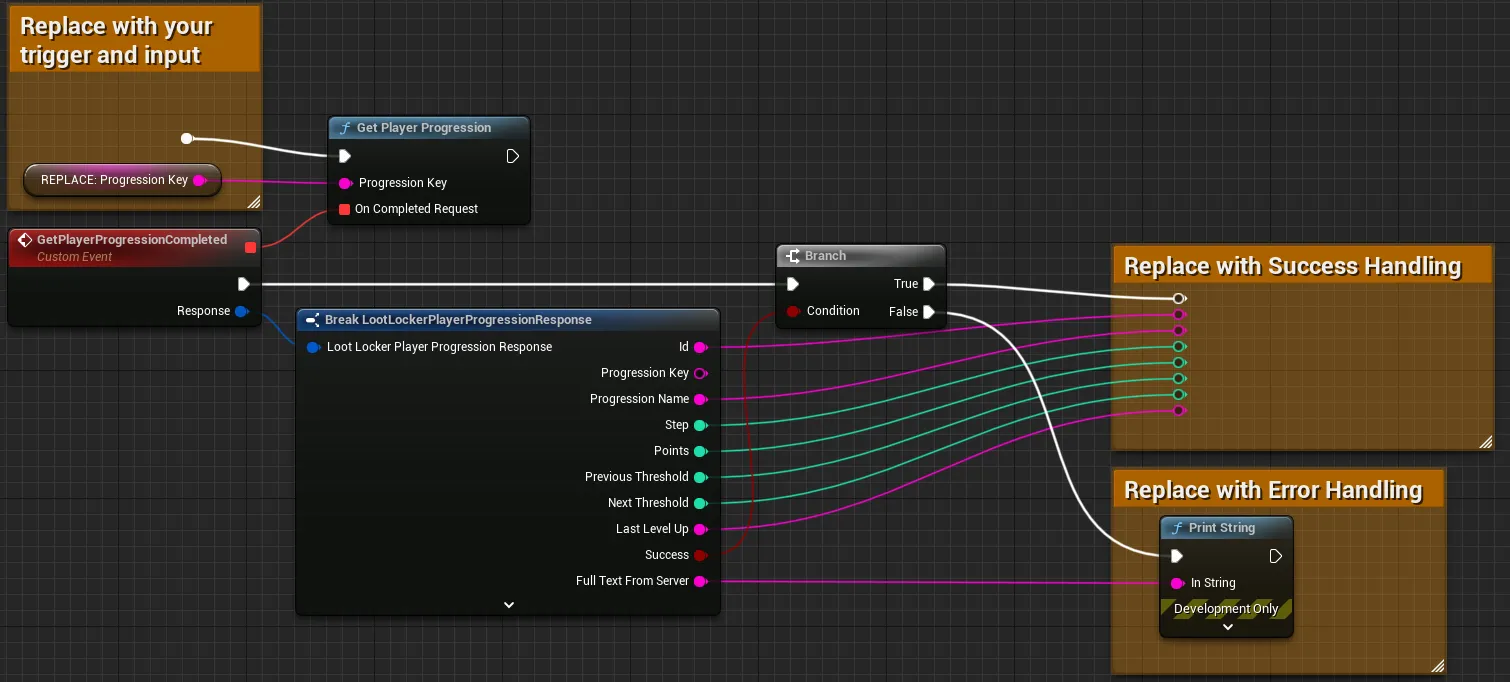
Connect the Progression Key to retrieve. The response includes the Player's current step, points, and the threshold needed to reach the next level.
Coming soon — this sample hasn't been written yet. In the meantime, refer to the Reference Documentation for this endpoint.
Coming soon — this sample hasn't been written yet. In the meantime, refer to the Reference Documentation for this endpoint.
Get All Player Progressions
Section titled “Get All Player Progressions”LootLockerSDKManager.GetPlayerProgressions(response =>{ if (!response.success) { Debug.Log("Failed: " + response.Error); }
// Output the player level and show how much points are needed to progress to the next tier for all player progressions foreach (var playerProgression in response.items) { Debug.Log($"Current level in {playerProgression.progression_name} is {playerProgression.step}"); if (playerProgression.next_threshold != null) { Debug.Log($"Points needed to reach next level in {playerProgression.progression_name}: {playerProgression.next_threshold - playerProgression.points}"); } }});See the Reference Documentation for the full response.
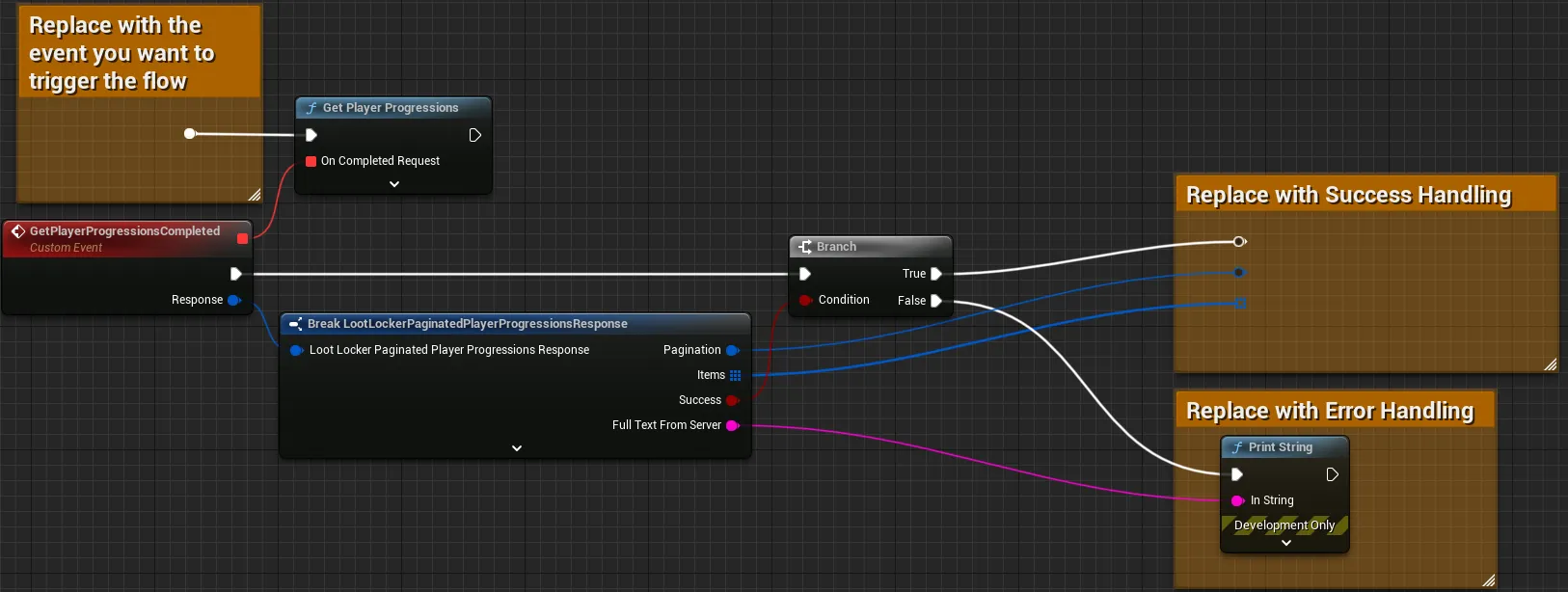
The response returns a list of the Player's Progressions along with pagination data — see Paginate Player Progressions below.
Coming soon — this sample hasn't been written yet. In the meantime, refer to the Reference Documentation for this endpoint.
Coming soon — this sample hasn't been written yet. In the meantime, refer to the Reference Documentation for this endpoint.
Get All Player Progressions Using Count
Section titled “Get All Player Progressions Using Count”Count limits the number of entries returned.
int count = 20;
LootLockerSDKManager.GetPlayerProgressions(count, response =>{    if (!response.success) {        Debug.Log("Failed: " + response.Error);    }
    // Output the player level and show how much points are needed to progress to the next tier for all player progressions    foreach (var playerProgression in response.items)    {        Debug.Log($"Current level in {playerProgression.progression_name} is {playerProgression.step}");        if (playerProgression.next_threshold != null)        {            Debug.Log($"Points needed to reach next level in {playerProgression.progression_name}: {playerProgression.next_threshold - playerProgression.points}");        }    }});
See the Reference Documentation for the full response.
Coming soon — this sample hasn't been written yet. In the meantime, refer to the Reference Documentation for this endpoint.
Coming soon — this sample hasn't been written yet. In the meantime, refer to the Reference Documentation for this endpoint.
Coming soon — this sample hasn't been written yet. In the meantime, refer to the Reference Documentation for this endpoint.
Paginate Player Progressions
Section titled “Paginate Player Progressions”Use the After parameter to paginate if the Player is on many Progressions.
int numberOfItemsPerPage = 10;LootLockerPaginatedPlayerProgressionsResponse playerProgressions;
void Start(){    LootLockerSDKManager.StartGuestSession(_ =>    {        // Fetch the initial player progressions list        LootLockerSDKManager.GetPlayerProgressions(numberOfItemsPerPage, response =>        {            if (!response.success)            {                Debug.Log("Failed: " + response.Error);            }
            if (response.pagination.total == 0)            {                Debug.Log("Your player does not have any progressions, start them by giving some exp to the player");            }
            playerProgressions = response;        });    });}
void Update(){    if (playerProgressions == null) return;
    // Fetch the next page if more player progressions exist    if (Input.GetKeyDown(KeyCode.RightArrow) && playerProgressions.pagination.next_cursor != null)    {        LootLockerSDKManager.GetPlayerProgressions(numberOfItemsPerPage, playerProgressions.pagination.next_cursor, response =>        {            if (!response.success)            {                Debug.Log("Failed: " + response.Error);            }
            playerProgressions = response;            Debug.Log($"Paginating right, got {playerProgressions.items.Count} player progressions");        });    }
    // Fetch the previous page if we are not on the first page    if (Input.GetKeyDown(KeyCode.LeftArrow) && playerProgressions.pagination.previous_cursor != null)    {        LootLockerSDKManager.GetPlayerProgressions(numberOfItemsPerPage, playerProgressions.pagination.previous_cursor, response =>        {            if (!response.success)            {                Debug.Log("Failed: " + response.Error);            }
            playerProgressions = response;            Debug.Log($"Paginating left, got {playerProgressions.items.Count} player progressions");        });    }}
See the Reference Documentation for the full response.
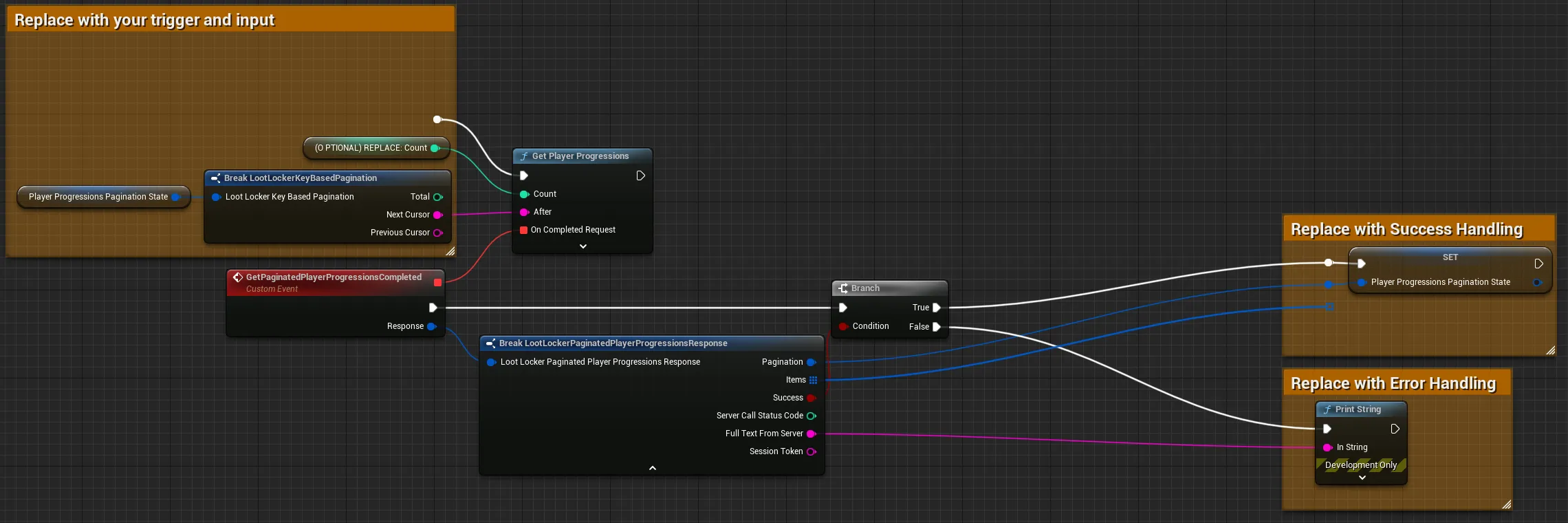
Supply a Count to limit the page size, and optionally an After value to start where a previous call left off.
Coming soon — this sample hasn't been written yet. In the meantime, refer to the Reference Documentation for this endpoint.
Coming soon — this sample hasn't been written yet. In the meantime, refer to the Reference Documentation for this endpoint.
Update Player Progressions
Section titled “Update Player Progressions”Add Points to a Player Progression
Section titled “Add Points to a Player Progression”If the Player levels up, the awarded_tiers field contains the Rewards acquired.
string progressionKey = "mage";ulong amountOfPoints = 100;
LootLockerSDKManager.AddPointsToPlayerProgression(progressionKey, amountOfPoints, response =>{    if (!response.success) {        Debug.Log("Failed: " + response.Error);    }
    // If the awarded_tiers array contains any items that means the player leveled up    // There can also be multiple level-ups at once    if (response.awarded_tiers.Any())    {        foreach (var awardedTier in response.awarded_tiers)        {            Debug.Log($"Reached level {awardedTier.step}!");
            foreach (var assetReward in awardedTier.rewards.asset_rewards)            {                Debug.Log($"Rewarded with an asset, id: {assetReward.asset_id}!");            }
            foreach (var progressionPointsReward in awardedTier.rewards.progression_points_rewards)            {                Debug.Log($"Rewarded with {progressionPointsReward.amount} bonus points in {progressionPointsReward.progression_name} progression!");            }
            foreach (var progressionResetReward in awardedTier.rewards.progression_reset_rewards)            {                Debug.Log($"Progression {progressionResetReward.progression_name} has been reset as a reward!");            }        }    }});
See the Reference Documentation for the full response.
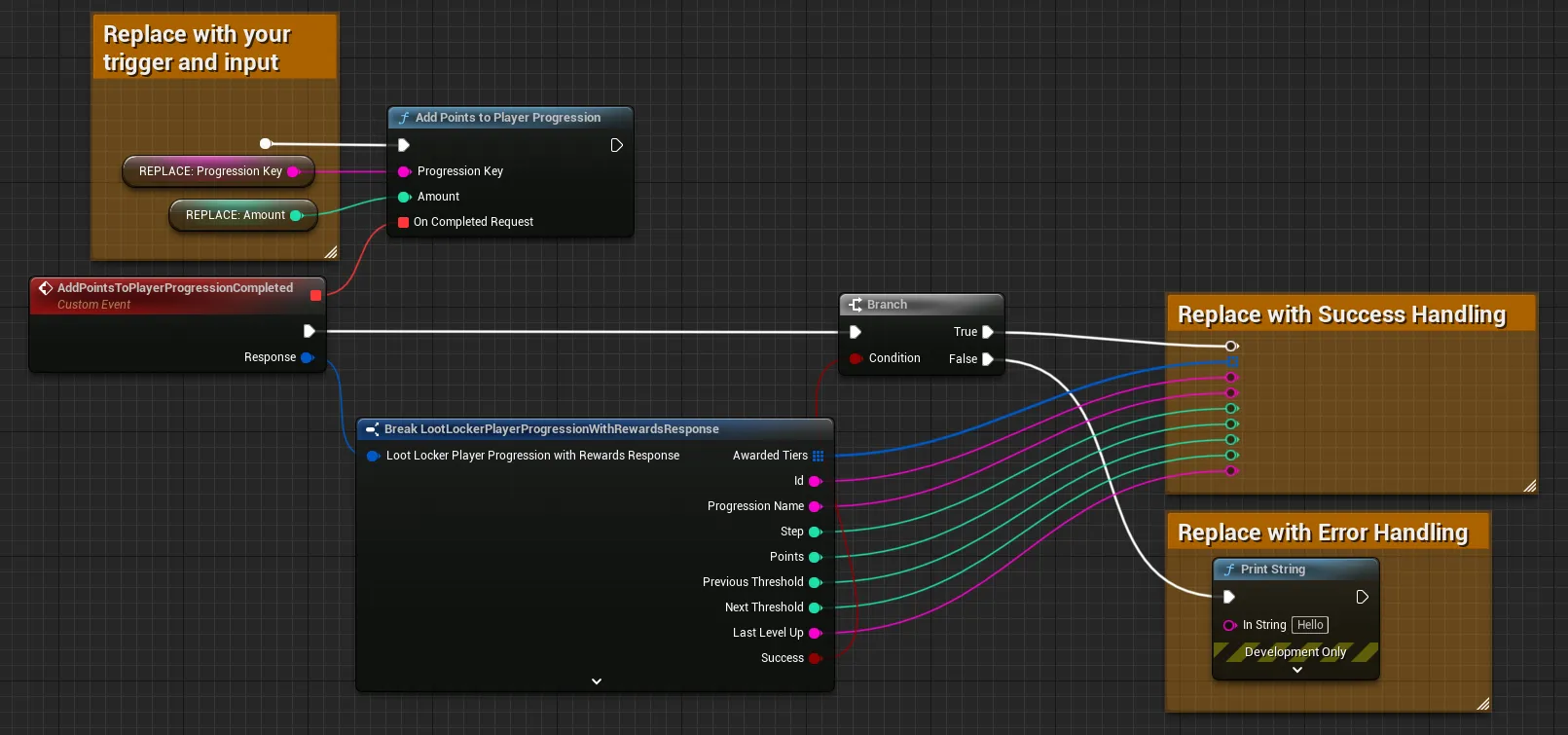
Connect the Progression Key and the amount of points to add. The response contains the Progression's current state, plus any tiers and Rewards the Player was awarded by leveling up.
Coming soon — this sample hasn't been written yet. In the meantime, refer to the Reference Documentation for this endpoint.
Coming soon — this sample hasn't been written yet. In the meantime, refer to the Reference Documentation for this endpoint.
Subtract Points from a Player Progression
Section titled “Subtract Points from a Player Progression”string progressionKey = "mage";ulong amountOfPoints = 10;
LootLockerSDKManager.SubtractPointsFromPlayerProgression(progressionKey, amountOfPoints, response =>{ if (!response.success) { Debug.Log("Failed: " + response.Error); }
// Output the amount of points the player has after subtracting points Debug.Log($"Player now has {response.points} points in {response.progression_name} progression");});See the Reference Documentation for the full response.
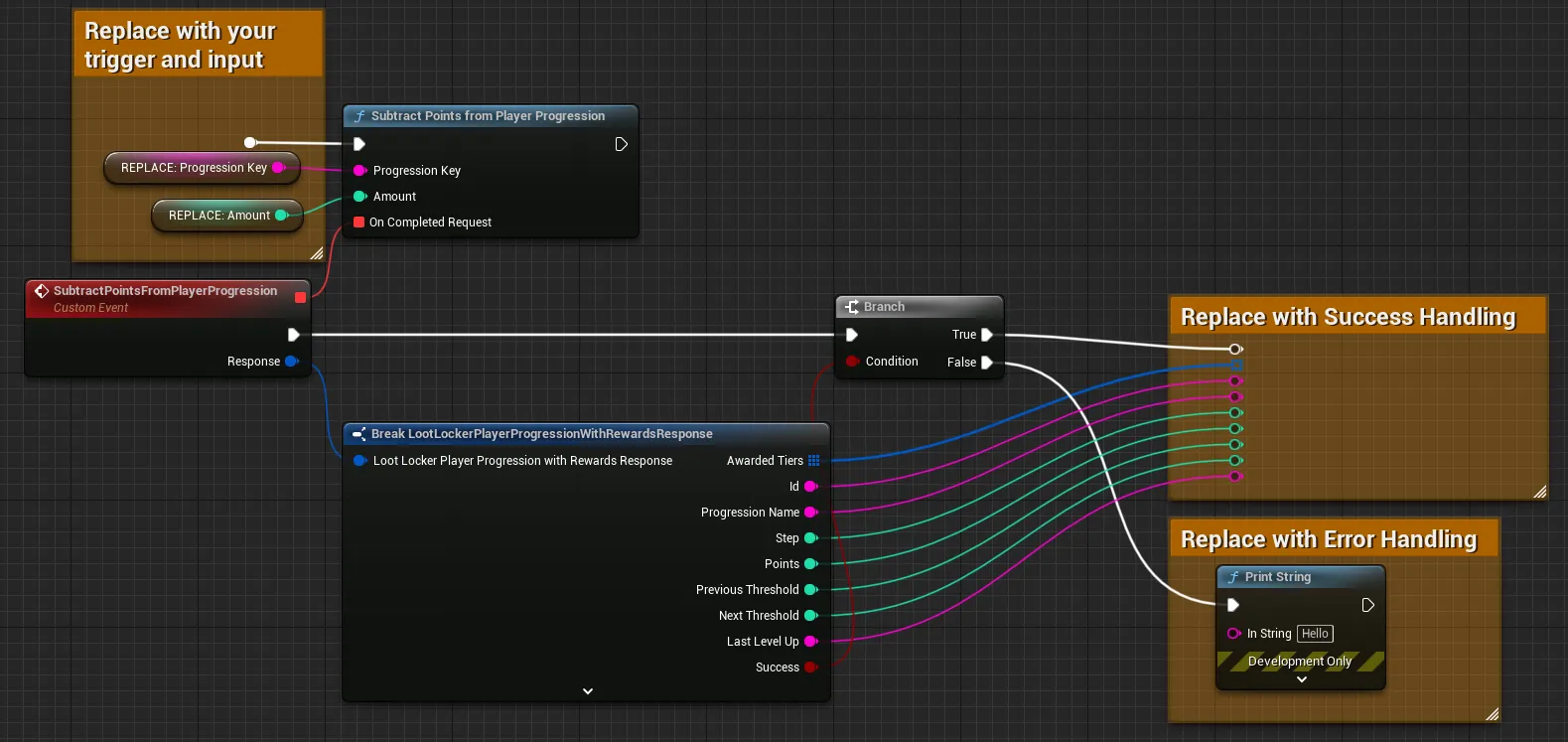
Connect the Progression Key and the amount of points to subtract. The response contains the Progression's current state, plus any tiers and Rewards affected by the change.
Coming soon — this sample hasn't been written yet. In the meantime, refer to the Reference Documentation for this endpoint.
Coming soon — this sample hasn't been written yet. In the meantime, refer to the Reference Documentation for this endpoint.
Reset a Player Progression
Section titled “Reset a Player Progression”Resets the Player's points on the Progression to 0, returning them to level 1. To remove the Progression from the Player entirely, see Delete a Player Progression below.
string progressionKey = "mage";
LootLockerSDKManager.ResetPlayerProgression(progressionKey, response =>{    if (!response.success) {        Debug.Log("Failed: " + response.Error);    }
    // Player level is now 1    Debug.Log($"Player is level {response.step} since the {response.progression_name} was reset");});
See the Reference Documentation for the full response.
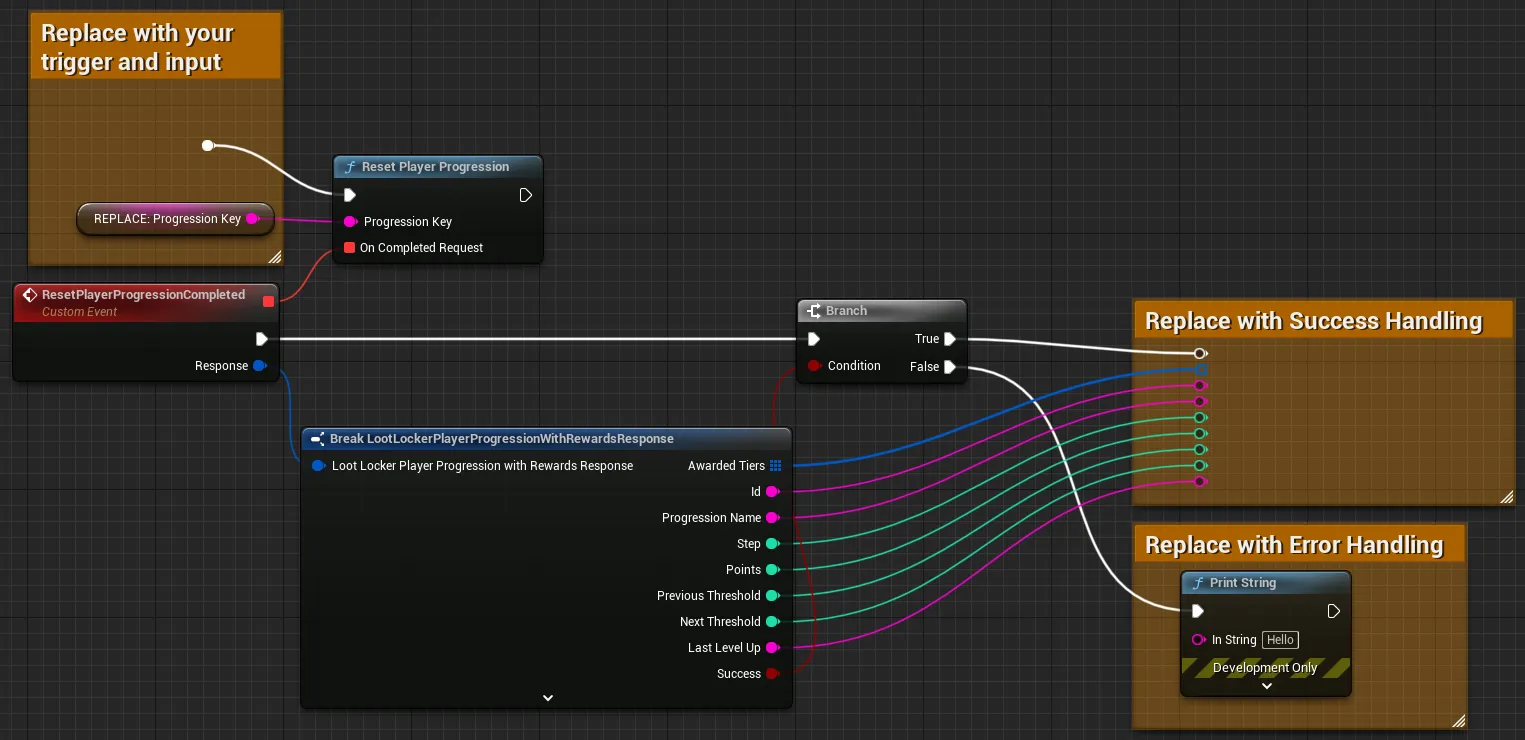
Connect the Progression Key to reset. The response contains the Progression's current state after the reset.
Coming soon — this sample hasn't been written yet. In the meantime, refer to the Reference Documentation for this endpoint.
Coming soon — this sample hasn't been written yet. In the meantime, refer to the Reference Documentation for this endpoint.
Delete a Player Progression
Section titled “Delete a Player Progression”Completely removes a Player Progression — it's no longer listed when retrieving the Player's Progressions.
string progressionKey = "mage";
LootLockerSDKManager.DeletePlayerProgression(progressionKey, response =>{    if (!response.success) {        Debug.Log("Failed: " + response.Error);    }
    // Trying to fetch the deleted player progression will result in a "Not Found" error    LootLockerSDKManager.GetPlayerProgression(progressionKey, response =>    {        if (!response.success) {            Debug.Log("Failed: " + response.Error);        }    });});
See the Reference Documentation for the full response.
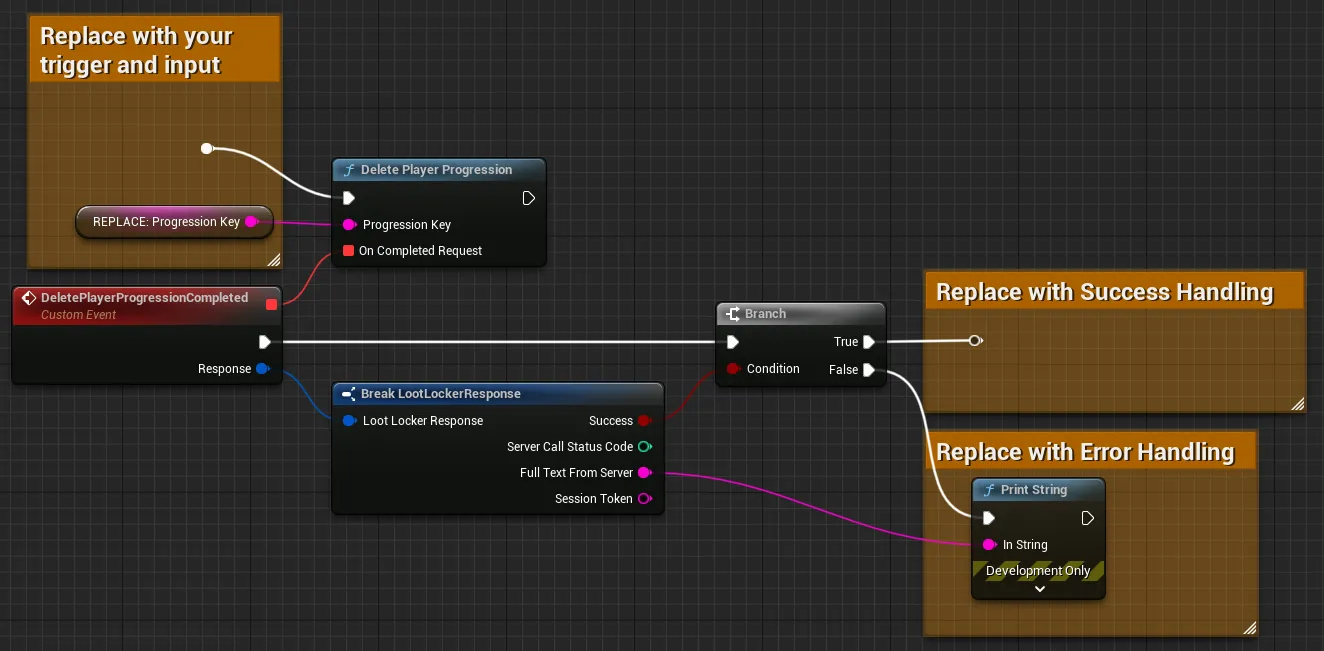
Connect the Progression Key to delete.
Coming soon — this sample hasn't been written yet. In the meantime, refer to the Reference Documentation for this endpoint.
Coming soon — this sample hasn't been written yet. In the meantime, refer to the Reference Documentation for this endpoint.
Conclusion
Section titled “Conclusion”You've retrieved a Player's Progressions and updated their points from your game. Next, explore Character Class Progressions or Asset Instance Progressions if your game also tracks progress on those holders.