
Remote login makes it easy to start LootLocker sessions on devices where entering credentials is hard, like on console. It also lets games implement first-party provider authentication without spending a long time manually implementing it into their game client.
Prerequisites
Section titled “Prerequisites”- Unity, Unreal, or Godot SDK installed and configured in your project (not required for REST).
- Your game configured to use UPA.
The Remote Login Flow
Section titled “The Remote Login Flow”- Initiate the remote login process, which returns a URL and QR code the player can use to log in.
- The player visits the URL and logs in using their preferred identity provider.
- The game client polls the server to check if the player has logged in yet.
- Once the player has logged in, the poll returns a success response with a LootLocker session and a refresh token.
- The next time the player opens the game, the refresh token can be used to start a new session without going through the full flow again.
Starting a Remote Session
Section titled “Starting a Remote Session”This function requires three separate callbacks, which are easier to manage as follows:
public void RemoteLease(){    LootLockerSDKManager.StartRemoteSession(leaseAction, pollingAction, onComplete);}
Action<LootLockerLeaseRemoteSessionResponse> leaseAction = (info) =>{    if (!info.success)    {        Debug.Log("Couldnt start Remote leasing");        return;    }};Action<LootLockerRemoteSessionStatusPollingResponse> pollingAction = (polling) =>{    if(!polling.success)    {        Debug.Log("Couldnt poll Remote leasing");        return;    }};Action<LootLockerStartRemoteSessionResponse> onComplete = (onComplete) =>{    if (!onComplete.success)    {        Debug.Log("Couldnt start Remote leasing");        return;    }};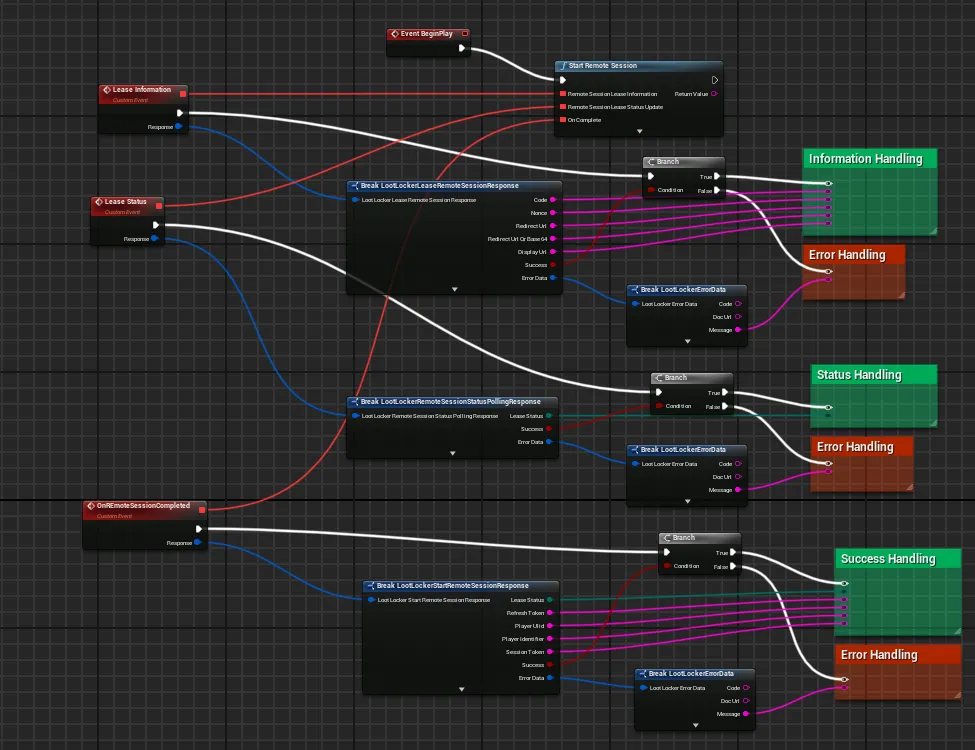
Coming soon — this sample hasn't been written yet.
First, call the endpoint to start the process:
curl -X POST "https://api.lootlocker.io/game/session/remote/lease" \ -H "LL-Version: 2021-03-01" \ -H "Content-Type: application/json" \ -d "{\"game_key\": \"your_game_key\", \"game_version\": \"1.0.0.0\" }"To poll for updates, use the same endpoint but include lease_code and nonce in the body:
curl -X POST "https://api.lootlocker.io/game/session/remote" \ -H "LL-Version: 2021-03-01" \ -H "Content-Type: application/json" \ -d "{\"game_key\": \"your_game_key\", \"game_version\": \"1.0.0.0\", \"lease_code\": \"R9SJMK2R\", \"nonce\": \"01HE2TM1JWRTPCWQFBYJ538XCE\" }"Cancel the Remote Login Process
Section titled “Cancel the Remote Login Process”If you want to cancel the process partway through, here's how.
LootLockerSDKManager.StartRemoteSession returns a Guid you can later use to cancel the remote session start process.
public void RemoteLease(){ var leasedGuid = LootLockerSDKManager.StartRemoteSession(leaseAction, pollingAction, onComplete); LootLockerSDKManager.CancelRemoteSessionProcess(leasedGuid);}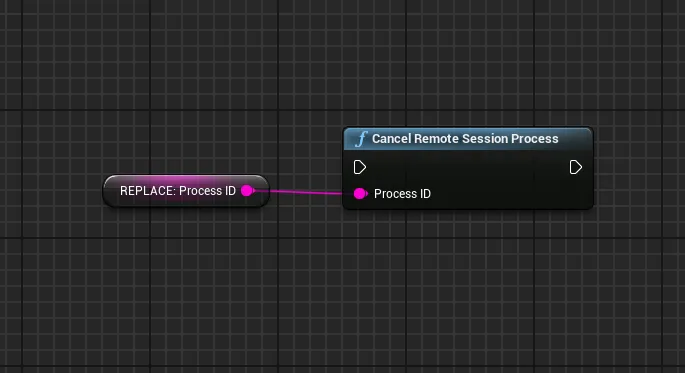
Coming soon — this sample hasn't been written yet.
Coming soon — this sample hasn't been written yet.
Use the Refresh Token to Start a Session
Section titled “Use the Refresh Token to Start a Session”The response from creating a remote session includes a refresh token. This token can be used to start a new session without the player having to go through the full flow again.
LootLockerSDKManager.RefreshRemoteSession((onComplete) =>{ if(!onComplete.success) { Debug.Log("Couldnt refresh remote session!"); return; }});With a manually stored refresh token:
string refreshToken = "";LootLockerSDKManager.RefreshRemoteSession(refreshToken, (onComplete) =>{ if(!onComplete.success) { Debug.Log("Couldnt refresh remote session!"); return; }});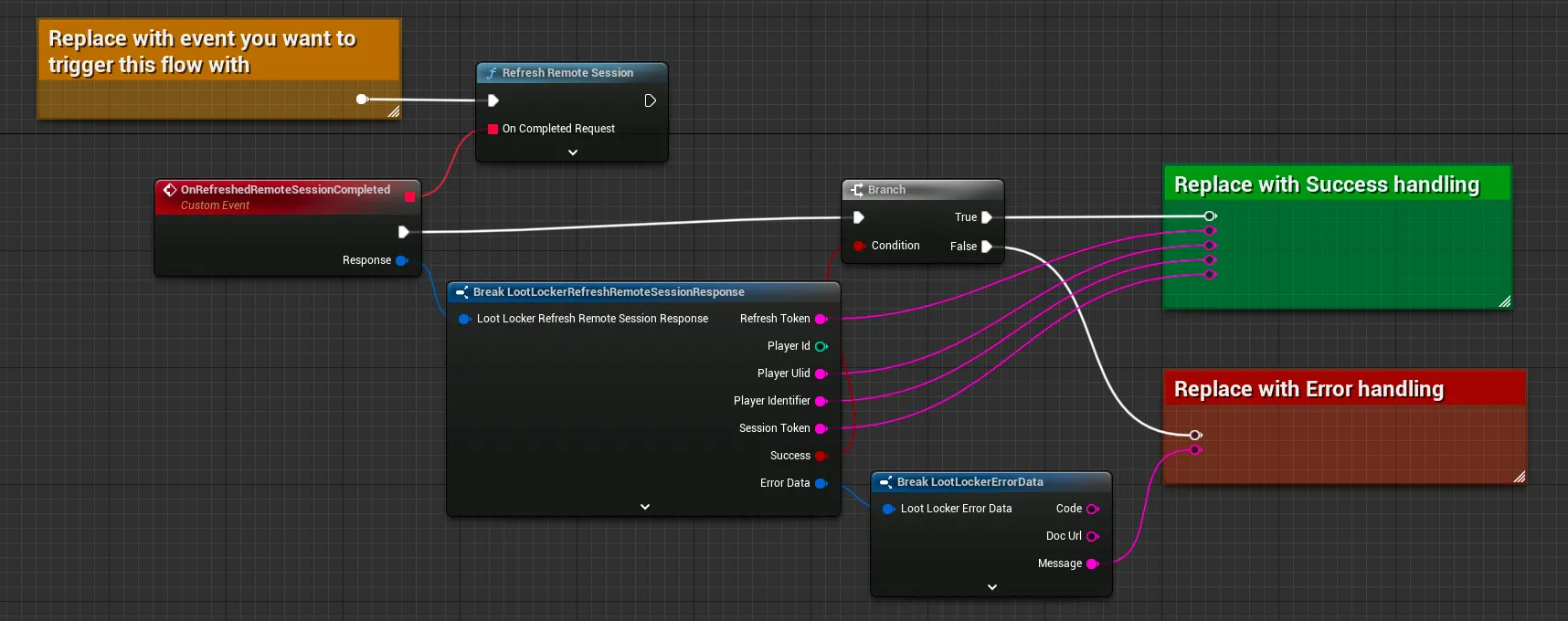
Coming soon — this sample hasn't been written yet.
curl -X POST "https://api.lootlocker.io/game/session/remote" \ -H "LL-Version: 2021-03-01" \ -H "Content-Type: application/json" \ -d "{\"game_key\": \"your_game_key\", \"game_version\": \"1.0.0.0\", \"refresh_token\": \"v4.public.eyJ.....\" }"Conclusion
Section titled “Conclusion”You've started and managed remote sessions from your game. To learn more about UPA, read about Connected Accounts or the general Unified Player Accounts page.