
Before you can register a session in the game, a user must first be created. Passwords must be at least 8 characters long.
Prerequisites
Section titled “Prerequisites”- Unity, Unreal, or Godot SDK installed and configured in your project (not required for REST).
- White Label Login enabled in the Web Console.
Sign Up a New User
Section titled “Sign Up a New User”// Remember to use the LootLocker namespace in the top of your file.using LootLocker.Requests;
// This code should be placed in a handler when user clicks the sign up button.string password = "password here";LootLockerSDKManager.WhiteLabelSignUp(email, password, (response) =>{ if (!response.success) { Debug.Log("error while creating user");
return; }
Debug.Log("user created successfully");});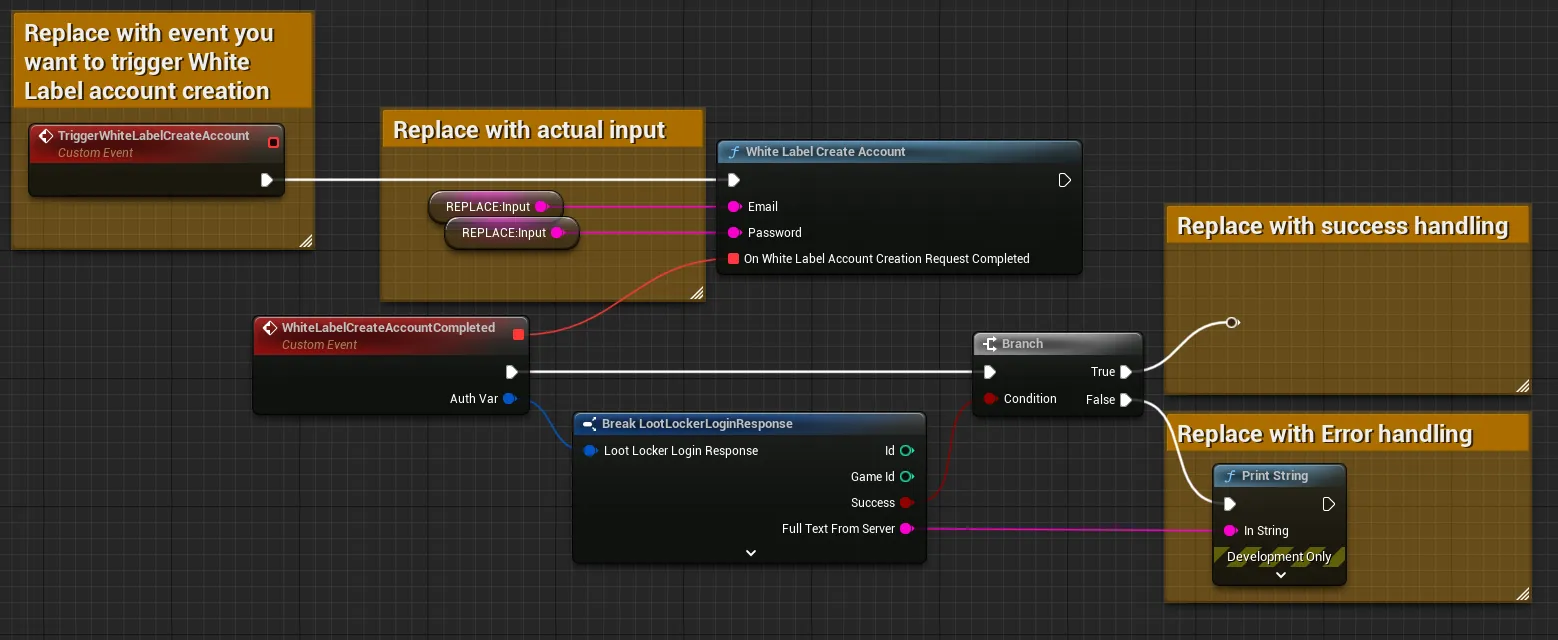
Input
Exchange the TriggerWhiteLabelCreateAccount event for whatever event should trigger the login flow. Remove the Replace: Input nodes with the email and password input from the user input in your game.
Output
Branch the completed events on the success flag, and add error handling for the failure case.
var response = await LL_WhiteLabel.SignUp.new("input-user-email-here", "input-user-password-here").send()if(!response.success) : # Request failed, handle errors passelse: # Request succeeded, use response as applicable in your game logic # Remember to remind the player to verify their email to be able to utilize this new account passcurl -X POST "https://api.lootlocker.io/white-label-login/sign-up" \ -H "domain-key: 11aaa11" \ -H "is-development: true" \ -H "Content-Type: application/json" \Example response:
{ "id": 406, "game_id": 2, "created_at": "2021-08-25T08:03:34.612346459Z", "updated_at": "2021-08-25T08:03:34.612346459Z", "deleted_at": null, "validated_at": null}Conclusion
Section titled “Conclusion”You've created a new White Label user. Next, learn how to request user verification.