
This how-to creates a new Leaderboard and configures its general settings in the Web Console.
Prerequisites
Section titled “Prerequisites”No prerequisites.
Create a Leaderboard
Section titled “Create a Leaderboard”Click Create in the top right corner of the Leaderboards section of the Web Console. This opens a modal where you can enter the Leaderboard's name and configure its structure.
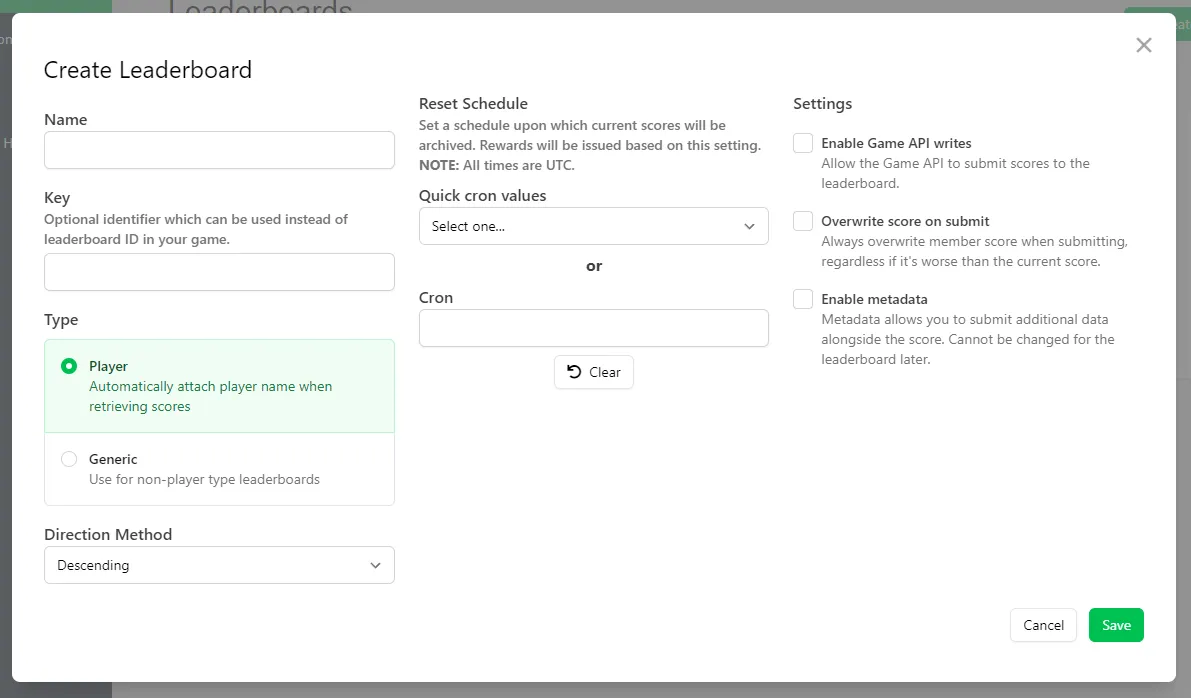
Configure General Settings
Section titled “Configure General Settings”- Name: identifies the Leaderboard in the Web Console.
- Key: identifies the Leaderboard within your game.
- Type: choose between Player Leaderboards, where entries are associated with specific players (based on their platform ID), or Generic Leaderboards, where you define what entries are associated with, such as a guild/clan, group, or player data that isn't stored in LootLocker.
- Direction Method: sort the Leaderboard by ascending or descending score.
- Enable Game API Writes: allows the Game API to submit scores.
- Overwrite Score on Submit: if a player submits a lower score than their existing one, replaces the current score, and any Metadata submitted alongside it, with the new values. If disabled, a lower score (and its Metadata) is discarded.
- Enable Metadata: stores additional information alongside each Leaderboard entry.
Configure Scheduled Resets
Section titled “Configure Scheduled Resets”You can set a Cron expression (or select a Quick Cron Value) to reset a Player Leaderboard on a recurring schedule. See Use Scheduled Reset with Rewards for the full walkthrough of configuring scheduling in the Web Console.
Configure Rewards
Section titled “Configure Rewards”Once a Leaderboard is saved, open it and select the Rewards tab to add Rewards for players based on their ranking when the Leaderboard resets. You can reward Assets, Progression Points, Progression Resets, and Currency. See Use Scheduled Reset with Rewards for the full walkthrough of configuring Rewards in the Web Console.
Conclusion
Section titled “Conclusion”You've created a Leaderboard and configured its general settings. Next, see Use Player Leaderboards or Use Generic Leaderboards to start submitting scores from your game.