
This how-to fetches Assets from the backend to use in your game, including filtering, pagination, favouriting, and reading or writing Asset Instance Key/Value storage.
Prerequisites
Section titled “Prerequisites”- Unity, Unreal, or Godot SDK installed and configured in your project (not required for REST).
- An active Player session (see Authentication).
- At least one Asset created and activated in the Web Console (see Create & Configure an Asset).
Retrieve Assets
Section titled “Retrieve Assets”List Assets
Section titled “List Assets”Fetch a batch of Assets from the backend:
int count = 10;LootLockerSDKManager.GetAssetListWithCount(count, (response) =>{ if (response.success) { Debug.Log("Successfully retrieved " + response.assets.Length + " assets"); } else { Debug.Log("Error retrieving assets"); }});See the Reference Documentation for the full response.
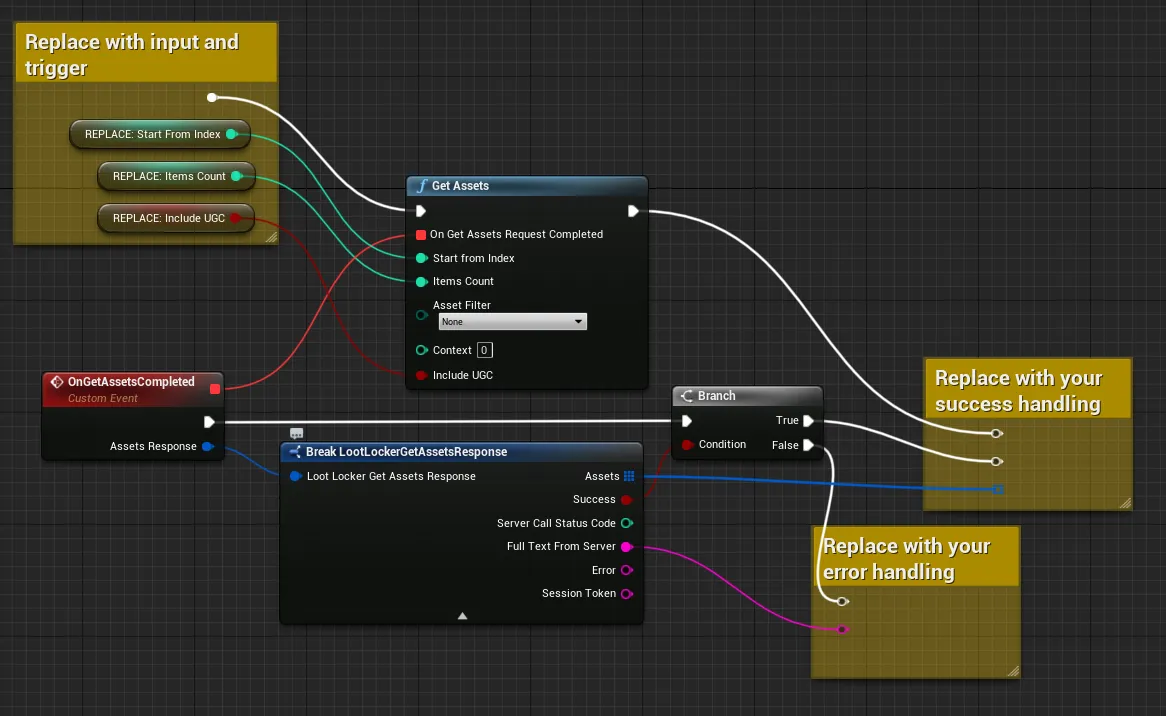
Coming soon — this sample hasn't been written yet. In the meantime, refer to the Reference Documentation for this endpoint.
Coming soon — this sample hasn't been written yet. In the meantime, refer to the Reference Documentation for this endpoint.
Get the Next Batch of Assets
Section titled “Get the Next Batch of Assets”After the initial call completes, call this method to retrieve more Assets. Keep calling it until you stop receiving Assets to retrieve all of them.
LootLockerSDKManager.GetAssetNextList(count, (response) =>{ if (response.success) { Debug.Log("Successfully retrieved second batch of " + response.assets.Length + " assets"); } else { Debug.Log("Error retrieving assets"); }});See the Reference Documentation for the full response.
Coming soon — this sample hasn't been written yet. In the meantime, refer to the Reference Documentation for this endpoint.
Coming soon — this sample hasn't been written yet. In the meantime, refer to the Reference Documentation for this endpoint.
Coming soon — this sample hasn't been written yet. In the meantime, refer to the Reference Documentation for this endpoint.
Reset Asset Pagination
Section titled “Reset Asset Pagination”After you finish retrieving the Assets you need, reset the pagination state — otherwise, the next retrieval might start from your previous last-retrieved Asset.
LootLockerSDKManager.ResetAssetCalls();Not applicable — Unreal doesn't require this call.
Coming soon — this sample hasn't been written yet. In the meantime, refer to the Reference Documentation for this endpoint.
Coming soon — this sample hasn't been written yet. In the meantime, refer to the Reference Documentation for this endpoint.
Retrieve Assets with a Filter
Section titled “Retrieve Assets with a Filter”int count = 10;List<LootLocker.LootLockerEnums.AssetFilter> filter = new List<LootLocker.LootLockerEnums.AssetFilter>() { LootLocker.LootLockerEnums.AssetFilter.nonpurchasable };
LootLockerSDKManager.GetAssetListWithCount(count, (response) =>{ if (response.success) { Debug.Log("Successfully retrieved " + response.assets.Length + " assets");
} else { Debug.Log("Error retrieving assets"); }}, filter);See the Reference Documentation for the full response.
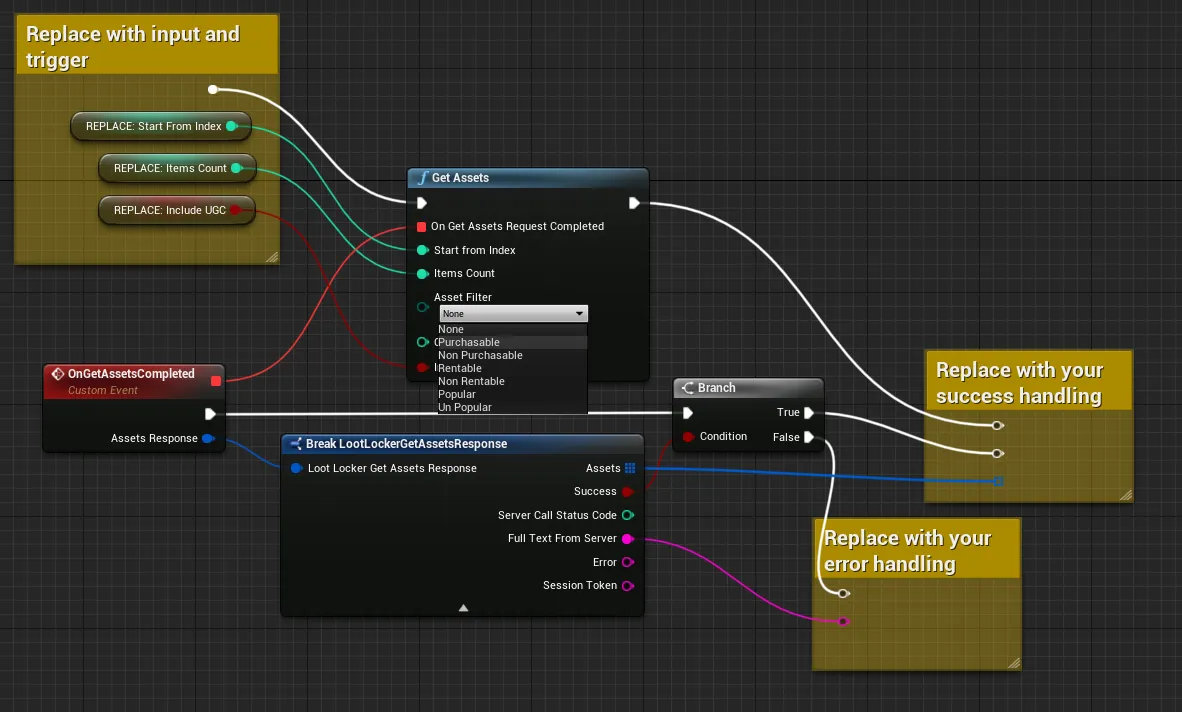
Specify the filter you want to retrieve Assets with through the same Blueprint used to retrieve Assets.
Coming soon — this sample hasn't been written yet. In the meantime, refer to the Reference Documentation for this endpoint.
Coming soon — this sample hasn't been written yet. In the meantime, refer to the Reference Documentation for this endpoint.
Retrieve Assets by IDs
Section titled “Retrieve Assets by IDs”If you already know the IDs of the Assets you want, retrieve them directly.
string[] list = new string[] { "8111" };
LootLockerSDKManager.GetAssetsById(list, (response) =>{    if (response.success)    {        Debug.Log("Successfully retrieved " + response.assets.Length + " assets");        Debug.Log("First Asset ID: " + response.assets[0].id);
    }    else    {        Debug.Log("Error retrieving assets");    }});
See the Reference Documentation for the full response.
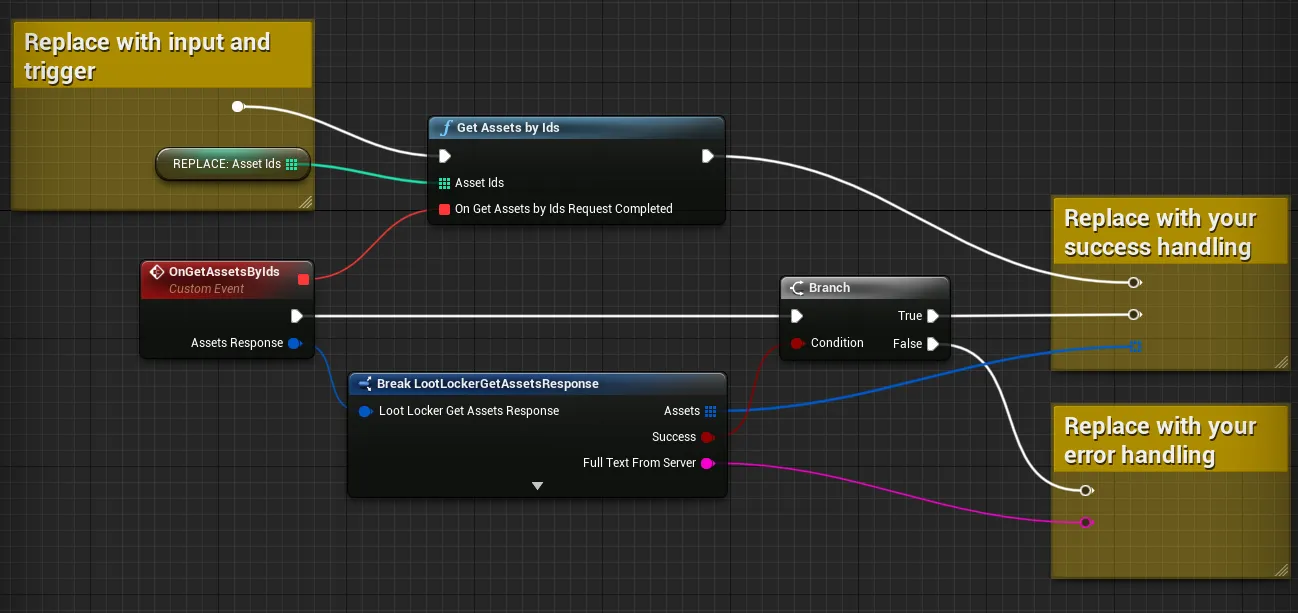
Coming soon — this sample hasn't been written yet. In the meantime, refer to the Reference Documentation for this endpoint.
Coming soon — this sample hasn't been written yet. In the meantime, refer to the Reference Documentation for this endpoint.
Manage Favourite Assets
Section titled “Manage Favourite Assets”List Favourite Assets
Section titled “List Favourite Assets”LootLockerSDKManager.ListFavouriteAssets((response) =>{ if (response.success) { Debug.Log("Successfully retrieved " + response.favourites.Length + " assets");
if (response.favourites.Length > 0) { Debug.Log("First Asset ID: " + response.favourites[0]); } else { Debug.Log("No favourite assets"); } } else { Debug.Log("Error retrieving assets"); }});See the Reference Documentation for the full response.
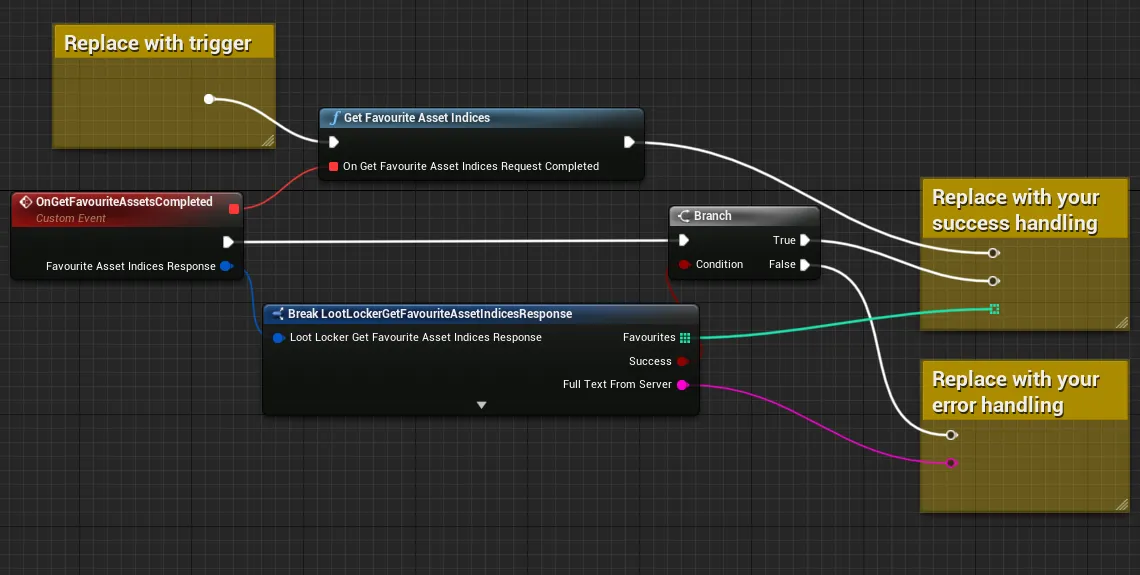
Coming soon — this sample hasn't been written yet. In the meantime, refer to the Reference Documentation for this endpoint.
Coming soon — this sample hasn't been written yet. In the meantime, refer to the Reference Documentation for this endpoint.
Add a Favourite Asset
Section titled “Add a Favourite Asset”LootLockerSDKManager.AddFavouriteAsset("8111", (response) =>{ if (response.success) { Debug.Log("Successfully favourited asset"); } else { Debug.Log("Error favouriting asset"); }});See the Reference Documentation for the full response.
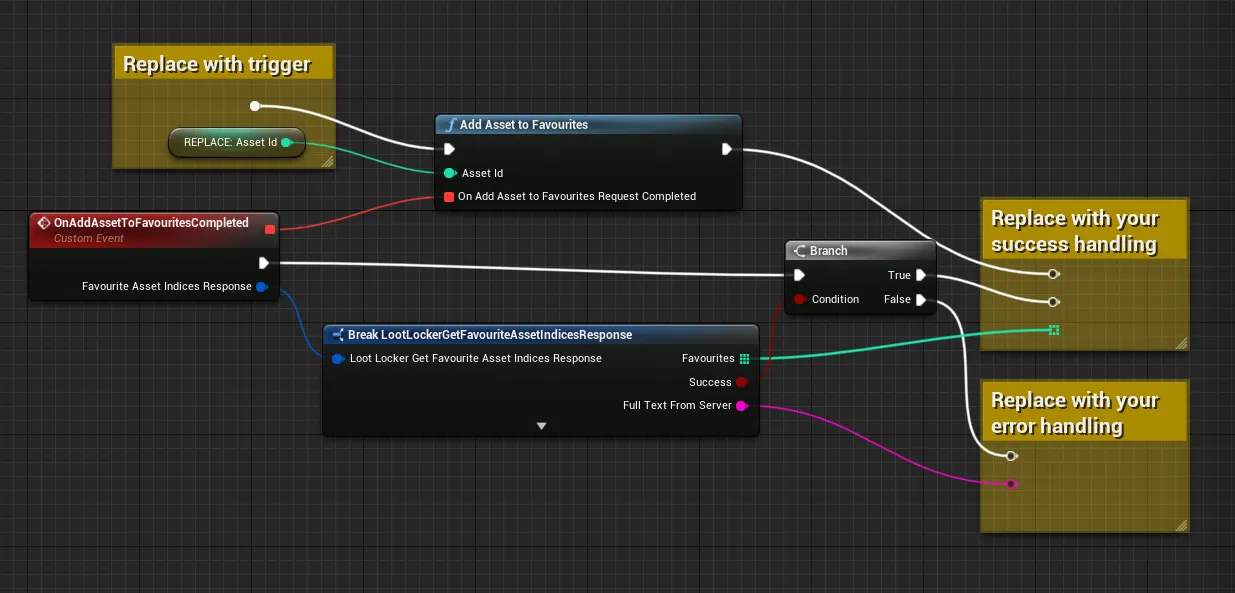
Coming soon — this sample hasn't been written yet. In the meantime, refer to the Reference Documentation for this endpoint.
Coming soon — this sample hasn't been written yet. In the meantime, refer to the Reference Documentation for this endpoint.
Remove a Favourite Asset
Section titled “Remove a Favourite Asset”LootLockerSDKManager.RemoveFavouriteAsset("8111", (response) =>{ if (response.success) { Debug.Log("Successfully removed favourite asset"); } else { Debug.Log("Error removing favourite asset"); }});See the Reference Documentation for the full response.
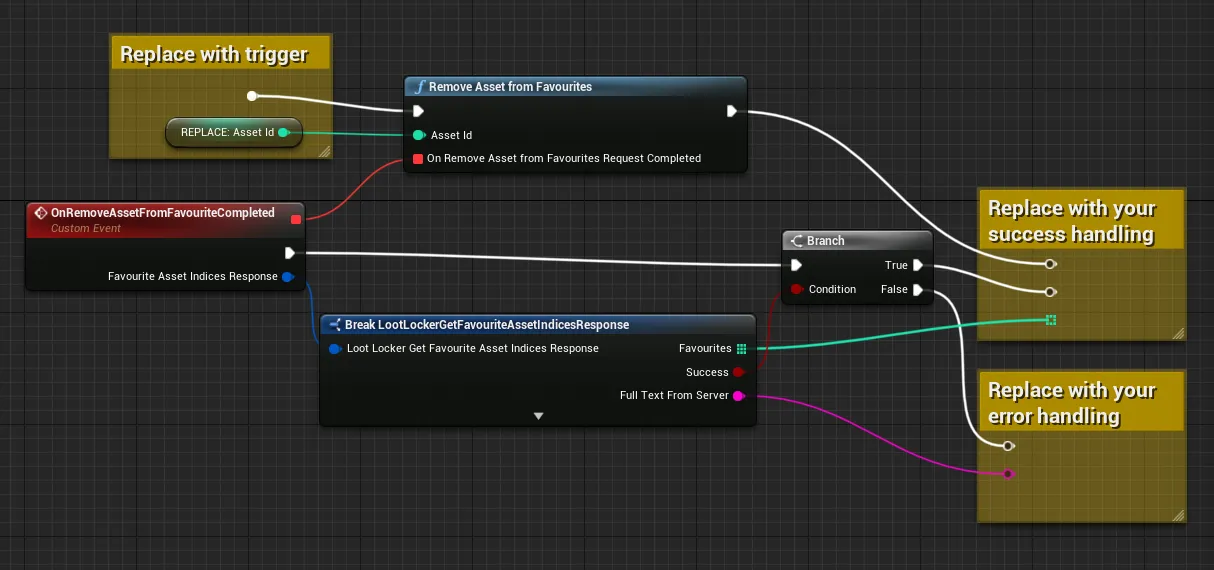
Coming soon — this sample hasn't been written yet. In the meantime, refer to the Reference Documentation for this endpoint.
Coming soon — this sample hasn't been written yet. In the meantime, refer to the Reference Documentation for this endpoint.
Manage Asset Instance Key/Value Storage
Section titled “Manage Asset Instance Key/Value Storage”Get All Key/Value Pairs for an Asset Instance
Section titled “Get All Key/Value Pairs for an Asset Instance”LootLockerSDKManager.GetAllKeyValuePairsToAnInstance(45781352, (response) =>{ if (response.success) { if (response.storage.Length > 0) { Debug.Log("Successfully retrieved " + response.storage.Length + " key value pairs"); } else { Debug.Log("No key value pairs for asset instance"); } } else { Debug.Log("Error retrieving assets"); }});See the Reference Documentation for the full response.
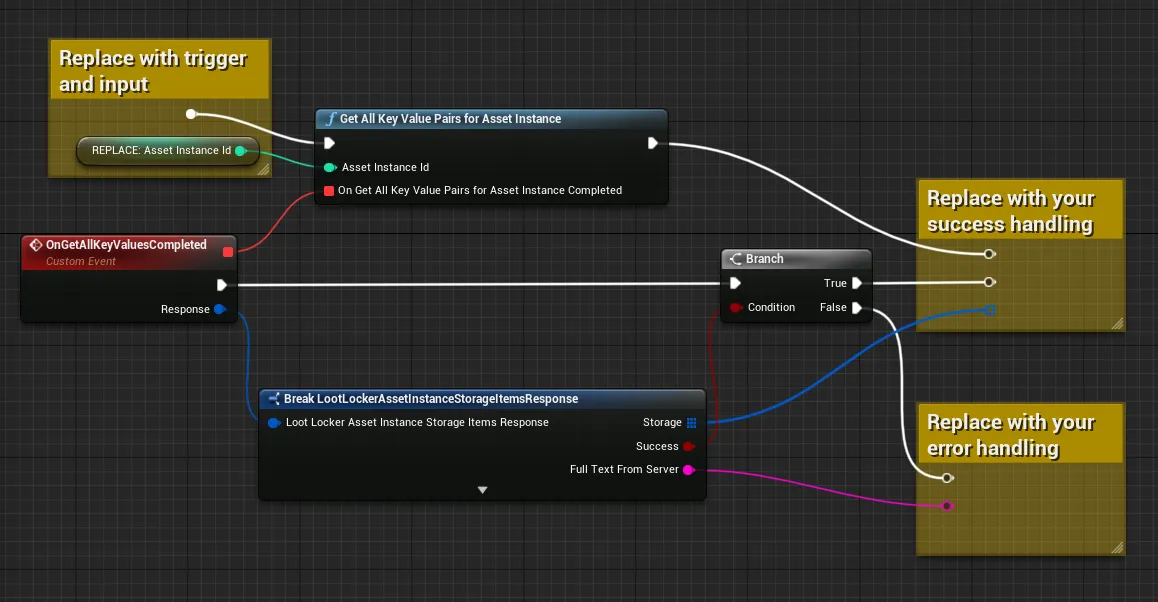
Coming soon — this sample hasn't been written yet. In the meantime, refer to the Reference Documentation for this endpoint.
Coming soon — this sample hasn't been written yet. In the meantime, refer to the Reference Documentation for this endpoint.
Get a Key/Value Pair by ID
Section titled “Get a Key/Value Pair by ID”int assetInstanceID = 84;int keyValueID = 1;LootLockerSDKManager.GetAKeyValuePairByIdForAssetInstances(assetInstanceID, keyValueID, (response) =>{ if (response.success) { Debug.Log("Successfully retrieved key value pair"); } else { Debug.Log("Error retrieving key value pair"); }});See the Reference Documentation for the full response.
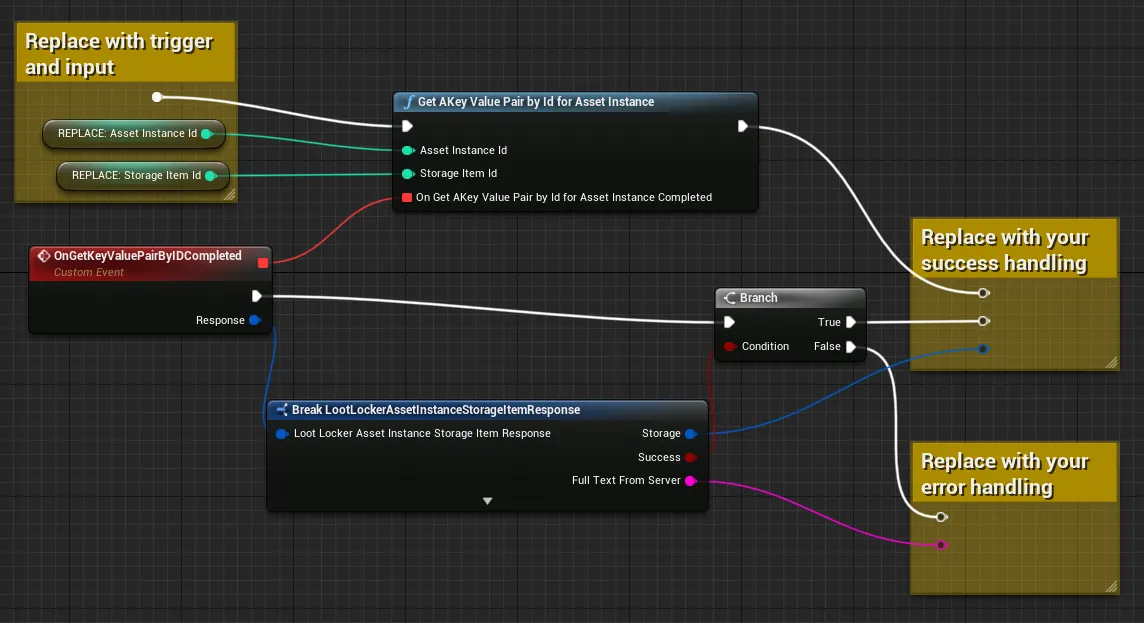
Coming soon — this sample hasn't been written yet. In the meantime, refer to the Reference Documentation for this endpoint.
Coming soon — this sample hasn't been written yet. In the meantime, refer to the Reference Documentation for this endpoint.
Create a Key/Value Pair
Section titled “Create a Key/Value Pair”LootLockerSDKManager.CreateKeyValuePairForAssetInstances(45781352, "some-new-key", "value here", (response) =>{ if (response.success) { Debug.Log("Successfully created key value pair for asset instance"); } else { Debug.Log("Error creating key value pair"); }});See the Reference Documentation for the full response.
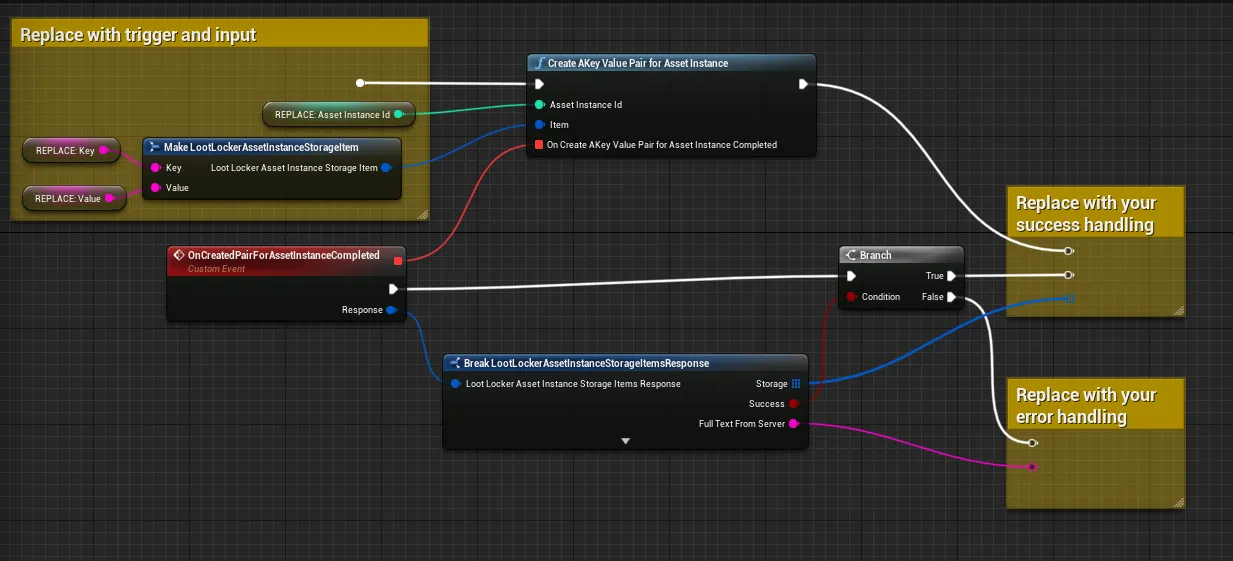
Coming soon — this sample hasn't been written yet. In the meantime, refer to the Reference Documentation for this endpoint.
Coming soon — this sample hasn't been written yet. In the meantime, refer to the Reference Documentation for this endpoint.
Update One or More Key/Value Pairs
Section titled “Update One or More Key/Value Pairs”int assetInstanceID = 84;
Dictionary<string, string> multipleTestKeys = new Dictionary<string, string>();
multipleTestKeys.Add("some-new-key", "Some value");multipleTestKeys.Add("some-other-key", "Some other value");LootLockerSDKManager.UpdateOneOrMoreKeyValuePairForAssetInstances(assetInstanceID, multipleTestKeys, (response) =>{ if (response.success) { Debug.Log("Successfully updated key value pairs"); } else { Debug.Log("Error updating key value pairs"); }});See the Reference Documentation for the full response.
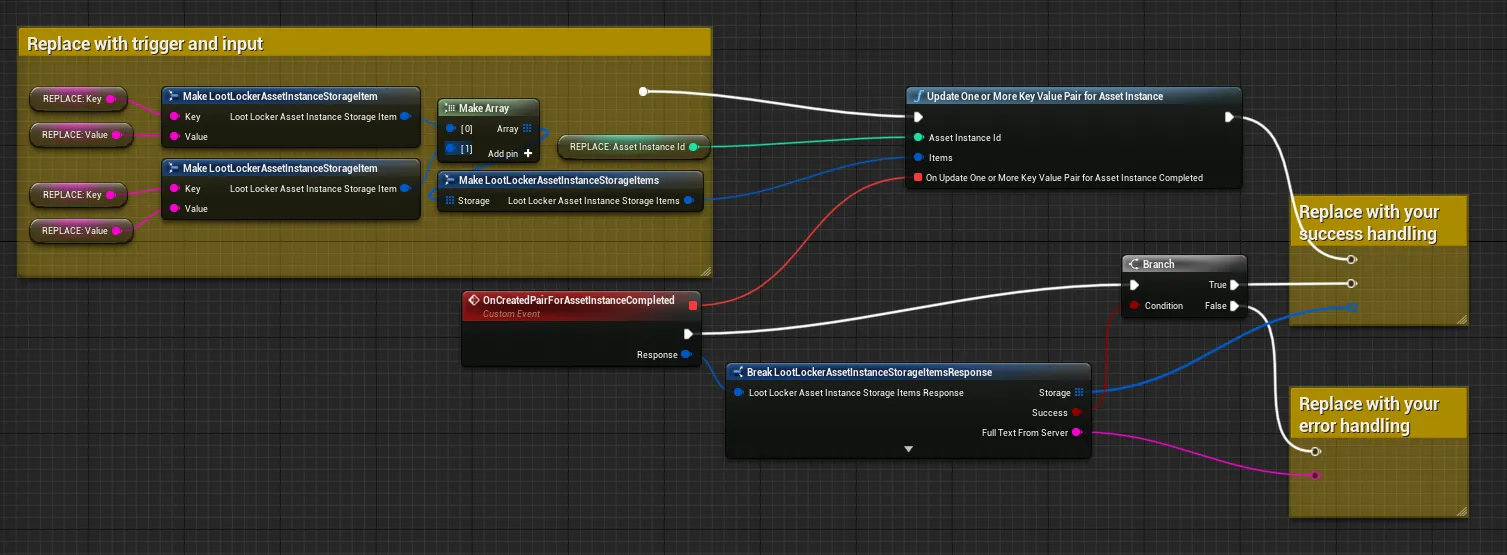
Coming soon — this sample hasn't been written yet. In the meantime, refer to the Reference Documentation for this endpoint.
Coming soon — this sample hasn't been written yet. In the meantime, refer to the Reference Documentation for this endpoint.
Delete a Key/Value Pair
Section titled “Delete a Key/Value Pair”int assetInstanceID = 84;int keyValuePairID = 1;
LootLockerSDKManager.DeleteKeyValuePairForAssetInstances(assetInstanceID, keyValuePairID, (response) =>{ if (response.success) { Debug.Log("Successfully removed key value pair"); } else { Debug.Log("Error removing key value pair"); }});See the Reference Documentation for the full response.
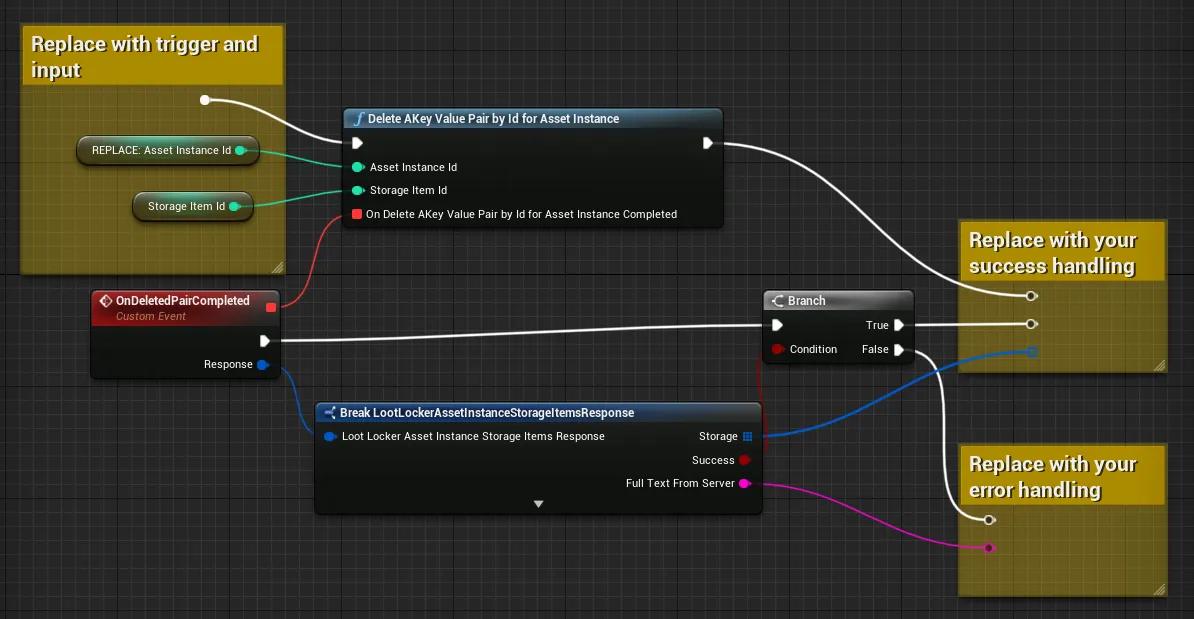
Coming soon — this sample hasn't been written yet. In the meantime, refer to the Reference Documentation for this endpoint.
Coming soon — this sample hasn't been written yet. In the meantime, refer to the Reference Documentation for this endpoint.
Conclusion
Section titled “Conclusion”You've retrieved Assets in your game, including filtering, pagination, favouriting, and Asset Instance Key/Value storage. Next, see Check Grant Notifications to check for Assets granted to a Player from outside sources.