
Profile switching lets you change which player is considered the "default" user in the SDK. This is useful if your game UI or logic is focused on one player at a time, but you have multiple authenticated users — similar to classic console or media streaming profile switching.
Use this, for example, when the game is played by only one player at a time locally, but multiple people share the device. At the start of the game session, ask the player to choose a profile (or sign in a new one); once done, all subsequent requests are made on behalf of that player until the game session ends.
Prerequisites
Section titled “Prerequisites”How It Works
Section titled “How It Works”- The SDK maintains a default user, used for API calls if you don't specify a ULID.
- You can switch the default user to another authenticated player by their ULID.
- This doesn't log out or remove any users — it only changes which user is considered default (used in calls to LootLocker when no player ULID is specified).
List Previously Logged-In Users
Section titled “List Previously Logged-In Users”In a profile switching scenario, you'll likely want to display a profile selection screen at the beginning of the game session. This example lists data about all previous players stored in the SDK.
var cachedPlayerUlids = LootLockerSDKManager.GetCachedPlayerUlids();
foreach (var playerUlid in cachedPlayerUlids){    var playerData = LootLockerSDKManager.GetPlayerDataForPlayerWithUlid(playerUlid);
// Replace with your own method to display player profile DisplayPlayerProfile(playerData.Name, playerData.ULID, playerData.CurrentPlatform.PlatformFriendlyString, playerData.LastSignIn);}TArray<FString> cachedPlayerUlids = ULootLockerSDKManager::GetCachedPlayerUlids();
for (const FString& playerUlid : cachedPlayerUlids){ FLootLockerPlayerData playerData = ULootLockerSDKManager::GetSavedStateOrDefaultOrEmptyForPlayer(playerUlid); if (playerData.PlayerUlid.IsEmpty()) { UE_LOG(<LogCategory>, Warning, TEXT("No player data found for ulid %s"), *playerUlid); continue; }
// Replace with your own method to display player profile DisplayPlayerProfile(playerData.PlayerName, playerData.PlayerUlid, playerData.CurrentPlatform.GetFriendlyPlatformString(), playerData.LastSignIn);}
// GetSavedStateOrDefaultOrEmptyForPlayer has the side effect of setting the player as active// so it's a good idea to reset the active state after displaying profilesULootLockerSDKManager::SetAllPlayersToInactive();
Coming soon — this sample hasn't been written yet.
Coming soon — this sample hasn't been written yet.
Select a Profile (Set as Default)
Section titled “Select a Profile (Set as Default)”Once the player has selected which profile to use for the current session, set this as the default user in LootLocker.
// Replace with actual player ULIDvar selectedPlayerUlid = "selectedPlayerUlid";if (!LootLockerSDKManager.SetDefaultPlayerUlid(selectedPlayerUlid)){ Debug.LogError("Failed to set default player ULID.");}// Replace with actual player ULIDFString selectedPlayerUlid = "selectedPlayerUlid";if (!ULootLockerSDKManager::SetDefaultPlayer(selectedPlayerUlid)){ UE_LOG(<LogCategory>, Error, TEXT("Failed to set default player ULID."));}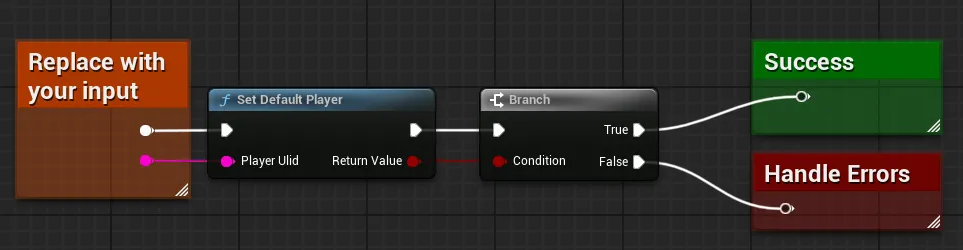
Coming soon — this sample hasn't been written yet.
Coming soon — this sample hasn't been written yet.
Conclusion
Section titled “Conclusion”You can now list previously signed-in players and switch which one is the default user in a multi user context.