
This how-to implements the in-game purchase flow for Steam, from initiating a purchase to polling its status and granting rewards to the player.
Prerequisites
- Steam Store IAP configured for your game
- A Catalog Listing configured for Steam IAP
- Unity, Unreal, or Godot SDK installed and configured in your project (not required for REST).
- An active Game Session
Initiate Purchase In-Game
Trigger the Steam purchase flow using LootLocker's Steam purchase redemption API. This begins the transaction with Steam and returns an entitlement_id, which is used to track the purchase throughout the flow.
CSteamID steamUser = SteamUser.GetSteamID();string steamLanguage = SteamApps.GetCurrentGameLanguage();
LootLockerSDKManager.BeginSteamPurchaseRedemption(    steamId: steamUser.ToString(),    currency: "USD",    language: steamLanguage,    catalogItemId: "01HRCA5QQBV9P0A57RFK9J073T",    onComplete: (response) =>    {        if (response.success)        {            Debug.Log("Steam purchase started. Entitlement ID: " + response.entitlement_id);            entitlementId = response.entitlement_id;            // Begin polling for purchase status            StartCoroutine(PollSteamPurchaseStatus(entitlementId));        }        else        {            Debug.LogError("Failed to start purchase: " + response.errorData.message);        }    });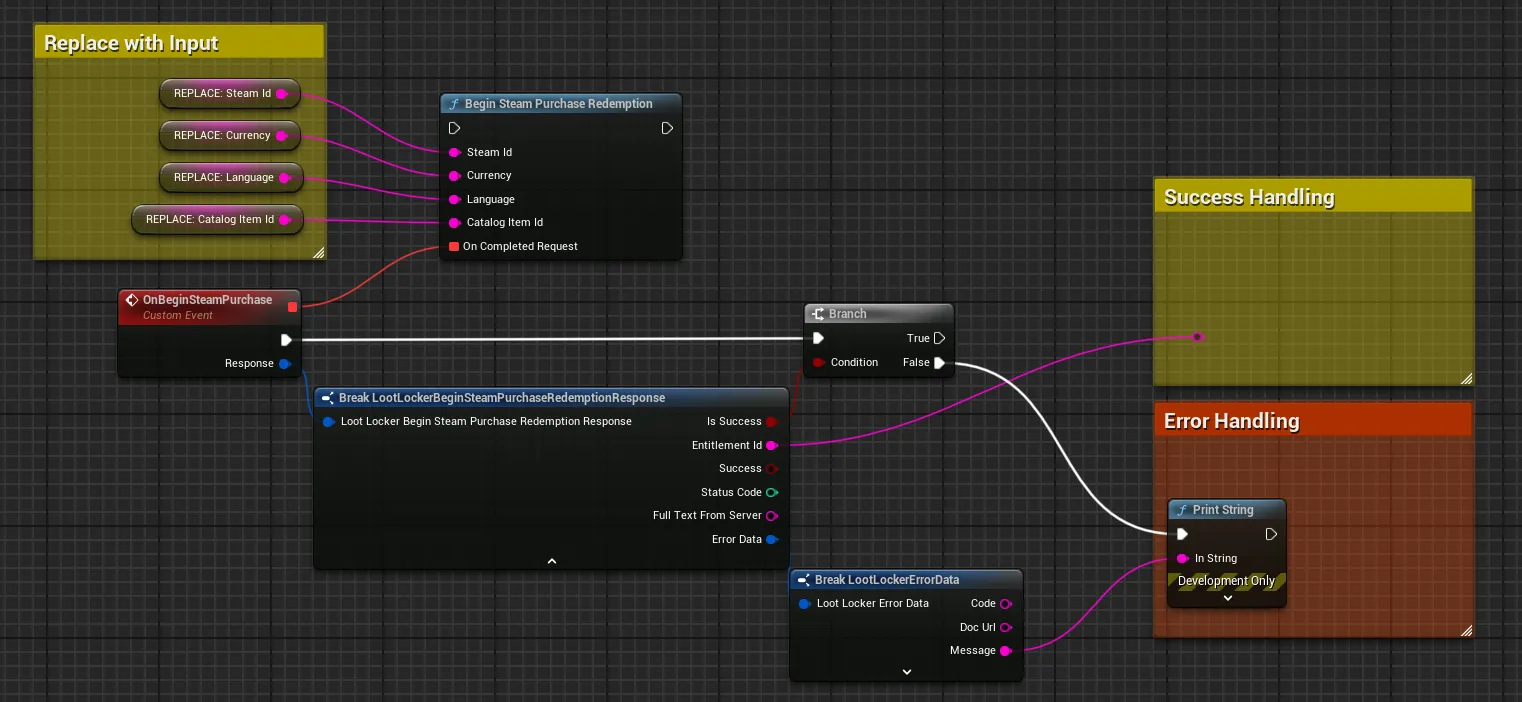
Coming soon — this sample hasn't been written yet.
Coming soon — this sample hasn't been written yet.
Poll Purchase Status
Use the entitlement_id to query the status of the purchase. LootLocker communicates with Steam to determine whether the user has approved, cancelled, or is still pending the transaction. Poll this endpoint until a final status is reached.
IEnumerator PollSteamPurchaseStatus(string entitlementId){    while (true)    {        LootLockerSDKManager.QuerySteamPurchaseRedemption(entitlementId, (response) =>        {            if (response.success)            {                if (response.status == LootLocker.LootLockerEnums.SteamPurchaseRedemptionStatus.Approved)                {                    Debug.Log("Purchase approved by user. Finalizing...");                    FinalizeSteamPurchase(entitlementId);                    purchasePollingComplete = true;                }                else if (response.status == LootLocker.LootLockerEnums.SteamPurchaseRedemptionStatus.Canceled)                {                    Debug.Log("Purchase was canceled by user");                    purchasePollingComplete = true;                }                // If status is Pending, continue polling            }            else            {                Debug.LogError("Failed to query purchase status: " + response.errorData.message);            }        });
        yield return new WaitForSeconds(2f); // Poll every 2 seconds
        if (purchasePollingComplete)            break;    }}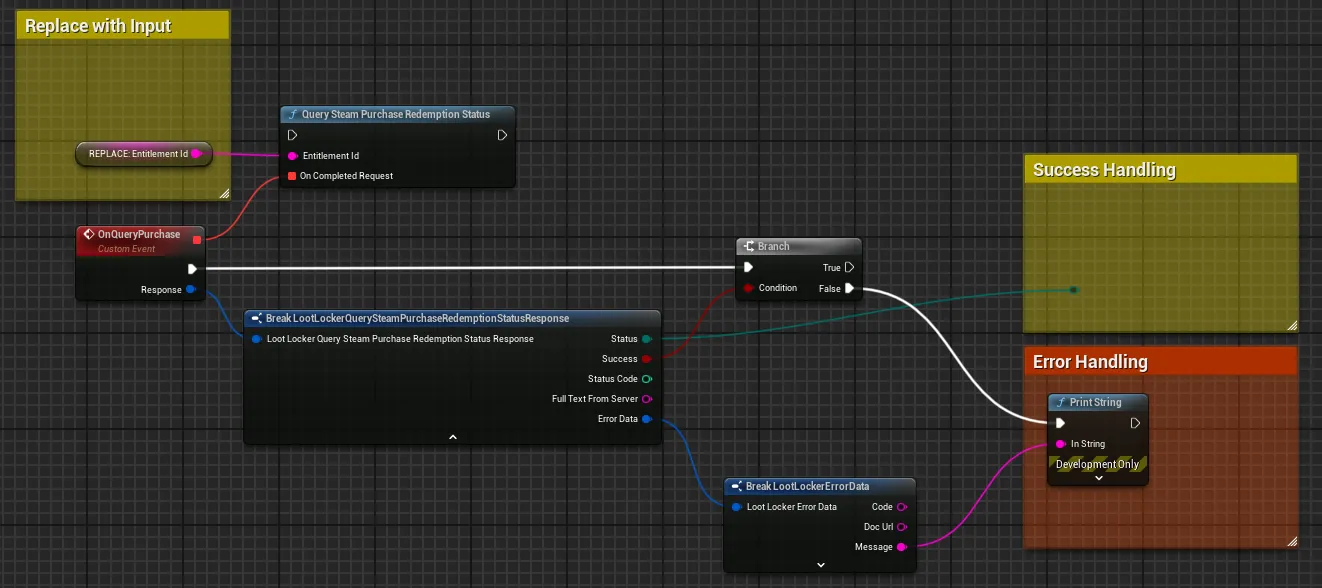
Coming soon — this sample hasn't been written yet.
Coming soon — this sample hasn't been written yet.
Finalize the Purchase
Once the purchase status is confirmed as approved, finalize the transaction using the entitlement_id. LootLocker then grants the configured rewards (Assets, Currency, and Progressions) to the player.
void FinalizeSteamPurchase(string entitlementId){ LootLockerSDKManager.FinalizeSteamPurchaseRedemption(entitlementId, (response) => { if (response.success) { Debug.Log("Purchase finalized! Rewards granted to player."); // Refresh player data to see the granted rewards LootLockerSDKManager.GetPlayerData((playerResponse) => { if (playerResponse.success) { Debug.Log("Player data updated with new rewards"); } }); } else { Debug.LogError("Failed to finalize purchase: " + response.errorData.message); } });}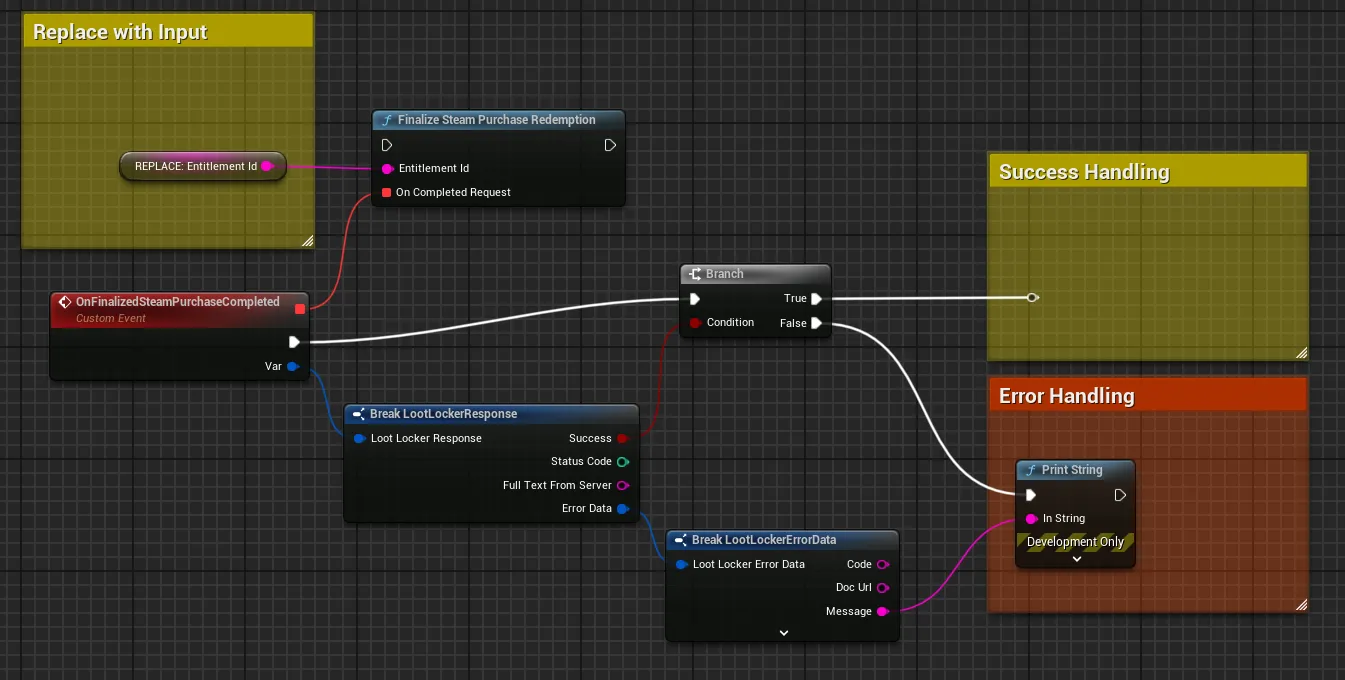
Coming soon — this sample hasn't been written yet.
Coming soon — this sample hasn't been written yet.
Grant Rewards to a Character Class
If your game uses Character Classes, you can grant rewards directly to a Character Class instead of the player. This is useful for character-specific purchases or unlocks.
CSteamID steamUser = SteamUser.GetSteamID();string steamLanguage = SteamApps.GetCurrentGameLanguage();
LootLockerSDKManager.BeginSteamPurchaseRedemptionForClass(    steamId: steamUser.ToString(),    currency: "USD",    language: steamLanguage,    catalogItemId: "01HRCA5QQBV9P0A57RFK9J073T",    classId: playerClassId,    onComplete: (response) =>    {        if (response.success)        {            Debug.Log("Steam purchase for class started. Entitlement ID: " + response.entitlement_id);            entitlementId = response.entitlement_id;            // Begin polling for purchase status            StartCoroutine(PollSteamPurchaseStatus(entitlementId));        }        else        {            Debug.LogError("Failed to start purchase: " + response.errorData.message);        }    });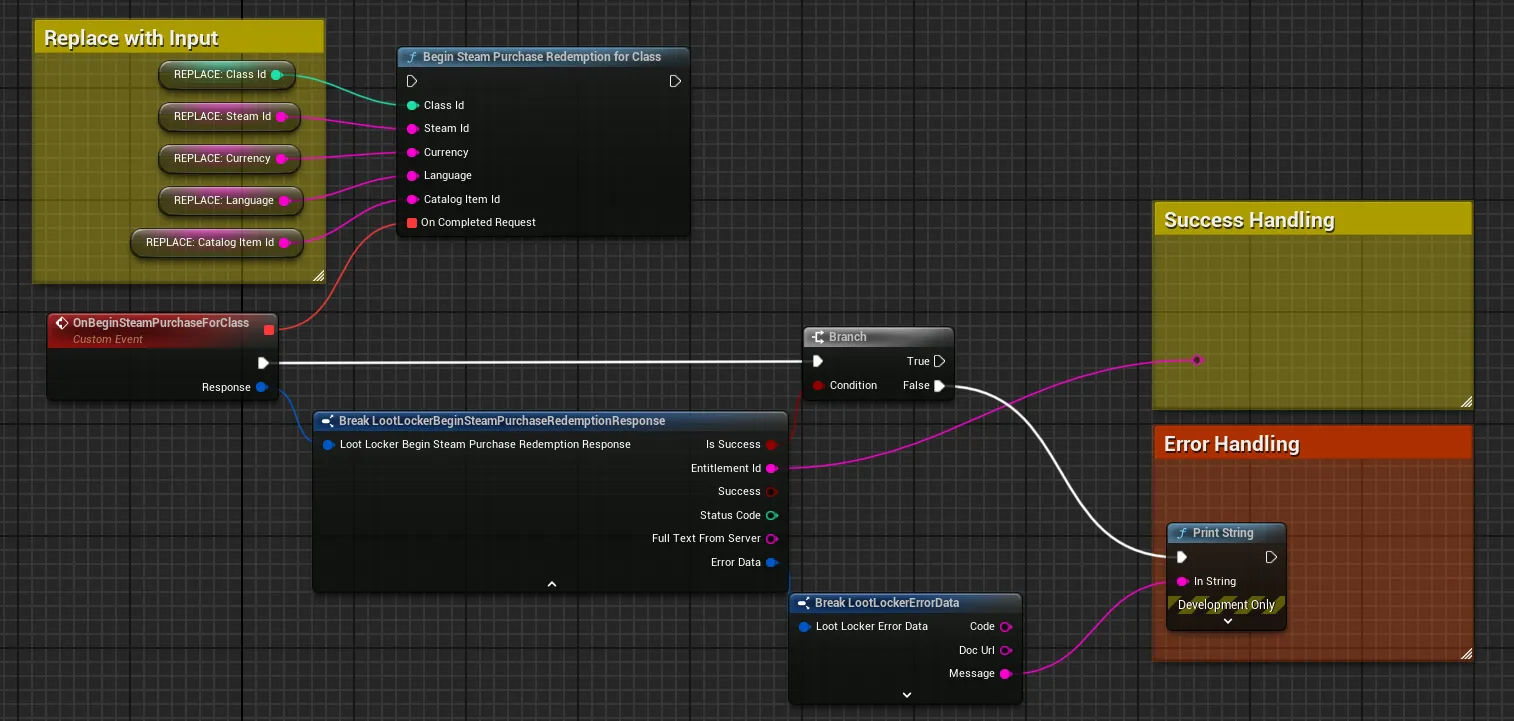
Coming soon — this sample hasn't been written yet.
Coming soon — this sample hasn't been written yet.
Handle Edge Cases
Make sure your implementation accounts for:
- Failed or cancelled purchases
- Pending transactions where the player hasn't completed the Steam overlay flow
- Polling for purchase completion, which is required for the Steam flow
- Duplicate finalization attempts — ensure idempotency when calling finalize
LootLocker handles communication with Steam and validation, but your game is responsible for the polling flow and updating the player experience accordingly.
Conclusion
You've implemented the full Steam purchase flow: initiating a purchase, polling for its status, and finalizing it through LootLocker to grant rewards to the player. Review LootLocker's full feature set to decide which other features to implement.