
Having trouble with multi user support in LootLocker? Here are some common issues and solutions.
Prerequisites
Section titled “Prerequisites”Common Issues
Section titled “Common Issues”- API calls return data for the wrong user: always specify the ULID when making API calls in a multi user context. If you don't, the SDK uses the default user, which may not be what you expect.
- Session not found or invalid: first make sure the request is for the expected player and not a previous, expired session. Next, ensure the player has been authenticated and their session is active. If you manually manage sessions (e.g. on a server), make sure you've called
StartSessionManualwith the correct data. - Removing a user doesn't clear their data: use the SDK's end session methods to properly remove a user's session and data. See End Sessions and Manage State.
- Unexpected default user: if you switch profiles, remember that the default user changes. Always specify the ULID for clarity.
Debugging
Section titled “Debugging”Check Which Player Is the Current Default
Section titled “Check Which Player Is the Current Default”Checking which player is currently the default player is a simple operation, but can be crucial when debugging your game.
LootLockerSDKManager.GetDefaultPlayerUlid();ULootLockerSDKManager::GetDefaultPlayerUlid();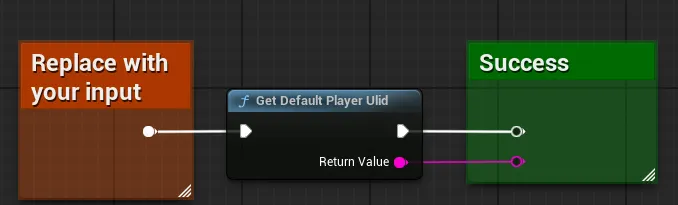
Coming soon — this sample hasn't been written yet.
Coming soon — this sample hasn't been written yet.
Check Which Player a Request Was Executed For
Section titled “Check Which Player a Request Was Executed For”Checking which player a request (any LootLocker request) was executed for is a simple operation, but can be crucial when debugging. The example below shows how to get this data from the response to a progression data request — but all responses to all LootLocker methods hold this context object, which contains the player ULID the request was executed for.
var progression_key = "replace_with_your_key";var executeRequestForPlayerWithUlid = "replace_with_your_player_ulid";LootLockerSDKManager.GetProgression(progression_key, response =>{ if (!response.success) { Debug.LogWarning($"Getting progression data for {progression_key} failed: {response.errorData}" + $"\n request was executed for player with ulid {response.requestContext.player_ulid}" + $" and was expected to be executed for player with ulid {executeRequestForPlayerWithUlid}"); }}, executeRequestForPlayerWithUlid);FString progression_key = "replace_with_your_key";FString executeRequestForPlayerWithUlid = "replace_with_your_player_ulid";ULootLockerSDKManager::GetProgression(progression_key, FLootLockerProgressionResponseDelegate::CreateLambda([=](const FLootLockerProgressionResponse& response){ if (!response.success) { UE_LOG(LogWorkingProject, Warning, TEXT("Getting progression data for %s failed: %s"), *progression_key, *response.errorData); UE_LOG(LogWorkingProject, Warning, TEXT("Request was executed for player with ulid %s"), *response.requestContext.player_ulid); UE_LOG(LogWorkingProject, Warning, TEXT("And was expected to be executed for player with ulid %s"), *executeRequestForPlayerWithUlid); }}), executeRequestForPlayerWithUlid);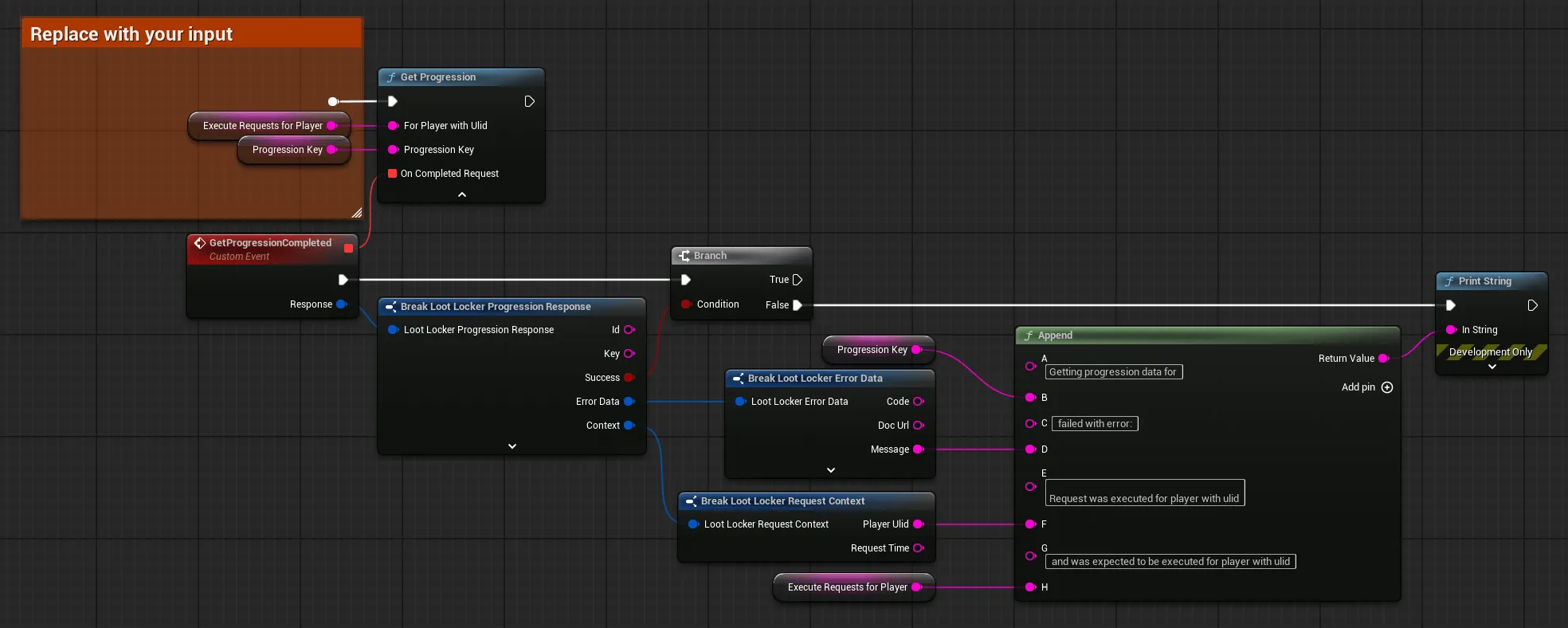
Coming soon — this sample hasn't been written yet.
Coming soon — this sample hasn't been written yet.
Best Practices
Section titled “Best Practices”- Always specify ULID in multi user scenarios.
- Clean up sessions for users who log out or leave, unless you want to keep them for added functionality like profile switching.
- In server contexts, manage session tokens and player data carefully.
Need More Help?
Section titled “Need More Help?”If you encounter issues not covered here, reach out in the community Discord.