
This how-to implements the Apple App Store purchase flow in your game: initiating a purchase, then redeeming it with LootLocker to grant rewards to the Player.
Prerequisites
Section titled “Prerequisites”- Unity, Unreal, or Godot SDK installed and configured in your project (not required for REST). Unity also requires the In-App Purchasing package.
- An active Player session (see Authentication).
- Apple App Store IAP settings configured and a Catalog Listing configured for Apple App Store IAP.
Set Up the IAP Manager
Section titled “Set Up the IAP Manager”Create an IAPManager script that inherits from IDetailedStoreListener to handle all purchase callbacks: initializing the store, registering your products with the Product IDs from App Store Connect, and handling the purchase flow when a player buys an item.
using Unity.Services.Core;using Unity.Services.Core.Environments;using UnityEngine;using UnityEngine.Purchasing;using UnityEngine.Purchasing.Extension;
public class IAPManager : MonoBehaviour, IDetailedStoreListener{    public IStoreController controller;    private IExtensionProvider extensions;
    public async void Awake()    {        try        {            var options = new InitializationOptions()                .SetEnvironmentName("production");            await UnityServices.InitializeAsync(options);        }        catch (Exception exception)        {            Debug.Log(exception);        }
        // Create IAP configuration for Apple App Store        var builder = ConfigurationBuilder.Instance(StandardPurchasingModule.Instance(AppStore.AppleAppStore));
        // Register your products from App Store Connect        builder.AddProduct("com.company.game.coins100", ProductType.Consumable);        builder.AddProduct("com.company.game.coins500", ProductType.Consumable);        builder.AddProduct("com.company.game.premium_pass", ProductType.NonConsumable);
        // Initialize the purchasing system        UnityPurchasing.Initialize(this, builder);    }
    /// <summary>    /// Called when a user clicks the purchase button    /// </summary>    public void OnPurchaseClicked(string productId)    {        Purchase(productId);    }
    /// <summary>    /// Initiates a purchase for the given product ID    /// </summary>    public void Purchase(string productId)    {        var product = controller.products.WithID(productId);
        if (product is { availableToPurchase: true })        {            controller.InitiatePurchase(product);        }        else        {            Debug.Log($"Product {productId} is not available for purchase");        }    }
    /// <summary>    /// Called when Unity IAP is ready to make purchases    /// </summary>    public void OnInitialized(IStoreController controller, IExtensionProvider extensions)    {        this.controller = controller;        this.extensions = extensions;    }
    /// <summary>    /// Called when Unity IAP encounters an initialization error    /// </summary>    public void OnInitializeFailed(InitializationFailureReason error)    {        Debug.Log($"IAP initialization failed: {error}");    }
    /// <summary>    /// Called when a purchase completes successfully    /// </summary>    public PurchaseProcessingResult ProcessPurchase(PurchaseEventArgs e)    {        string purchaseToken = e.purchasedProduct.transactionID;
        // Redeem with LootLocker (see section below for details)        RedeemPurchaseForPlayer(purchaseToken);
        return PurchaseProcessingResult.Complete;    }
    /// <summary>    /// Called when a purchase fails    /// </summary>    public void OnPurchaseFailed(Product product, PurchaseFailureDescription failureDescription)    {        Debug.Log($"Purchase failed: {failureDescription.reason}");    }
    public void OnInitializeFailed(InitializationFailureReason error, string message)    {        Debug.Log("IAP Error: " + message);    }
    private void RedeemPurchaseForPlayer(string purchaseToken)    {        LootLockerSDKManager.RedeemAppleAppStorePurchaseForPlayer(purchaseToken, (result) =>        {            if (!result.success)            {                Debug.Log("Redeem Purchase unsuccessful!");                return;            }        });    }}
Coming soon — this sample hasn't been written yet.
Coming soon — this sample hasn't been written yet.
To initiate a purchase, use the Apple App Store's StoreKit directly in your game. After a successful purchase, extract the transaction ID and send it to LootLocker for validation.
# After getting a transaction ID from a successful purchase, redeem it:curl -X POST 'https://api.lootlocker.io/game/store/apple/redeem' \ -H 'x-session-token: your_session_token' \ -H 'Content-Type: application/json' \ -d '{ "sandboxed": true, "transaction_id": "2000000316432479" }'Redeem a Purchase for the Player
Section titled “Redeem a Purchase for the Player”After a purchase completes, redeem it with LootLocker to validate the purchase and grant rewards to the player. Provide the transaction ID from the completed purchase — LootLocker validates it with Apple's servers and grants the configured rewards.
private void RedeemPurchaseForPlayer(string purchaseToken){    LootLockerSDKManager.RedeemAppleAppStorePurchaseForPlayer(purchaseToken, (result) =>    {        if (!result.success)        {            Debug.Log("Redeem Purchase unsuccessful!");            return;        }
        Debug.Log("Purchase successfully redeemed with LootLocker!");    });}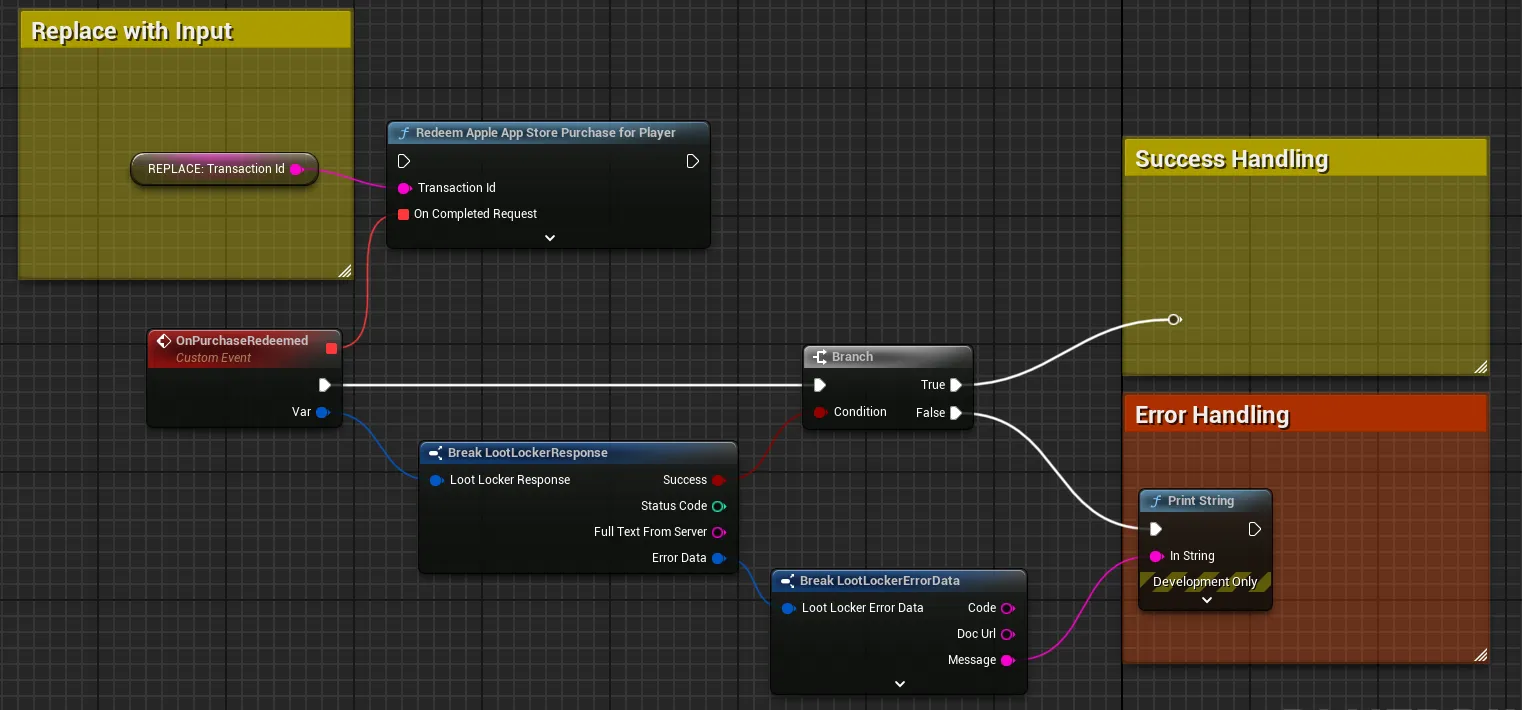
Extract the transaction ID from a successful purchase and pass it to the redeem function.
Coming soon — this sample hasn't been written yet.
curl -X POST 'https://api.lootlocker.io/game/store/apple/redeem' \ -H 'x-session-token: your_session_token' \ -H 'Content-Type: application/json' \ -d '{ "sandboxed": true, "transaction_id": "2000000316432479" }'On successful redemption, a 204 No Content response is returned.
Redeem a Purchase for a Character Class
Section titled “Redeem a Purchase for a Character Class”You can also redeem a purchase to reward a specific Character Class that the player owns. This is useful for class-specific cosmetics or items. Provide both the transaction ID and the class ID of the target Character Class.
public void RedeemPurchaseForClass(string purchaseToken, int classID){    LootLockerSDKManager.RedeemAppleAppStorePurchaseForClass(purchaseToken, classID, (result) =>    {        if (!result.success)        {            Debug.Log("Redeem Purchase unsuccessful!");            return;        }
        Debug.Log($"Purchase successfully redeemed for class {classID}!");    });}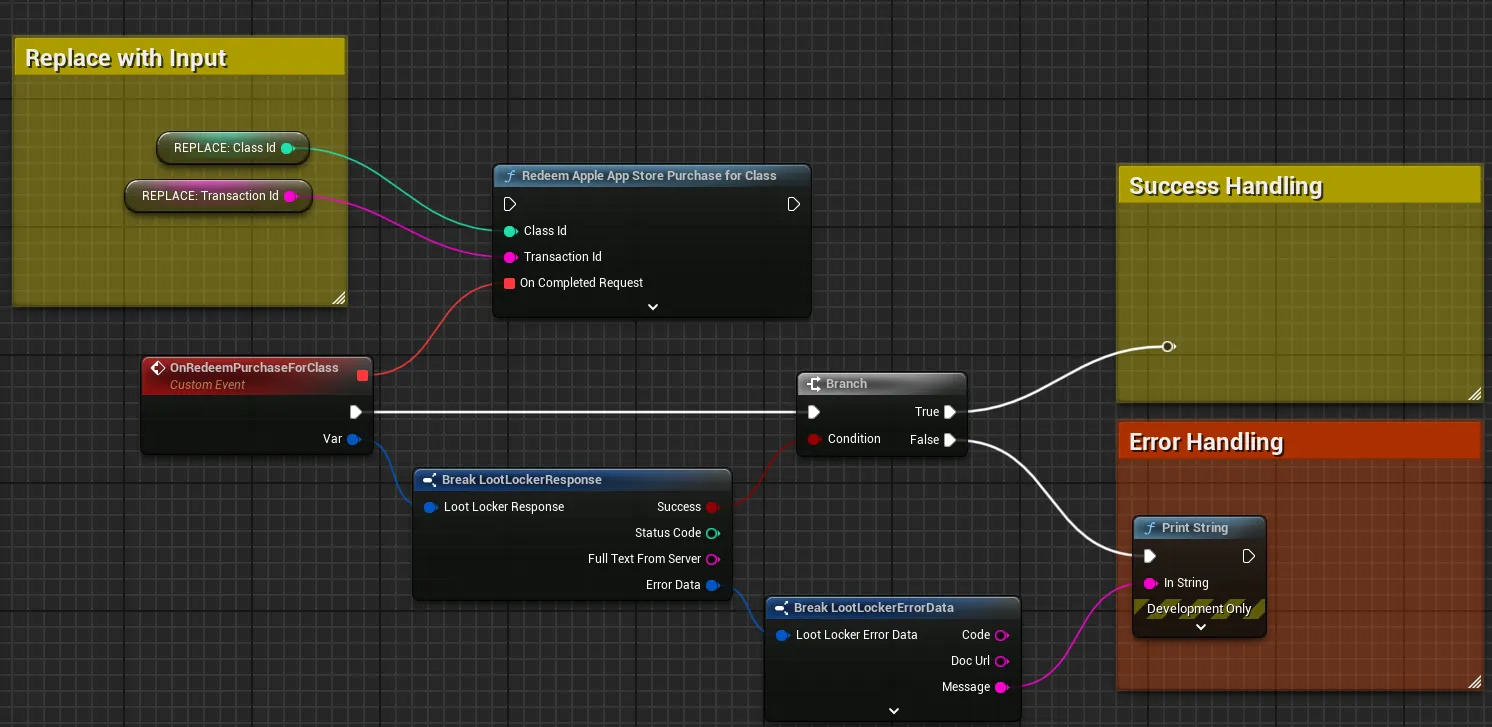
Extract the transaction ID and provide the class ID to the redeem function.
Coming soon — this sample hasn't been written yet.
curl -X POST 'https://api.lootlocker.io/game/redeem/store/apple' \ -H 'x-session-token: your_session_token' \ -H 'Content-Type: application/json' \ -d '{ "sandboxed": true, "transaction_id": "2000000316432499", "character_id": 123 }'On successful redemption, a 204 No Content response is returned.
Conclusion
Section titled “Conclusion”You now have a complete Apple in-app purchase flow: setting up products in App Store Connect, initiating purchases from your game, and redeeming them through LootLocker to grant rewards to Players and Character Classes.