
This how-to explains what a single error report contains, so you can tell from the report alone whether the failure came from your game, from the LootLocker API, or from the network in between.
Prerequisites
Section titled “Prerequisites”- An error report to open. See Find and Filter Error Reports to locate one.
Reading the Summary
Section titled “Reading the Summary”Click a row in the Error Reports list to open the report. The summary at the top covers the identity of the failed request.
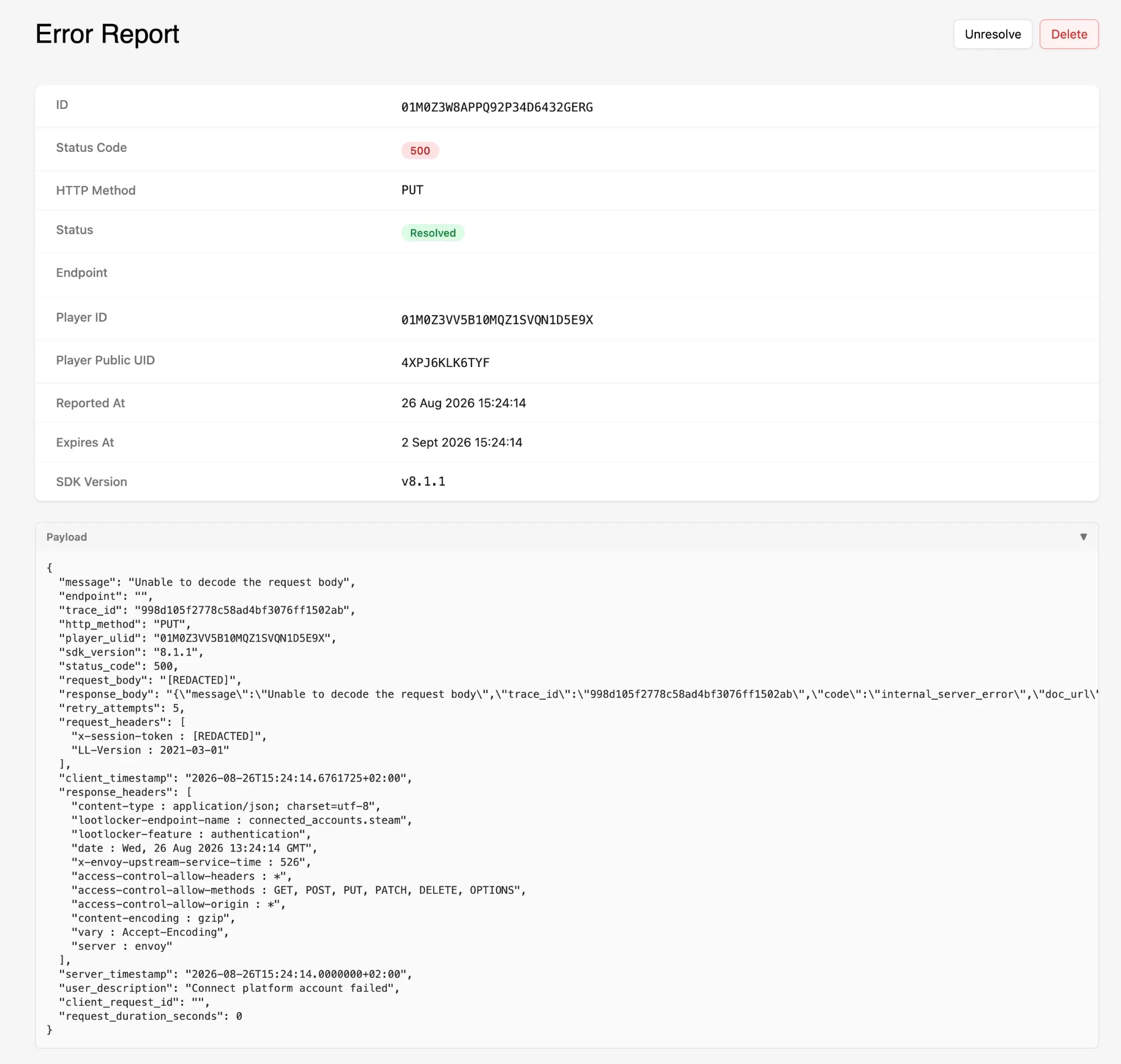
- ID: the report's own identifier, distinct from any identifier on the request itself.
- Status Code: the HTTP status the API returned. A
5xxpoints at LootLocker, a4xxusually points at the request your game sent. - HTTP Method: the method used for the request, such as
PUT. - Status: whether the report is open or Resolved.
- Endpoint: the API path the request was made to.
- Player ID: the ULID of the player whose client reported the failure.
- Player Public UID: that player's short public identifier.
- Reported At: when the failure was reported.
- Expires At: when the report ages out, 7 days after it was reported.
- SDK Version: the LootLocker SDK version the player's build was running. Check this first when a failure only affects some of your players — it's often the fastest way to see that an error is confined to an older build.
Reading the Payload
Section titled “Reading the Payload”Expand Payload to see the full record of the request and response as JSON. Alongside the summary fields, it contains:
message: the human-readable error message from the API. Useful for debugging and logging, but don't branch on it in your code — see Error Codes for thecodefield to use instead.trace_id: the identifier that lets LootLocker support find this exact transaction. This is the value the Support page asks you to collect, included in every report without you having to capture it yourself.request_bodyandresponse_body: the bodies sent and received. The request body is redacted, and the response body carries the full error object, includingcodeanddoc_url.request_headersandresponse_headers: the headers on each side of the request, including theLL-Versionyour game sent and thelootlocker-endpoint-nameandlootlocker-featurethat identify what was being called.retry_attempts: how many times the SDK retried before giving up. A high count alongside a5xxsuggests a sustained failure rather than a one-off.client_timestampandserver_timestamp: when the client and the server each recorded the request. A large gap between them points at the network or a clock problem on the client rather than at the request itself.request_duration_seconds: how long the request took.user_description: a description of what failed. You set this when you implement error reporting, or you can expose it as a free-text field so the player describes the problem in their own words.
Conclusion
Section titled “Conclusion”You can now read a report well enough to tell where a failure originated and which build it affects. If the report points at LootLocker rather than at your game, open a support ticket with its trace_id — see Support for what else to include.